Prompt Engineering : The Most In-Demand AI Skill of 2026
Roles requiring prompt engineering skills grew 3x between 2024 and 2026. The job title "Prompt Engineer" declined 30%. Both things are true, and the contradiction is exactly where most career advice about this skill goes wrong.
The standalone job title got absorbed into broader roles — AI Engineer, LLM Engineer, Applied ML Engineer, AI Solutions Architect. But the skill did not disappear. It became a prerequisite for all of them. According to PE Collective job board data compiled in April 2026, prompt engineering now appears as a required competency in 78% of AI-related job postings, up from under 20% in early 2024.
And here is what almost nobody says clearly: you do not need to be technical to learn this. Prompt engineering, at its core, is about communicating precisely with an AI system. If you can write a clear email with context, a specific ask, and a preferred format, you already understand the fundamental structure.
This post explains what prompt engineering actually is, covers the five core techniques that matter in 2026, and gives you 10 reusable templates across writing, research, analysis, coding, and career tasks. Start with one. Use it today.
What Is Prompt Engineering?
Prompt engineering is the practice of designing and refining the instructions you give to an AI model to get better, more consistent, and more useful outputs. A prompt is any input you give to an AI system — a question, instruction, task description, or combination of all three. Prompt engineering is the skill of crafting those inputs well.
The simplest version: a vague prompt gets a vague answer. A precise prompt gets a precise answer. The delta between those two outcomes is enormous in practice.
Here is a concrete example of the same task with two different prompt qualities:
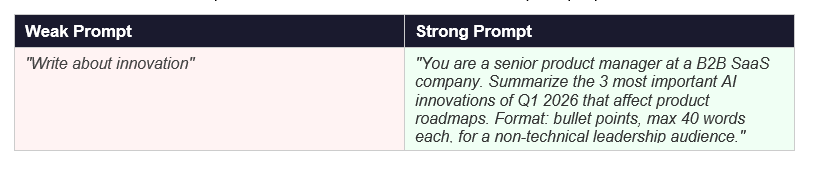
The output quality difference between these two prompts is not marginal. It is the difference between something you would actually use and something you would immediately rewrite.
Understanding why that difference exists requires knowing how LLMs actually process your input. The model does not "understand" your request the way a colleague would. It predicts the most likely useful continuation of your text, based on patterns learned across trillions of words. The more context, structure, and specificity you give it, the better the prediction. Our post on what large language models are covers this mechanism in about 5 minutes if you want the conceptual foundation.
Is Prompt Engineering Still Worth Learning in 2026?
The honest answer is yes — and the context matters.
The term "Prompt Engineer" as a standalone job title peaked around late 2024 and has since declined by roughly 30% (PE Collective, April 2026). Fast Company declared in May 2025 that "prompt engineering as a standalone role has all but disappeared," with 68% of firms now folding it into standard AI training across all roles. This is the data point skeptics cite.
What the same data also shows: the skill requirement grew 3x. Salaries for roles requiring prompt engineering competency did not decline. According to Glassdoor, the median total pay for prompt engineers reached $129,538 in April 2026. Adobe lists prompt engineering roles paying $211,800 to $306,625. The skill did not die. It became embedded.
The more useful framing in 2026 is this: prompt engineering is to AI what Excel was to spreadsheets in 2000. "Excel skills" is not a job title. But not knowing Excel made you significantly less effective in every business role for the next two decades. Prompt engineering is on the same trajectory.
Forrester's 2026 Predictions report estimates that 30% of large companies will require formal AI training for employees this year, with prompt engineering as a core module. That number will only increase.
My honest read: the window to learn this before it becomes table stakes is closing. It has not closed yet. But it is narrowing every month.
The 5 Core Prompt Engineering Techniques
These are the techniques that appear in every serious prompt engineering guide, explained without jargon. You do not need all five. Start with zero-shot, add role prompting, and you will already be ahead of most AI users.
1. Zero-Shot Prompting
Zero-shot prompting means giving the AI a task with no examples. You describe what you want and let the model figure out the format and approach from its training.
When to use it: For straightforward tasks where the output format is obvious — summarize this, translate that, rewrite this more concisely.
Limitation: Works well for simple tasks. Breaks down for anything nuanced or where the format matters a lot.
Zero-Shot Template
"Summarize the following text in 3 bullet points, each under 20 words, for a non-technical audience: [paste your text here]"
2. Few-Shot Prompting
Few-shot prompting gives the AI 2-3 examples of what you want before asking it to do the actual task. You teach by example rather than by instruction.
When to use it: Any time output format, tone, or style needs to match a specific pattern that is hard to describe in words. Customer support responses, branded copy, structured reports.
Why it works: LLMs are pattern matchers. Showing the pattern is more reliable than describing it.
Few-Shot Template
"Convert these customer complaints into structured support tickets. Example 1: Input: Your app crashed when I uploaded a PDF. Output: Issue: App crash on file upload | Type: Bug | Priority: High | Detail: PDF upload triggers crash Example 2: Input: I cannot change my password. Output: Issue: Password reset failure | Type: Account Access | Priority: Medium | Detail: Password change flow not completing Now convert this: Input: [paste customer complaint]"3. Role Prompting
Role prompting assigns a specific persona or expertise level to the AI before giving it a task. "Act as a senior UX designer" produces fundamentally different output than the same question asked without a role.
When to use it: When you need a specific professional perspective, when you want the AI to match a seniority level, or when you need domain-specific vocabulary and judgment.
Research note: IBM's 2026 prompt engineering guide cites role prompting as one of the highest-ROI techniques for improving output quality with no additional complexity.
Role Prompting Template
"You are a senior [role] with 10+ years of experience in [domain]. Your audience is [describe audience]. Your communication style is [clear/direct/formal/conversational]. Task: [your task here] Format your response as: [bullet points / numbered list / short paragraphs / table]"4. Chain-of-Thought Prompting
Chain-of-thought prompting asks the AI to reason through a problem step by step before giving the final answer. It dramatically improves accuracy on complex tasks by making the model show its work.
When to use it: Any task that involves multiple steps, judgment calls, calculations, or reasoning — strategic analysis, decision-making, problem diagnosis, data interpretation.
The simple trigger phrase: Add "Think through this step by step before giving your final answer" to almost any complex request.
Chain-of-Thought Template
"Think through this step by step before giving your final recommendation. Context: [describe the situation] Question: [what you need answered] Constraints: [any limits — budget, time, audience, format] First, reason through the key factors. Then give your recommendation in 2-3 sentences."5. Constraint-Based Prompting
Constraint-based prompting explicitly tells the AI what NOT to do alongside what TO do. Most prompts over-specify the desired output and under-specify what to avoid.
When to use it: When you have seen the AI consistently produce something unwanted — too formal, too long, full of disclaimers, too generic.
Adding negative constraints ("do not include caveats," "do not use corporate jargon," "do not list more than 5 items") gives the model clearer boundaries and consistently produces cleaner output.
Constraint-Based Template
"Task: [what you want] Do NOT: - Use corporate jargon or buzzwords - Include disclaimers or qualifications - Exceed [X] words - Start with 'As an AI...' or 'Certainly!' DO: - Use plain, direct language - Give specific examples - Match the tone of [a professional email / a casual Slack message / a formal report]"10 Reusable Prompt Templates for Professionals
These templates are designed for actual work tasks. Each includes the structure, the variable slots to fill in, and a note on when to use it. Copy, adapt, and save these.
Template 1: Email Drafting
Email Draft Template
"You are a professional business writer. Write an email from [your role] to [recipient role] about [topic]. Context: [1-2 sentences of relevant background] Goal: [what you want the email to achieve] Tone: [formal / professional but warm / direct] Length: Under [X] lines Do not include a subject line unless I ask. Start with the body."Best for: cold outreach, difficult conversations, client updates, internal requests.
Template 2: Document Summarization
Summary Template
"Summarize the following [document type: report / article / meeting transcript / contract] in [3 bullet points / 1 paragraph / an executive summary under 150 words]. Audience: [who will read this — executives, engineers, clients] Focus on: [key decisions / action items / risks / main arguments] Ignore: [background context / boilerplate / repetition] [paste document here]"Best for: research synthesis, meeting prep, report review, saving reading time.
Template 3: Research and Analysis
Research Template
"You are a research analyst. Analyze the following information and answer this question: [your specific question]. Think through this step by step: 1. What does the data actually show? 2. What are the key patterns or gaps? 3. What are the 2-3 most important implications? Finish with: one concrete recommendation in 2 sentences. Source material: [paste text or describe what you know]"Best for: competitive analysis, market research, report interpretation, decision support.
Template 4: Content Rewriting
Rewrite Template
"Rewrite the following text to be [shorter by 50% / more direct / less formal / more compelling / clearer]. Keep: [the core message / key data / specific examples] Remove: [filler phrases / passive voice / jargon / qualifications] Target reader: [describe who they are and what they care about] Original text: [paste text here]"Best for: simplifying internal docs, improving client communications, editing first drafts.
Template 5: Structured Brainstorming
Brainstorm Template
"Generate [10 / 15 / 20] ideas for [specific goal or problem]. Context: [2-3 sentences about your situation, constraints, audience] Ideas should be: [specific / actionable / unconventional / beginner-friendly] Do not include: [obvious suggestions / things that require large budget / generic advice] Format: numbered list. For each idea, add one sentence explaining the core benefit."Best for: product features, campaign ideas, blog topics, problem-solving sessions.
Template 6: Meeting Prep
Meeting Prep Template
"I have a [meeting type] with [who] about [topic] in [time frame]. Context: [relevant background they may not know / key decisions to make / recent developments] Generate: 1. The 3 most important questions I should ask 2. The 2 things I should know before walking in 3. A suggested agenda under 5 items 4. One potential objection and how to address it"Best for: client calls, job interviews, investor meetings, difficult 1:1s.
Template 7: Code Explanation
Code Explanation Template
"Explain the following code to someone who [is not a developer / understands Python basics / manages a technical team but does not code]. Cover: 1. What the code does in plain language (2 sentences) 2. The key steps it follows 3. What would break it or cause errors 4. One thing I could do to make it better [paste code here]"Best for: PMs reviewing engineering work, developers explaining to stakeholders, code review prep.
Template 8: Career Document Writing
Career Template
"You are a professional career coach and resume writer. Task: Write a [LinkedIn headline / resume bullet / cover letter opening / performance review self-assessment] for: Role: [your role] Company type: [startup / enterprise / agency / consulting] Key achievement: [specific result with numbers if possible] Tone: [confident and direct / warm and collaborative / technical and precise] Do not use the phrases 'results-driven,' 'passionate,' 'synergy,' or 'leverage.'"Best for: job applications, LinkedIn profiles, self-assessments, promotion cases.
Template 9: Learning and Explanation
Learning Template
"Explain [concept or topic] to me as if I [am completely new to AI / have 6 months of experience / work in marketing / am a PM with no technical background]. Use: - One simple analogy I would recognize from everyday life - A real-world example of where this shows up - The one thing I need to understand to avoid the most common mistake Keep your explanation under 200 words."Best for: understanding AI concepts, learning new tools, onboarding to a new domain quickly.
Template 10: Decision Analysis
Decision Template
"Help me think through this decision: [describe the decision you need to make]. Context: - What I know: [relevant facts] - What I do not know: [key uncertainties] - Constraints: [time / budget / resources / stakeholders] - My current leaning: [what you are considering doing] I want you to: 1. Identify the 2-3 factors that should most heavily influence this decision 2. Point out what I might be missing or underweighting 3. Give me your honest recommendation in 2 sentences, with your reasoning"Best for: career decisions, product decisions, business strategy, personal planning.
How to Write Better Prompts: The RCTF Framework
Most people's prompts fail for one of four reasons: no role, no context, no task clarity, or no format specification. The RCTF framework covers all four in a structure you can apply to any prompt.
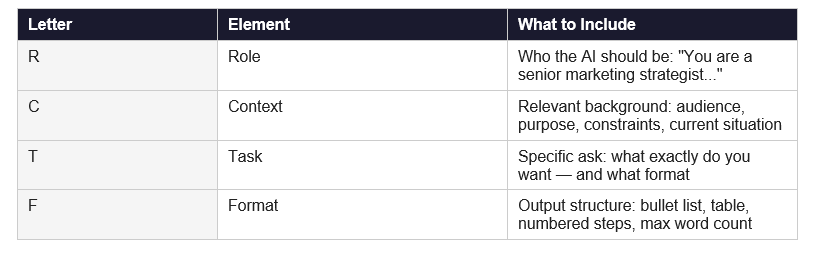
You do not need all four elements for every prompt. Simple tasks (summarize this, translate that) work fine with just T and F. Complex tasks (strategic analysis, document drafting, decision support) benefit from all four.
One rule that applies every time: be more specific than feels necessary. The number one mistake in prompt engineering is assuming the AI knows what you mean. It does not. It knows what you say. Specificity is not pedantry — it is the core skill.
Prompt Engineering vs Context Engineering: What Changed in 2026
"Prompt engineering" is evolving into something the industry now calls "context engineering." The distinction is worth understanding even if you are just starting out.
In mid-2025, former OpenAI researcher Andrej Karpathy publicly framed the shift: the LLM is the CPU, the context window is RAM, and your job is to be the operating system — loading the right information into working memory for each task. Shopify CEO Tobi Lütke used similar framing. By late 2025, LangChain, Anthropic, and LlamaIndex had formally adopted "context engineering" as a distinct discipline.
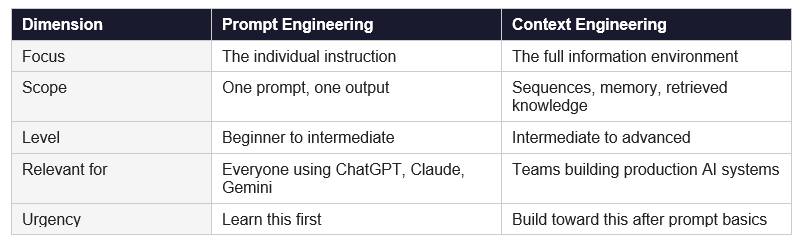
For Unrot's audience — working professionals who want to use AI better at work — prompt engineering is where to start and where most of the practical value lives. Context engineering is where you go next, once the basics are deeply habitual.
How Long Does It Take to Learn Prompt Engineering?
Honest breakdown, not marketing copy:
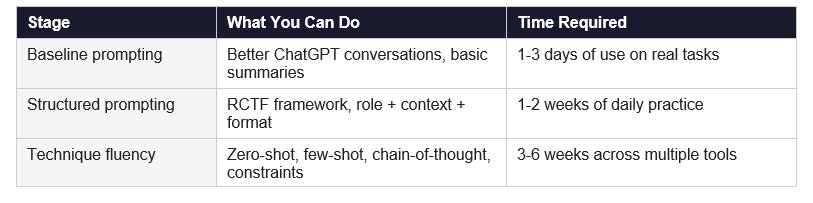
The fastest path is not a course. It is using these techniques on real tasks you already have. Read a template, apply it to something you need to do today, observe what changes. That feedback loop is worth ten hours of passive learning.
For reference: Vanderbilt University's Prompt Engineering for ChatGPT course on Coursera has over 400,000 learners and a 4.8 rating. It takes about 6 hours to complete. A good benchmark if you want a structured starting point alongside daily practice.
Frequently Asked Questions
Q: What is prompt engineering in simple terms?
Prompt engineering is the skill of writing clearer, more specific instructions to AI tools so they produce better, more useful output. It is not coding. It is not a technical skill in the traditional sense. It is precision communication. A better prompt gets a better answer — every time. The difference between a weak prompt and a strong one is usually context, role, format specification, and constraints.
Q: Is prompt engineering worth learning in 2026?
Yes. Roles requiring prompt engineering skills grew 3x between 2024 and 2026 (PE Collective, April 2026), even as the standalone "Prompt Engineer" job title declined. Forrester's 2026 Predictions report estimates that 30% of large enterprises will formally require AI training this year, with prompt engineering as a core competency. The Grand View Research prompt engineering market is projected to grow at 32.8% CAGR through 2030. This is not a fad. It is a baseline skill for professional AI use.
Q: Can non-technical people learn prompt engineering?
Absolutely. The most commonly recommended prompt engineering course — Vanderbilt University's Prompt Engineering for ChatGPT on Coursera — requires zero coding knowledge. IBM's 2026 prompt engineering guide explicitly targets "non-technical learners who work with generative AI." The majority of practical prompt engineering happens in natural language, not code. The RCTF framework in this post (Role, Context, Task, Format) is the entire foundation, and it requires no technical background.
Q: What is zero-shot prompting?
Zero-shot prompting means giving the AI a task with no examples — you describe what you want and the model responds based entirely on its training. "Summarize this article in 3 bullet points" is zero-shot. It is the default approach for most everyday AI interactions. It works well for simple, clear tasks. For complex or format-sensitive tasks, few-shot prompting (providing 2-3 examples) produces significantly better results.
Q: What is few-shot prompting?
Few-shot prompting provides 2-3 examples of the desired input-output pattern before asking the model to complete the actual task. Instead of describing the format you want, you show it. This is one of the highest-ROI techniques for output consistency — particularly for tasks where tone, structure, or format matters. Three good examples consistently outperform a page of written instructions.
Q: What is chain-of-thought prompting?
Chain-of-thought prompting asks the model to reason through a problem step by step before giving the final answer. The trigger phrase is simple: add "Think through this step by step before giving your final answer." This technique dramatically improves accuracy on complex tasks — strategic analysis, multi-step decisions, data interpretation — because it forces the model to surface its reasoning, which you can then evaluate and redirect.
Q: What is the difference between prompt engineering and context engineering?
Prompt engineering focuses on crafting individual instructions to get better AI outputs. Context engineering, a term formalized by practitioners including Andrej Karpathy and Shopify CEO Tobi Lütke in mid-2025, is the broader discipline of managing everything the model "sees" — not just the instruction, but the retrieved knowledge, conversation history, system prompts, tool outputs, and memory. For most professionals: learn prompt engineering first. Context engineering becomes relevant when building production AI systems or multi-step AI workflows.
Q: How do I write better prompts for ChatGPT?
Apply the RCTF framework: Role (who the AI should be), Context (relevant background), Task (the specific ask), Format (output structure and length). Beyond structure: be more specific than feels necessary, add constraints (what NOT to do), use few-shot examples for format-sensitive tasks, and add "think through this step by step" for any complex reasoning task. Start with one technique, apply it on real work for a week, then add the next.
Q: What is a system prompt?
A system prompt is an instruction that sets the AI's behaviour, persona, or constraints before any user input. In most consumer AI apps, users do not see or set the system prompt — it is configured by the app or platform. When you build your own AI applications or use APIs directly, you write your own system prompt to define how the model should behave across all interactions. System prompts are the foundation of consistent, controlled AI output in production environments.
Recommended Blogs
These Unrot posts build directly on what you just read:
One Prompt, Every Day
The fastest way to get good at prompt engineering is not to read guides. It is to practice with real tasks every day. Start with Template 1 tomorrow morning. Apply it to the first email you need to write.
Unrot teaches one AI concept every day in 5 minutes — including prompt engineering fundamentals, techniques, and real-world examples. Start with Day 1 free, no commitment.