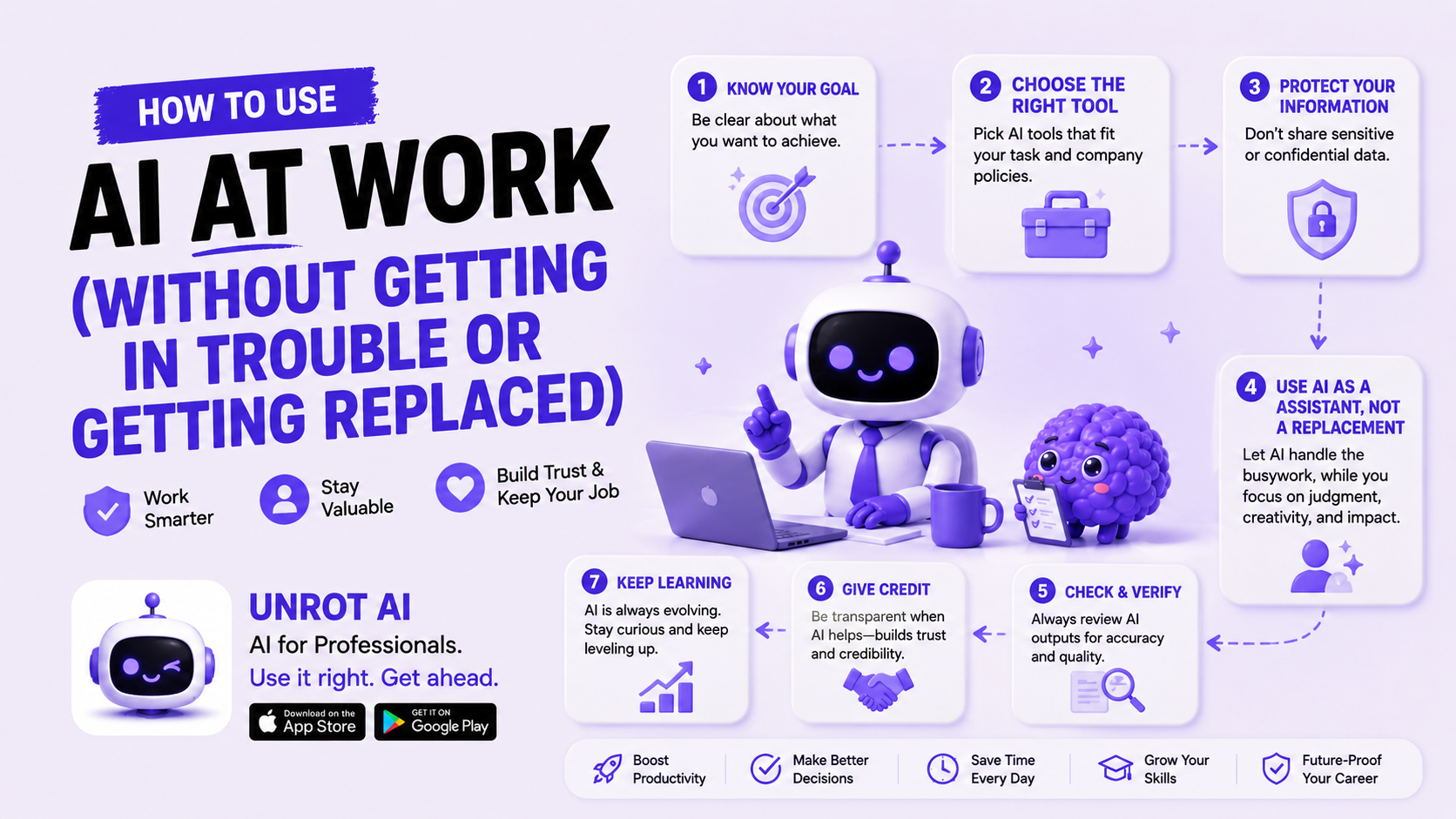
How to Use AI at Work (Without Getting in Trouble or Getting Replaced)
Workers with AI skills earn 56% more than peers in the same role without them. That is not a prediction. It is the current finding from PwC's 2025 Global AI Jobs Barometer, based on analysis of close to a billion job ads across six continents.
At the same time: 40% of workers say they've received AI-generated content from a colleague that was unhelpful, low-effort, or wrong — and spent nearly 2 hours cleaning it up. Stanford and BetterUp researchers named this pattern 'workslop.' The financial cost is $186 per month per employee in wasted productivity.
So the professional reality of AI in 2026 is not one story — it is two. The people using AI well are pulling ahead measurably. The people using it carelessly are creating problems for themselves and their colleagues. And the biggest professional risk in 2026 is not being replaced by AI. It is being replaced by someone who uses AI better than you do.
This post gives you the practical guide to being in the first group. What to use AI for. What never to put in a public AI tool. How to prompt it for real work tasks. Which tools are right for which roles. And how to talk about your AI use with your manager.
The Smart Professional's AI Toolkit
The first decision is not which AI tool to use. It is whether the AI tool you're using is appropriate for your workplace context. There are two categories:
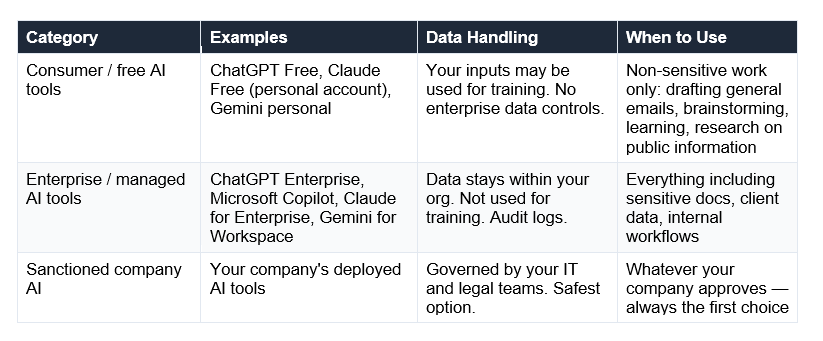
The BYOAI problem: 78% of professionals using AI at work bring their own tools. And 98% of organisations have employees using unsanctioned AI apps. This is 'Shadow AI' — and it's the #1 security concern for CISOs in 2026. If your company has an IT-approved AI tool, use that. If not, use consumer tools only for tasks where no sensitive information is involved.
What You Can Use AI For at Work
The honest breakdown from 2026 research: AI triples productivity on approximately one-third of tasks — specifically drafting, research, data analysis, coding, and content creation. It adds minimal value to tasks requiring judgment, relationship management, or physical coordination. Here is the practical task map:
Writing and Communication — High ROI
Draft first versions of emails, reports, proposals, and memos — especially the ones you've been delaying. AI eliminates the blank-page problem.
Improve tone and clarity — paste a draft you've already written and ask Claude or ChatGPT to make it more concise, professional, or direct.
Meeting prep — summarise a document or briefing before a meeting. Read the summary in 3 minutes instead of the document in 30.
Follow-up emails after calls — prompt: 'I just had a call where we agreed to X. Write a professional follow-up email confirming the decision and next steps.'
Research and Synthesis — High ROI
Topic briefs — ask for a plain-English overview of any subject before a meeting or presentation. Fact-check the specific claims before acting on them.
Competitive research — use Perplexity (search-grounded) for current market information, not ChatGPT from memory.
Summarising long documents — paste a 40-page report and ask for a 5-bullet executive summary. Harvard Business Review research found AI can reduce task time by up to 56%.
Translating jargon — paste a legal contract, technical spec, or financial report and ask for a plain-English explanation of key points.
Productivity and Organisation — Medium ROI
Meeting agenda creation — input the meeting goal and attendees; AI structures a 45-minute agenda with time allocations.
Project plan drafts — describe the project and timeline; AI produces a task breakdown with dependencies.
Performance review self-assessments — describe your accomplishments; AI helps you frame them in impact-focused language.
Job description interpretation — paste a job description and ask what skills and experience are most important.
Coding and Technical Work — Very High ROI
Code explanation — paste code you don't understand; AI explains it line by line in plain English.
SQL query writing — describe what data you need; AI writes the query.
Debugging — paste an error message and the relevant code; AI identifies the likely cause and suggests a fix.
Documentation — paste a function or process; AI generates the documentation.
Real numbers on productivity: Consultants using ChatGPT complete tasks 25% faster and 40% higher quality (Harvard Business School and MIT). Programmers complete 126% more coding projects per week. Support agents answer 13.8% more questions per hour. On average, workers save 3.5 hours per week from AI assistance on routine tasks.
What to Avoid — The 5 Rules That Keep You Safe
The Samsung incident became the reference case for workplace AI risk: Samsung engineers uploaded proprietary source code and internal meeting notes to ChatGPT to get debugging help. Samsung banned external AI tools company-wide as a result. The risk is not theoretical.
Sensitive data now makes up 34.8% of employee ChatGPT inputs — up from 11% in 2023, according to Metomic research. And consumer ChatGPT has no native access management: no mechanism to restrict uploads, no log of what was shared, and no alert when something sensitive leaves your organisation.
⚠ Rule 1: Never paste client or customer data into a consumer AI tool
Customer names, emails, contact details, order history, or any personally identifiable information (PII). This violates GDPR, HIPAA, and most enterprise data policies. Even in regions without explicit regulation, it is a serious breach of trust. Use enterprise AI tools with DPAs (Data Processing Agreements) for any customer data work.
⚠ Rule 2: Never paste proprietary company information
Source code, product roadmaps, financial projections, M&A discussions, pricing strategies, or unreleased product details. Consumer AI tools may use inputs for training. Your company's competitive information could, in theory, appear in another user's response. When in doubt, do not paste. Describe the situation in general terms and ask for structural help instead.
⚠ Rule 3: Always verify before you send or act on AI output
'Workslop' — low-quality AI-generated content passed along unchecked — costs the recipient nearly 2 hours to fix and damages your professional reputation. Harvard Business Review found that task time drops by 56% when employees use AI tools correctly — but that assumes verification. Always read, edit, and fact-check. You are the professional; the AI is the draft.
⚠ Rule 4: Never use AI for regulated advice without human review
Legal, medical, financial, and HR advice from an AI tool is not professional advice. An AI hallucinating a regulatory requirement in a compliance document creates legal liability. A fabricated medical recommendation in a patient communication is dangerous. Use AI to draft and structure — always have the relevant professional review before anything goes out.
⚠ Rule 5: Know your company's AI policy before you use anything
Many companies now have explicit AI policies. Some sectors (banking, healthcare, government) have specific restrictions. If your company has IT-approved AI tools, those are your first choice for any work task. Shadow AI — using unapproved tools — can create compliance violations even when intentions are good. If no policy exists, ask your manager or IT before using AI on anything sensitive.
How to Prompt AI for Work Tasks
The difference between AI that wastes your time and AI that saves it is almost always in how you ask. Here are four work-specific prompt templates you can use today:
Template 1: The Professional Email
Act as a professional business communicator.
Write a [100-120 word] email to [recipient] about [topic].
Context: [2-3 sentences about the situation]
Tone: [professional and warm / direct / formal]
Goal: [the single outcome you need]
Constraints:
- Do NOT open with 'I hope this finds you well'
- End with one specific, time-bound call to action
- Include a subject line
Template 2: The Document Summary
[PASTE YOUR DOCUMENT]
Summarise this document. Produce:
1. A 3-sentence executive summary
2. Five key takeaways as bullet points
3. One action this summary should prompt
Constraints: Use ONLY information in the document.
If you are unsure about a specific claim, flag it.
Template 3: The Meeting Prep Brief
Act as a research analyst.
I have a meeting with [person/company] about [topic] in [time].
Give me:
1. Three things I need to know before this meeting
2. Two questions I should ask
3. One risk or concern I should be prepared for
Constraints: Be specific. No generic advice.
Template 4: Improve My Writing
[PASTE YOUR DRAFT]
You are a direct editor. Improve this writing.
1. Identify two weak sentences and rewrite them
2. Find anything that sounds vague or AI-generated
3. Rewrite only the opening paragraph
Constraints: Preserve my voice. Cut, don't pad.
For a full set of 10 copy-paste templates covering brainstorming, research, data analysis, decision-making, and more, see: How to Write a Perfect ChatGPT Prompt (10 Templates That Work).
AI Tools by Job Type — The 2026 Map
Not all AI tools are equal for all tasks. Here is the honest map of which tools are delivering results for which professional roles in 2026:
The most important tool decision: For most office workers in 2026, Microsoft Copilot (if you are in Microsoft 365) or Gemini for Workspace (if you are in Google Workspace) is the safest and most integrated choice — because it lives inside your existing tools, respects your enterprise data controls, and does not require switching context. Start there before evaluating standalone AI tools
The AI Productivity Numbers That Actually Matter
The press tends to either hype AI productivity wildly ('AI will do everything!') or dismiss it ('AI saves nothing worth measuring!'). The actual research in 2026 is more nuanced — and more interesting.
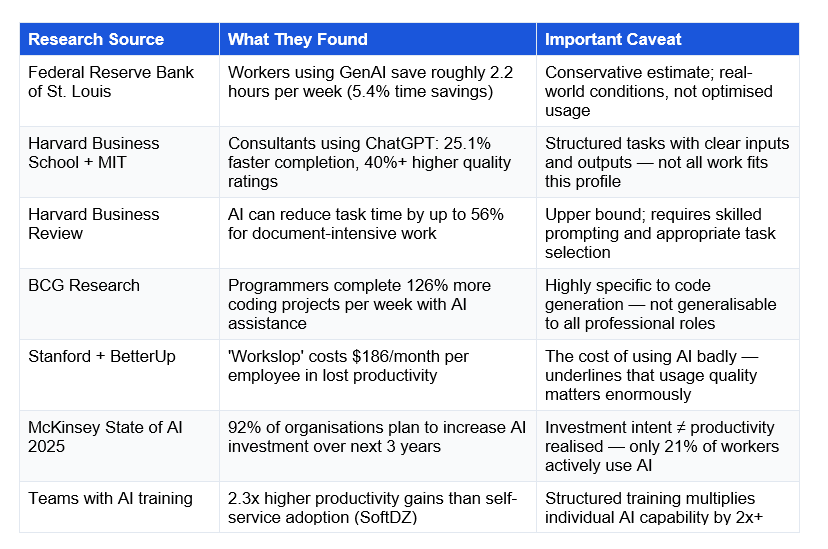
The honest takeaway: AI is genuinely productive for specific task categories with skilled usage. It is not a blanket productivity multiplier. The people getting the most from it are using it deliberately, prompting it well, verifying outputs, and applying it to the right tasks.
How to Talk About Your AI Use with Your Manager
This conversation is increasingly common in 2026 — and it goes better when you lead it rather than waiting to be asked. Here is how professionals are handling it well:
Frame it as output, not process
The conversation that goes badly: 'I used AI to write the proposal.' The conversation that goes well: 'The proposal was delivered on time and the client loved it. I used AI to draft the first version and then edited it significantly — same outcome, faster.' Lead with the result, then explain the process if asked.
Address the accuracy question proactively
The most common manager concern about AI is accuracy and quality control. Pre-empt it: 'I always verify AI outputs before anything goes out — especially on facts, numbers, or anything client-facing.' This shows you understand the risk and have a process for it.
Suggest a team AI policy if one doesn't exist
If your company has no AI policy, you can be the person who brings it up constructively: 'I've been using Claude for drafting documents and it's saving me several hours a week. Would it be worth establishing some guidelines for how the team uses AI tools?' This positions you as thoughtful rather than rule-bending.
The script that works
Script for telling your manager you use AI:
'I've been using [specific AI tool] for [specific tasks — e.g. drafting first versions of documents, research summaries, email templates]. It's saving me roughly [X hours] per week on those tasks, which I'm using for [higher-value work — e.g. client calls, strategic analysis]. I always review and edit the output before it goes anywhere. I wanted to be transparent about it — is there a company policy I should know about, or any specific concerns?'
This works because: it names the tool (no mystery), names the specific tasks (no exaggeration), names the benefit (time saved for better work), names your quality control (reduces accuracy concern), and invites policy alignment proactively.
The AI Skills Employers Are Actually Paying For in 2026
The AI salary premium is real. PwC's analysis of close to a billion job ads found a 56% wage premium for AI skills — up from 25% the year prior. Lightcast found job postings requiring AI skills offer 28% higher salaries, approximately $18,000 more per year in the US.
LinkedIn's 2025 data identified AI literacy and LLM proficiency as the two fastest-growing skills globally. Critically: 51% of AI-related job postings in 2026 are now outside traditional IT roles — in marketing, sales, HR, and operations. The AI skill premium is not reserved for engineers.
Frequently Asked Questions
Q: Is it safe to use ChatGPT at work?
It depends on the task and which version. Consumer ChatGPT (free or Plus, personal account) should not be used for any sensitive work data — customer information, proprietary company documents, source code, or financial details. Sensitive data now makes up 34.8% of employee ChatGPT inputs, creating real compliance and data security risks. ChatGPT Enterprise, Claude for Enterprise, and Microsoft Copilot (for Microsoft 365 organisations) are designed for professional use, with data controls, no-training guarantees, and audit logs. Use enterprise tools for work; use consumer tools only for non-sensitive tasks.
Q: Will AI replace my job?
The honest answer in 2026: AI is replacing specific tasks, not most complete jobs. Work that is repetitive, formulaic, and document-heavy is being automated or accelerated. Work that requires judgment, relationships, creativity, and domain expertise is not. The more useful question is: which parts of your job are repetitive enough for AI to handle? Move those to AI. Double down on the parts that require human judgment. PwC's analysis shows AI-skilled workers earn 56% more than non-AI-skilled peers — the real risk is being replaced by someone who uses AI better, not by AI itself.
Q: What should I never put into ChatGPT at work?
Five categories to avoid in consumer AI tools: (1) Customer or client personal data — names, emails, phone numbers, purchase history. This violates GDPR, HIPAA, and most enterprise data policies. (2) Proprietary company information — source code, unreleased products, financial projections, M&A discussions, competitive strategy. (3) Personnel information — employee performance reviews, salary data, disciplinary records. (4) Legal or compliance documents with confidential details. (5) Any document explicitly marked confidential or restricted by your company. If you're unsure, describe the situation in general terms and ask for structural guidance rather than pasting the actual document.
Q: How much time can AI save me at work?
Research gives a range depending on task type and usage quality. Federal Reserve research found the average worker saves 2.2 hours per week from generative AI assistance (5.4% time savings). Harvard Business School found consultants complete tasks 25% faster with 40%+ higher quality. Programmers complete 126% more coding projects per week. For document-intensive work, Harvard Business Review found task time can drop by 56%. The gap between these numbers reflects task selection and prompting quality — the time savings go to people who use AI deliberately on the right tasks, not as a generic productivity layer.
Q: Do I need to tell my manager I use AI at work?
This depends on your company's policies and the nature of the work. For most creative, research, and drafting tasks where you are adding substantial human judgment and verification, disclosure is a professional judgement call. For work where AI generated content is being presented as fully your own creative work (in academic or creative contexts), disclosure is usually expected. For work involving client deliverables, regulated outputs, or anything where accuracy is critical, being transparent about AI assistance is both professionally responsible and legally protective. If your company has no AI policy, proactively asking your manager is a smart professional move.
Q: What is shadow AI and why does it matter?
Shadow AI refers to employees using unapproved, unvetted AI tools at work without IT or management oversight. IBM's research found 1 in 5 companies has suffered a data breach tied to shadow AI, with 97% of organisations lacking proper AI access controls. When employees use personal accounts on consumer AI tools for work tasks, the organisation loses visibility and control over data flows. In regulated industries, this can create direct compliance violations. In 2026, 78% of professionals bring their own AI tools to work — making shadow AI one of the top security concerns for CISOs.
Q: Which AI tool is best for work in 2026?
It depends on your workflow. If you are in Microsoft 365 (Word, Excel, Outlook, Teams): Microsoft Copilot is the most integrated and governed option. If you are in Google Workspace (Gmail, Docs, Sheets): Gemini for Workspace has direct integration. For writing and document work outside those ecosystems: Claude Sonnet 4.6 (Claude.ai) consistently produces the highest-quality written output in blind evaluations. For research requiring current information: Perplexity AI provides search-grounded answers with citations. For coding: Claude Code or GitHub Copilot. The best tool is the one your organisation has approved — use enterprise tools for sensitive work, consumer tools only for non-sensitive tasks.
Q: What AI skills should I learn to advance my career?
In 2026, the highest-ROI skill to learn is prompt engineering — the ability to get reliable, high-quality outputs from AI tools. It applies across every role, takes 2-4 weeks to develop meaningfully, and directly improves the quality of everything AI assists you with. After that: AI output verification (catching errors and hallucinations), familiarity with the specific AI tools used in your industry, and a conceptual understanding of how AI systems work (what RAG is, why hallucinations happen, when AI is unreliable). LinkedIn data shows AI literacy and LLM proficiency as the two fastest-growing skills globally, with a 56% salary premium for AI-skilled workers
Recommended Articles
The natural next reads:
How to Write a Perfect ChatGPT Prompt (10 Templates That Work) The practical skill that separates good AI use from bad — RISEN framework and 10 copy-paste templates for work tasks.
ChatGPT vs Claude vs Gemini (2026): Which AI Should You Use? Now that you know what to use AI for at work, this comparison tells you which tool wins for each specific professional use case.
Why Does ChatGPT Make Up Facts? Understanding AI hallucinations is the most important safety skill for professional AI use — especially before sending AI-generated content to clients.
The 20 Most Important AI Terms Every Beginner Must Know Prompt engineering, RAG, hallucination, context window — all the vocabulary you need to sound credible when discussing AI at work.
The AI skills employers are hiring for are learnable in weeks, not years.
Unrot's Interview Prep section covers the exact AI concepts hiring managers test for — from LLM fundamentals to prompt engineering to RAG. 8 questions per category, with explanations. Free in the app.
app.unrot.co → Interview Prep → Start with Prompt Engineering
References
Published on Unrot.co | May 2026