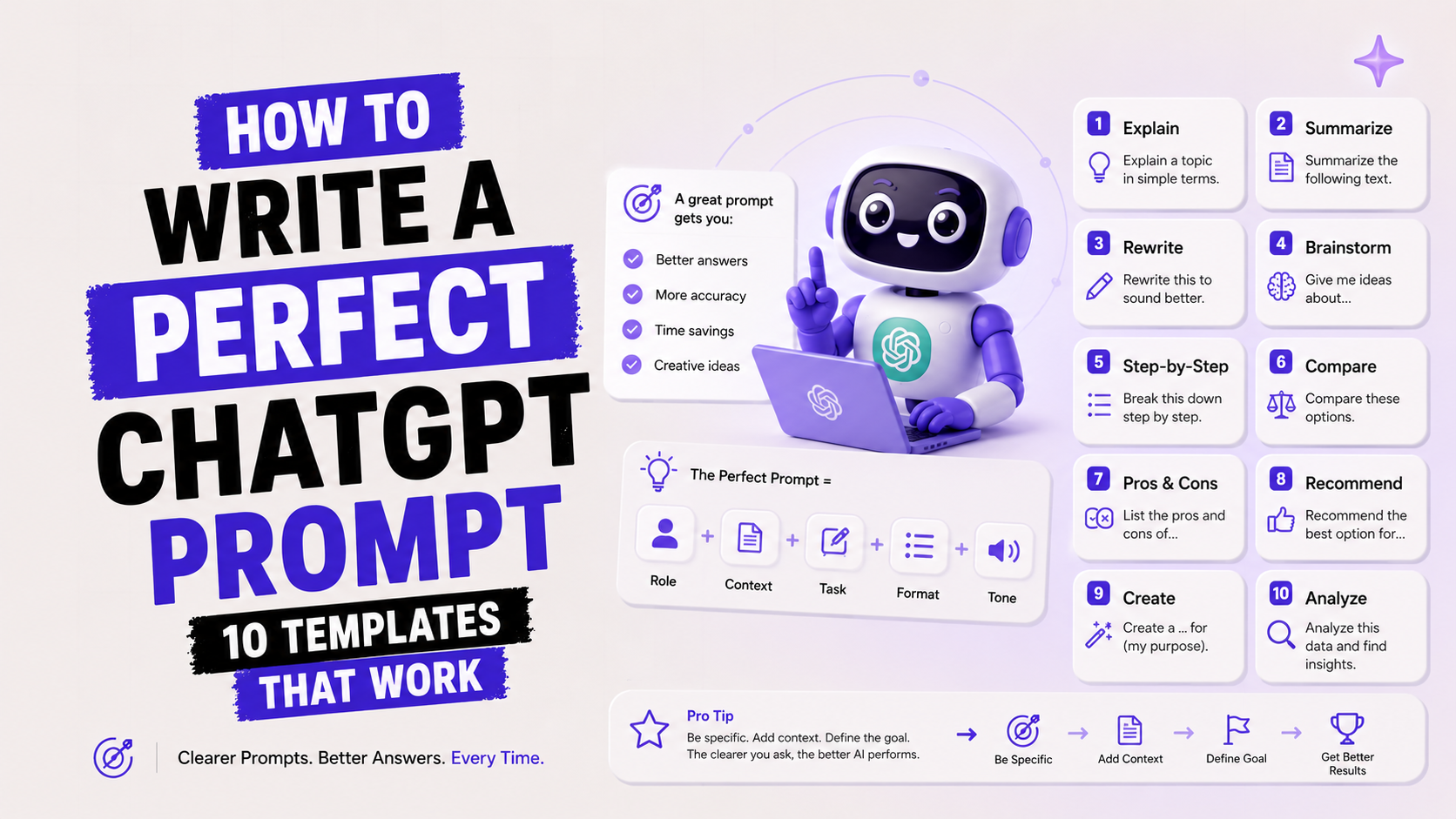
How to Write a Perfect ChatGPT Prompt (10 Templates That Work)
In 2022, the phrase 'prompt engineer' did not exist.
By 2024, it was a job title that paid $300,000 at some companies. In 2026, 2.5 billion prompts flow through ChatGPT alone every single day. And the overwhelming majority of them are mediocre. Not because the AI is bad. Because the instructions are vague.
Here is the part nobody tells you: ChatGPT does not read your mind. It reads your words. And it optimises for exactly what you ask for — including all the gaps, ambiguities, and missing context you left in your prompt. A vague question gets a vague answer. A specific, structured prompt gets output you can actually use.
I have spent a lot of time testing what actually works. Not theory — real prompts, real outputs, real comparison. The gap between a mediocre result and a genuinely useful one is almost always in the prompt, not the model. This post gives you the framework and 10 copy-paste templates that consistently produce output worth using.
In 2022, the phrase 'prompt engineer' did not exist.
By 2024, it was a job title that paid $300,000 at some companies. In 2026, 2.5 billion prompts flow through ChatGPT alone every single day. And the overwhelming majority of them are mediocre. Not because the AI is bad. Because the instructions are vague.
Here is the part nobody tells you: ChatGPT does not read your mind. It reads your words. And it optimises for exactly what you ask for — including all the gaps, ambiguities, and missing context you left in your prompt. A vague question gets a vague answer. A specific, structured prompt gets output you can actually use.
I have spent a lot of time testing what actually works. Not theory — real prompts, real outputs, real comparison. The gap between a mediocre result and a genuinely useful one is almost always in the prompt, not the model. This post gives you the framework and 10 copy-paste templates that consistently produce output worth using.
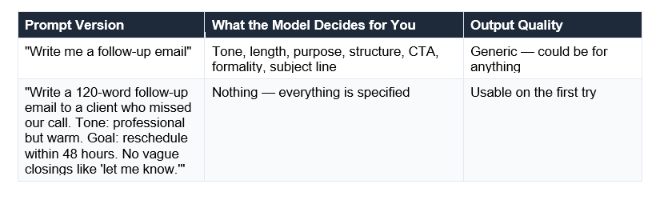
The second prompt is not harder to write - it took me 20 extra seconds. The output saved me 5 minutes of editing.
The core principle: every element of your prompt you leave unspecified is a decision the AI makes for you, using its statistical best guess. Specify more. Edit less.
The 4 Elements Every Good Prompt Needs
Before getting into frameworks and templates, here are the four building blocks. A good prompt needs at least three of them. The best prompts have all four:
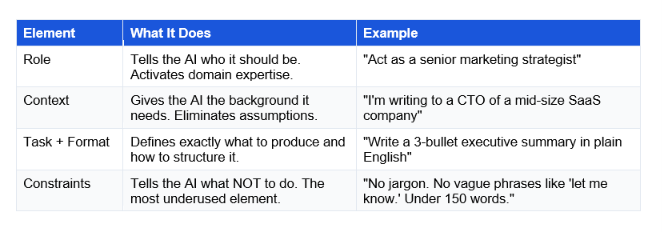
Sanjeev Patel's rule of thumb, from testing 200+ prompts: a prompt with only the task — "write me an email" — leaves the model guessing on role, format, and constraints, and you end up editing more than you saved. You need at least three of the four elements to get output worth using.
The RISEN Framework — The Most Reliable Prompt Structure
There are dozens of prompt frameworks in 2026: CRAFT, RACE, TAG, CO-STAR, APE. I have tested most of them. For multi-step tasks where you want repeatable, high-quality output, RISEN is the most reliable. It was popularised by Kyle Balmer and stands for:
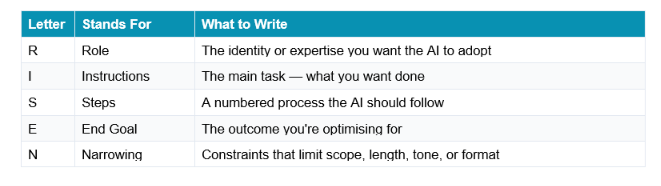
Here is the same task written with and without RISEN:
WITHOUT RISEN — Bad Prompt
Write a go-to-market strategy for our new AI product.
WITH RISEN — Good Prompt
Role: You are a senior product marketing manager with 10 years of experience
launching B2B SaaS products in competitive markets.
Instructions: Create a go-to-market strategy for our new AI-powered project
management tool targeting mid-market engineering teams (50-200 employees).
Steps:
Analyse the competitive landscape — identify our three strongest differentiators
Define three primary buyer personas with pain points and decision criteria
Outline a 90-day launch timeline with specific milestones
Recommend five marketing channels ranked by expected ROI
Draft key messaging pillars that connect features to business outcomes
End Goal: A strategy we can present to our leadership team next Friday.
Narrowing: Under 800 words. No jargon. No generic advice about "social media
presence." Specific, actionable, ready to present.
The difference in output quality is not subtle. The RISEN version produces a structured, usable strategy on the first try. The vague version produces something you will spend 20 minutes rewriting.
You do not need RISEN for every prompt. For simple, one-off requests, a shorter version works fine. But for anything that matters - a strategy document, a client email, a complex analysis - RISEN consistently produces first-draft-ready output.
10 Copy-Paste Prompt Templates That Work
These 10 templates are structured, tested, and ready to customise. Every bracket [like this] is a placeholder — replace it with your specific details. The more specific your replacements, the better the output.
Template 1: Professional Work Email
Use for: client follow-ups, meeting requests, status updates, cold outreach
COPY-PASTE PROMPT
Act as a professional business communicator.
Write a [length: 100-150 word] email to [recipient: client / manager / colleague]
about [topic: e.g. missed meeting / project update / invoice follow-up].
Context: [2-3 sentences of background — who they are, what happened, what you need]
Tone: [professional and warm / direct / formal]
Goal: [the one outcome you want — reschedule / approve / confirm]
Constraints:
- No opening with "I hope this finds you well"
- No vague closing like "let me know what you think"
- End with one specific, time-bound call to action
- Include a clear subject line above the email
Why it works: Reddit's AI communities report a 40-60% higher response rate on cold emails generated with structured constraints like 'under 125 words' and 'one specific CTA' compared to freeform prompts. The explicit constraint against 'I hope this finds you well' is the single most-upvoted prompt tip on r/ChatGPT with over 50,000 upvotes.
Template 2: Research and Synthesis
Use for: summarising a topic, preparing for a meeting, learning something quickly
COPY-PASTE PROMPT
Act as an expert researcher with deep knowledge of [your topic].
I need to understand [specific question or topic] well enough to [purpose: explain it
to my team / make a decision about / present on].
Task: Give me:
1. A 2-sentence plain-English definition of [topic]
2. Three key facts or statistics I should know
3. The most common misconception about this topic
4. Two concrete examples from the real world
5. One thing most people get wrong when acting on this information
Constraints:
- No academic jargon
- Use specific numbers where possible, not vague claims like "many studies show"
- If you are uncertain about a stat, say so rather than inventing one
Template 3: Content and Creative Writing
Use for: blog intros, LinkedIn posts, social captions, landing page copy
COPY-PASTE PROMPT
Act as a copywriter who specialises in [industry/audience: tech professionals /
e-commerce / B2B SaaS].
Write a [content type: LinkedIn post / blog intro / email subject line] about [topic].
Target audience: [describe in 1-2 sentences — who they are, what they care about]
Tone: [conversational and direct / inspirational / contrarian]
Angle: [the specific hook — a surprising stat / a personal story / a counterintuitive claim]
Constraints:
- Do NOT start with "In today's world" or "Are you struggling with"
- First sentence must hook the reader without using a question
- Specific, not generic — one concrete detail in the first 2 sentences
- [Platform-specific: LinkedIn: under 200 words / Twitter: under 240 chars]
Template 4: Document Summarisation
Use for: summarising reports, articles, meeting transcripts, long documents
COPY-PASTE PROMPT
I am going to paste [document type: a research report / meeting transcript / article].
Your task is to summarise it.
[PASTE YOUR DOCUMENT HERE]
Now produce:
1. A 3-sentence executive summary (who, what, why it matters)
2. Five key takeaways as bullet points with one supporting fact each
3. Three questions this document leaves unanswered
4. One decision or action this summary should prompt
Constraints:
- Use only information from the document — do not add outside knowledge
- If you are unsure about a point from the document, flag it
- Plain English throughout - no jargon even if the document uses it
Critical prompting tip: When summarising documents, always add 'Use only information from the document — do not add outside knowledge.' Without this constraint, AI models often supplement gaps with training data, which can introduce hallucinations into factual summaries.
Template 5: Brainstorming and Idea Generation
Use for: generating ideas, exploring options, solving creative problems
COPY-PASTE PROMPT
Act as a creative strategist known for counterintuitive, high-quality ideas.
I need [number: 10] ideas for [challenge: e.g. ways to grow a newsletter audience /
product features that reduce churn / headlines for a campaign].
Context: [2-3 sentences about your specific situation — audience, constraints, goals]
For each idea:
- One-line title
- 2-sentence explanation of what it is and why it would work
- One concrete example or precedent
Constraints:
- No generic advice (no "post consistently" or "know your audience")
- At least 3 of the ideas should be ones most people would not think of
- If an idea requires significant budget or resources, say so
- Be honest if an idea has a known failure mode
Template 6: Problem-Solving and Decision-Making
Use for: analysing a business problem, making a difficult decision, getting structured advice
COPY-PASTE PROMPT
Act as an honest advisor. Not the kind who validates everything — the kind who
asks the questions I have not thought of.
I am facing this problem: [describe your situation in 3-5 sentences]
I am considering this solution: [your proposed approach]
I want you to:
1. Identify the three strongest arguments FOR my proposed approach
2. Identify the three strongest arguments AGAINST it
3. Name the one assumption my plan depends on that I should stress-test
4. Suggest one alternative approach I may not have considered
5. Give me your honest verdict in 2 sentences
Constraints:
- Do not tell me what I want to hear — tell me what I need to hear
- Be specific — "this could be risky" is not useful; name the specific risk
Template 7: Getting Feedback on Your Writing
Use for: editing documents, improving emails, refining any written work
COPY-PASTE PROMPT
Act as a senior editor who is known for being direct and not softening feedback.
I am going to share a piece of writing. Your job is to improve it.
[PASTE YOUR WRITING HERE]
Feedback I need:
1. Three specific lines or sentences that are weak — and a rewritten version of each
2. The single biggest structural problem (if any)
3. Anything that sounds generic, vague, or like it was written by AI
4. A revised version of the opening paragraph only (leave the rest)
Constraints:
- Preserve my voice and tone — do not make it sound like a different person
- Do not just add more words — cutting is as valuable as adding
- Be specific about what is wrong, not just that something "could be clearer"
Template 8: Learning a New Concept Quickly
Use for: understanding any unfamiliar topic, preparing for interviews, upskilling
COPY-PASTE PROMPT
Act as a patient teacher who is an expert in [topic].
I am a [your background: complete beginner / someone with basic knowledge of X]
who needs to understand [specific concept] well enough to [goal: explain it in a
meeting / pass an interview / use it in my work].
Teach me:
1. The simplest possible explanation (one analogy that makes it click)
2. The three most important things to know about this
3. One concrete real-world example I would recognise
4. One common misunderstanding I should avoid
5. What I should learn next after this
Constraints:
- Assume zero prior knowledge unless I told you otherwise
- No walls of text — break it into sections
- If a concept requires maths or code, give me the plain-English version first
Template 9: Data Analysis and Interpretation
Use for: making sense of data, interpreting results, identifying patterns
COPY-PASTE PROMPT
Act as a data analyst who specialises in [domain: e-commerce / marketing / finance].
Here is the data I need you to analyse:
[PASTE YOUR DATA OR DESCRIBE IT]
My question: [the specific question you need answered]
Decision context: [what decision this data will inform]
Please provide:
1. What the data actually shows (not interpretations yet — just the facts)
2. The three most significant patterns or anomalies
3. What these patterns most likely mean for my decision
4. What additional data would change your interpretation
5. One conclusion I should be cautious about drawing from this data alone
Constraints:
- Flag clearly when you are making an inference vs stating a fact
- If the data is insufficient to answer my question reliably, say so directly
Template 10: The 'Clarifying Questions First' Power Prompt
Use for: any complex task where you want the AI to gather context before starting
COPY-PASTE PROMPT
I need your help with [task description].
Before you begin, ask me any questions you need so you can give me the most
useful, specific output possible. Be extremely comprehensive — ask about:
- My audience and their expectations
- Any constraints I haven't mentioned
- What success looks like
- What I want to avoid
Once I have answered your questions, then produce the output.
Do NOT start producing content until you have asked your questions and I have answered.
Why Template 10 is underrated: Most people want the output immediately. But for complex tasks — a strategic document, a long piece of writing, a product spec — letting the AI ask clarifying questions first is one of the highest-leverage prompt moves you can make. It forces the model to surface your hidden assumptions before they become output problems.
The 5 Biggest Prompting Mistakes (And How to Fix Them)
I see these every time I show someone how I prompt. Each one has a simple fix.
Mistake 1: Vague task, no constraints
The prompt: "Write me a blog post about AI."
The fix: Add a target keyword, a word count, a specific angle, and at least one 'do not include' constraint. Any of those additions will improve the output significantly.
Mistake 2: Not giving the AI permission to say 'I don't know'
For factual prompts — research, data, statistics — add one line: "If you are not sure about a specific fact or statistic, say so rather than inventing one." This simple addition dramatically reduces hallucinations. Claude Sonnet 4.6 has a ~3% hallucination rate on factual queries; adding this instruction reduces it further.
Mistake 3: Treating the first response as the final output
The best prompts are iterative. OpenAI's Academy explicitly teaches that GPT-5's biggest improvement is in mid-conversation refinement: you can clarify or adjust mid-conversation rather than starting over. If the first output is 80% right, a follow-up prompt like 'Great — now make the tone more conversational and cut 20%' will get you the other 20%. Single-prompt thinking kills output quality.
Mistake 4: Putting the most important instruction at the end
Counterintuitively, AI models pay more attention to instructions at the beginning and end of a prompt than in the middle. If your most important constraint is buried in paragraph 3, it may be underweighted. Put critical constraints either in the opening sentence or at the very end as a standalone line.
Mistake 5: Using the same prompt for different tools
ChatGPT, Claude, and Gemini respond differently to the same prompt. Claude excels with nuanced, long-form writing and follows detailed style guides more precisely. ChatGPT responds better to explicit format requests (tables, bullet points). Gemini benefits from web-search-aware prompts when you need current information. A prompt optimised for one model may underperform on another.
What Comes After Prompt Engineering? Context Engineering.
Here is the news angle this post has been building toward: in 2026, the most sophisticated AI users have moved beyond prompt engineering. They have moved to context engineering.
According to DataHub's 2026 State of Context Management Report, 82% of IT and data leaders agree that prompt engineering alone is no longer sufficient to power AI at scale. The shift is not about writing better prompts. It is about designing the entire information environment the model works within.
The distinction is clean:
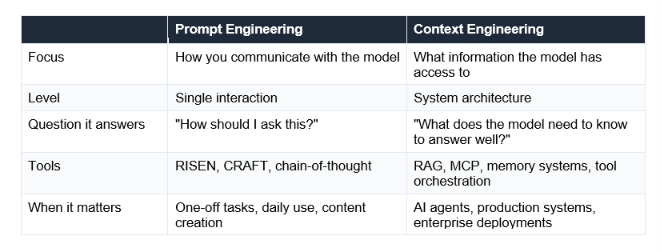
For most everyday users — writing emails, doing research, getting help with tasks — prompt engineering is the right skill to focus on right now. Context engineering becomes critical when you are building AI systems that need to work reliably at scale.
Andrej Karpathy put it best: "The LLM is the CPU and the context window is RAM." Prompt engineering is about writing good instructions to the CPU. Context engineering is about making sure the right data is in RAM before the CPU starts working. Both matter. But you need to learn them in order.
Frequently Asked Questions
Q: How do you write a good ChatGPT prompt?
A good ChatGPT prompt includes at least three of these four elements: a Role (who the AI should be), Context (background information), a clear Task with a specified Format, and Constraints (what not to do). For most tasks, the RISEN framework (Role, Instructions, Steps, End Goal, Narrowing) produces the most reliable, first-draft-ready output.
Q: What is the RISEN framework for prompts?
RISEN stands for Role, Instructions, Steps, End Goal, and Narrowing. It is a structured prompt framework popularised by Kyle Balmer that breaks any complex task into five components. Role defines who the AI should be. Instructions describe the main task. Steps provide a numbered process to follow. End Goal specifies the desired outcome. Narrowing adds constraints that limit scope, tone, length, or format.
Q: How do I get ChatGPT to give better answers?
Four immediate improvements: (1) Specify a role — 'Act as a senior marketing strategist' consistently outperforms no role. (2) Add constraints — tell the AI what NOT to include, not just what to include. (3) Ask for a specific format — 'bullet points' or 'table' or 'under 150 words'. (4) Use iterative refinement — treat the first response as a draft and refine in the same conversation rather than starting over.
Q: Can I use the same prompts for Claude and Gemini?
Yes, the same prompt structure works across ChatGPT, Claude, and Gemini. However, each model has distinct strengths. Claude follows complex style guides and produces more natural long-form writing. ChatGPT responds well to explicit format requests. Gemini benefits from prompts that explicitly leverage web search for current information. A prompt optimised for one model will work on the others, but tailoring for each improves results.
Q: What is the single most effective change I can make to my prompts right now?
Add constraints. Most people write prompts that tell the AI what to do. Almost nobody tells the AI what NOT to do. Adding one constraint — 'no generic advice', 'no opening with I hope this finds you well', 'under 150 words', 'do not add information that is not in the document' — immediately narrows the output and reduces the editing you need to do.
Q: What is context engineering and how is it different from prompt engineering?
Prompt engineering focuses on how you communicate with the model in a single interaction — the words, structure, and techniques in your prompt. Context engineering focuses on what information the model has access to when it generates a response — managing memory, retrieval systems, tool outputs, and the full information environment. According to DataHub's 2026 State of Context Management Report, 82% of IT leaders agree prompt engineering alone is no longer sufficient for production AI systems. For everyday use, prompt engineering remains the right skill to develop first.
Q: Why does ChatGPT sometimes ignore my instructions?
Usually for one of three reasons. First, the instruction is buried in the middle of a long prompt where attention is lowest. Put critical instructions at the start or end. Second, the instruction is vague — 'write naturally' is ambiguous; 'do not use the word utilise' is not. Third, the conversation has grown long enough that early instructions have drifted out of focus due to context window limitations. Repeating the key constraint at the end of a long conversation reactivates it.
Q: How long should a good prompt be?
There is no ideal length — only ideal specificity. A 15-word prompt can be perfect for a simple task. A 300-word prompt is appropriate for a complex strategy document. OpenAI's Academy specifically notes that GPT-5 can handle longer multi-step prompts without confusion, meaning you can consolidate related instructions into one request. The rule: make it as long as it needs to be to eliminate ambiguity, no longer.
Recommended Articles
The natural next reads from this guide:
Prompting is a skill. Skills get better with practice.
Unrot's Prompt Engineering course teaches the techniques in this post — plus few-shot prompting, chain-of-thought, and system prompts — in under 5 minutes per concept. Free in the app.
app.unrot.co → Course: Prompt Engineering Basics
References
OpenAI Help Centre (2026). Prompt engineering best practices for ChatGPT.
AiPromptsX (March 2026). RISEN Framework: Role, Instructions, Steps, End Goal, Narrowing.
SurePrompts (March 2026). The 10 Best AI Prompt Frameworks: Tested Templates.
Beginners in AI (May 2026). Best ChatGPT Prompts: Reddit's Most Upvoted Templates for 2026.
Published on Unrot.co | May 2026