What Is a Context Window in AI? (And Why It Matters for You)
Something happened to me during a coding session last year that I still think about. I had been working with Claude for about an hour. We had built a detailed mental model of the codebase together, going back and forth, refining the logic. Then, around message 60, it happened: Claude started suggesting things that contradicted what we had established in message 5.
It was not a bug. It was not Claude being unreliable. It was a context window doing exactly what it was designed to do: dropping old information to make room for new information. I had hit the limit, and the AI had quietly started forgetting the beginning of our conversation.
I did not understand this at the time. Once I did, I changed how I use AI permanently. The context window is one of the most practically important concepts in AI — and one of the least explained in plain language.
This post fixes that.
The Simple Explanation: What a Context Window Actually Is
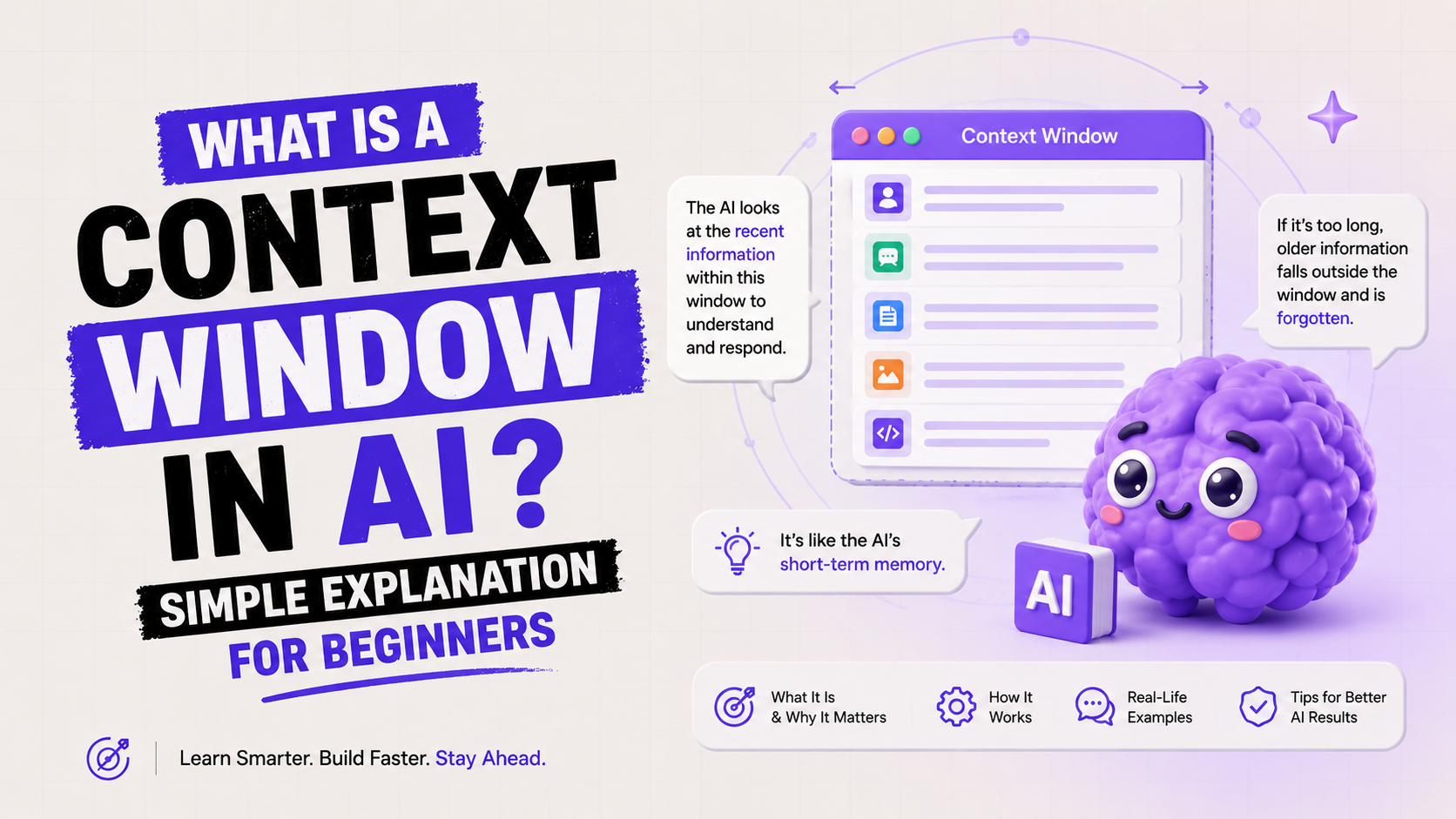
A context window is the maximum amount of text an AI model can process in a single conversation. Think of it as the AI's working memory, the total amount it can see and think about at any one moment.
Everything in your current session counts toward this limit: your messages, the AI's responses, any documents you uploaded, and any instructions you gave at the start. Once you hit the limit, the model cannot see everything anymore. It starts dropping the oldest parts of the conversation to make room for the new.
Here is the most useful analogy I have found: imagine a whiteboard. Every message you send adds writing to the whiteboard. Every response the AI gives adds more. The whiteboard has a fixed size. Once it fills up, new text erases the oldest text from the top to make room. The AI can still see the whiteboard, but it can no longer see what was written there first.
One-sentence definition: A context window is the fixed-size whiteboard of text that an AI model can see and reason about at any given moment — input, output, and conversation history all included.
What counts toward the context window? Everything:
Your messages — every question and instruction you have typed
The AI's responses — every reply it has generated back to you
System instructions — any setup instructions at the start of a chat
Uploaded documents or files — the full text of anything you paste or attach
Tool outputs — results from web searches, code execution, etc.
This is why long conversations start to degrade before the context window is fully 'full.' The AI is processing all of those layers simultaneously, not just your most recent message.
How Tokens Work (The Unit That Measures Context Windows)
Context windows are measured in tokens, not words or characters. A token is roughly three-quarters of a word in English, or about 4 characters. This matters because when AI companies advertise a '1 million token context window,' what they mean in plain terms is a very large reading window. Here is how it converts to human-readable amounts:
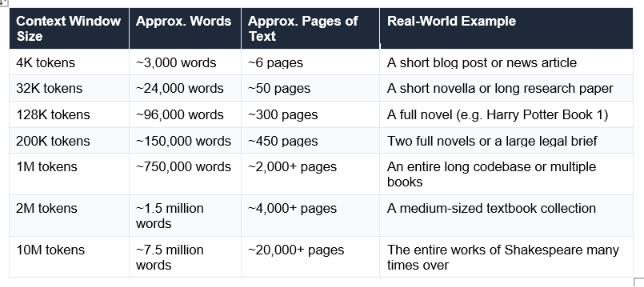
A quick estimation rule: 1,000 tokens ≈ 750 English words. Or flip it: 1,000 words ≈ 1,333 tokens. Any time you see a context window number, you can quickly convert it to pages of text using this rough guide.
The key insight about tokens and context windows is that output counts too. When a model has a 1M token context window and a 64K token max output, your actual usable input budget is roughly 936K tokens — because the AI's response has to fit in the same shared space. This matters when you are sending very long documents.
Practical rule: If you upload a 300-page PDF, that single document is consuming approximately 128K tokens before you have typed a single question. Always factor in document size when working with long-context models.
Context Window Sizes Compared — Every Major Model (May 2026)
Context windows have grown at a remarkable pace. In 2020, GPT-3 had a 4,096-token context window. As of May 2026, multiple models offer 1 million tokens, and some extend to 10 million. Here is where the major consumer models stand:
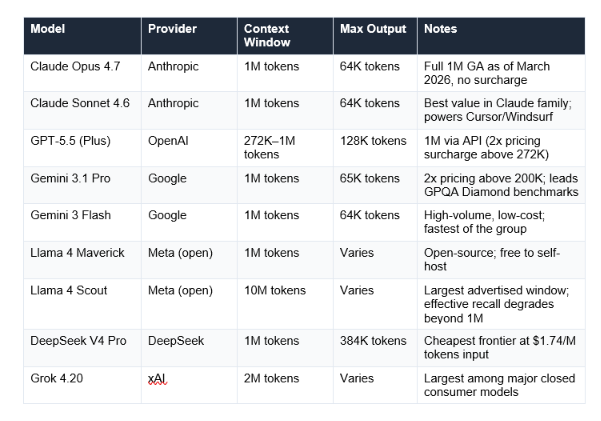
One important caveat that most comparison articles skip: advertised context window size is not the same as effective context window. Research consistently shows that most models become unreliable at 60-70% of their advertised capacity. Claude Sonnet 4.6 is notable for showing less than 5% accuracy degradation across its full window — consistent reliability matters as much as raw size.
There is also the 'lost in the middle' problem: research shows models recall information from the beginning and end of a long context at 85-95% accuracy, but information buried in the middle drops to 76-82% accuracy. Simply having a 1 million token window does not guarantee the AI will reliably use every part of it equally
News angle: Context windows became a major competitive battleground in early 2026. Claude Sonnet 4.6 and Opus 4.6 reached full 1M-token availability with no surcharge in March 2026. Gemini 3.1 Pro maintained its 1M window with a 2x pricing tier above 200K tokens. OpenAI extended GPT-5.4 to 1M tokens via API in March 2026, also with a 2x surcharge above 272K tokens.
What Happens When You Hit the Context Window Limit?
This is the part that surprises most people, because the AI does not warn you clearly when it is happening. There is no pop-up that says 'context window 90% full.' The experience is subtler, and more frustrating, than that.
What You Will Actually Notice
The symptoms of hitting a context limit are not dramatic. They are:
The AI contradicts something it agreed with earlier. Because it no longer has access to that earlier message.
It asks you a question you already answered. The answer was in the part of the conversation that got dropped.
It ignores an instruction from the start of the conversation. System instructions placed at the beginning are often the first things dropped.
Responses feel less coherent. The model is working with an incomplete picture of what you are building together.
Responses get slower. The model is processing more tokens, which takes more computation and time.
Research from AI Fire in January 2026 found that performance starts declining at around 60% of the context window, not 100%. Pushing a conversation to 90% capacity causes a sharp increase in contradictions and hallucinations. The safe operating zone is roughly the first 60% of the window.
What the Model Actually Does When It Overflows
Different platforms handle overflow differently:
Rolling drop: The most common approach. Oldest messages are removed from the beginning to make room. The conversation continues, but earlier context is permanently gone.
Hard stop: Some API implementations refuse the request if it exceeds the limit and return an error. You must reduce your input before retrying.
Summarization: Some platforms (ChatGPT includes this) automatically summarize earlier parts of the conversation rather than dropping them entirely. The summary is less detailed than the original but preserves key points.
The critical difference: a rolling drop permanently destroys context. A summarization approach preserves a compressed version. For practical work on long projects, knowing which method your platform uses changes how you structure conversations.
Context Window vs. AI Memory: An Important Distinction
This is one of the most common points of confusion, and it matters practically. Context window and memory are two completely different things, and most AI tools have both, working very differently.
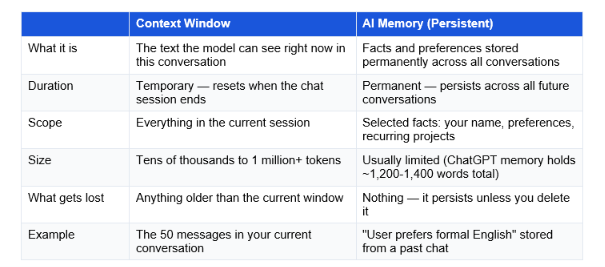
The key insight: context is what the AI knows right now. Memory is what it knows forever. Most people confuse them because both affect how the AI behaves in a conversation, but they work at completely different scales and time horizons.
ChatGPT's Memory feature (available in paid plans) stores a limited set of preferences and facts about you. But even with memory enabled, hitting the context window limit still causes the current conversation to forget earlier messages. Memory does not solve the context problem, it supplements it for long-term continuity.
Claude's Projects feature works differently: it stores a set of reference documents and instructions that are automatically injected into every new conversation within that project. This effectively extends the usable context by keeping key documents consistently available without filling the conversation window with repetitive context.
Is a Bigger Context Window Always Better?
I want to give you the honest answer here, because the marketing around context windows in 2026 is almost entirely focused on 'bigger is better.' The reality is more interesting.
Larger context windows are genuinely useful for:
Uploading and analyzing entire long documents (legal contracts, full reports, book manuscripts)
Working with large codebases where the AI needs to see many files simultaneously
Long research sessions where you build on earlier findings
Multi-step tasks where early context remains relevant throughout
But larger context windows create real problems too:
Cost: API pricing scales with token count. A 900K-token request at $3/M tokens costs $2.70. Multiply by hundreds of daily requests and it compounds rapidly.
Speed: Processing more tokens takes longer. Very long context windows introduce noticeable latency in responses.
'Lost in the middle': Even with a 1M token window, models recall early and late information better than middle information. Burying critical details in the middle of a large context reduces their effective influence on the response.
Quality vs. quantity trade-off: Research consistently shows models perform better when given focused, relevant context rather than everything-and-the-kitchen-sink inputs.
My honest take: For most everyday users, the difference between a 128K and a 1M token context window is irrelevant. The typical daily use case — writing emails, asking questions, generating content — uses less than 5K tokens per conversation. Context window size matters most for power users, developers, and anyone working with very long documents.
7 Practical Tips for Working Within Context Limits
The best AI users in 2026 do not have one long, sprawling conversation. They work in focused sprints and use these techniques to stay within context limits while never losing important information.
1. Put your most important instructions first AND last
When a context window overflows, the oldest text (beginning of conversation) gets dropped first. Put critical instructions at both the very start and at the most recent message. Front-load the most important constraints. Repeat key constraints at regular intervals in long conversations.
2. Use the 60% rule
AI performance declines at around 60% context usage, not 100%. If you are working on a long project and notice the AI's responses drifting or losing coherence, do not wait until you hit the limit. Refresh the conversation at 60%.
3. Summarize before starting a new conversation
Before a conversation gets too long, ask the AI to generate a summary: "Summarize everything we have discussed and decided in this conversation in 300 words. Include all key decisions and constraints." Paste that summary at the start of your next conversation. This is called a 'handoff' and it is one of the highest-leverage AI workflow habits you can build.
4. Paste documents directly rather than referencing them
Instead of saying 'Based on the document we discussed earlier...' — the AI may no longer have access to it — paste the relevant section of the document directly into your current message. This ensures the AI can see it, regardless of where the conversation is in terms of context usage.
5. Use dedicated project features where available
Claude's Projects and ChatGPT's Memory features are specifically designed to handle persistent context. If you work on a recurring project, set it up as a Project so your key documents and instructions are injected into every new conversation automatically, without consuming your conversation context window.
6. Split long tasks into focused sessions
Instead of 'analyze this entire 500-page report,' break it into focused sessions: 'Analyze chapters 1-3 for the main arguments' in one conversation, 'Analyze chapters 4-6' in another, then 'Synthesize the findings from these summaries' in a final conversation. Each session stays fresh and within context limits.
7. Know your platform's limit before you need to
The context window of the model you are using in the ChatGPT or Claude app is not always the same as the API limit. ChatGPT Plus typically uses a 128K window in the interface, even though the API supports more. Claude Pro on the free-conversation interface typically uses Sonnet 4.6's 1M window. Know your actual working limit so you can plan accordingly.
The power move: The teams getting the best results from AI in 2026 are not the ones with the largest context windows. They are the ones whose conversations are the most focused. A 50K-token conversation with sharp, relevant context beats a 900K-token conversation crammed with noise, every time.
Frequently Asked Questions
Q: What is a context window in AI? (Simple definition)
A context window is the maximum amount of text an AI model can process at one time. It includes everything in your current conversation: your messages, the AI's replies, any documents you uploaded, and any instructions given at the start. Think of it as the AI's working memory — once it fills up, older information starts getting dropped to make room for new content.
Q: What does a 200K context window mean?
A 200,000-token context window means the model can process approximately 150,000 words — roughly 450 pages of text — in a single conversation. This includes both your input and the AI's output. In practice, models like Claude Sonnet 4.6 (200K standard context, 1M expanded) allow you to upload entire long reports, legal documents, or codebases and have them analyzed in a single session.
Q: What is ChatGPT's context window?
As of May 2026, ChatGPT Plus users typically interact with a 128,000-token context window in the chat interface (roughly 300 pages of text). The API supports up to 1 million tokens for GPT-5.4, though with a 2x pricing surcharge above 272K tokens. The free tier provides a smaller context window and degrades to a lighter model when usage limits are hit.
Q: Which LLM has the largest context window in 2026?
As of May 2026, Llama 4 Scout (Meta's open-source model) has the largest advertised context window at 10 million tokens. Among major closed consumer models, Grok 4.20 (xAI) and Gemini 3.1 Pro (Google) offer 2M and 1M token windows respectively. Claude Sonnet 4.6 and Opus 4.7 both reached 1M tokens in March 2026 with flat pricing and no surcharge.
Q: What is the difference between context window and context length?
Context window and context length are used interchangeably by most sources and mean the same thing: the maximum number of tokens an AI model can process in a single request. Some technical sources use 'context length' to refer specifically to the input budget (excluding output), but in everyday usage and product descriptions, the two terms describe the same concept.
Q: What is the difference between a context window and AI memory?
A context window is temporary — it holds everything in your current conversation and resets when the session ends. AI memory is persistent — it stores selected facts and preferences across all conversations indefinitely. ChatGPT's Memory feature and Claude's Projects are forms of persistent memory. Both exist in modern AI tools, but they solve different problems: context handles working memory, memory handles long-term continuity.
Q: Is a larger context window always better?
No. Larger context windows are genuinely useful for long documents, large codebases, and extended research sessions. However, they come with real trade-offs: higher API costs (pricing scales with tokens), slower response times, and a 'lost in the middle' problem where models recall information at the beginning and end of long contexts better than information in the middle. For most everyday use cases, a 128K context window is more than sufficient.
Q: How can I work around context window limits?
Five practical approaches: (1) Start a new conversation and paste a summary of the previous one. (2) Put critical instructions at both the start and end of your conversation, not just the beginning. (3) Use Claude Projects or ChatGPT Memory to store persistent context outside the conversation window. (4) Split long tasks into focused sessions with clear handoffs. (5) Work within 60% of your context window — performance degrades well before you hit 100%.
Recommended Articles
These are the natural next steps from understanding context windows:
Understanding tokens and context is the foundation of using AI well.
The Unrot course on Tokens and AI Pricing explains everything in 5 minutes — what tokens are, how they are counted, why they cost money, and how to use AI efficiently without burning your budget.
References
LLM Guides (February 2026). Context Window Explained. Context window size table for major models.
Morph LLM (February 2026). LLM Context Window Comparison 2026: Every Model, Priced and Benchmarked.
GPTCompress (January 2026). Why Long ChatGPT Conversations Break.
myNeutron (January 2026). AI Memory Limitations: Why Your AI Keeps Forgetting.