

50 ChatGPT Prompts That Save You an Hour Every Day
The right ChatGPT prompts can hand you back an hour every single day, and this pack gives you 50 of them, grouped by the tasks that eat your time. I have used these ChatGPT prompts to save time on the boring parts of my week: the third follow-up email, the meeting notes nobody wants to write, the spreadsheet formula I forgot again. The idea is simple. You should spend your energy on decisions and ideas, not on rephrasing the same message for the tenth time. These are meant to be the best ChatGPT prompts for real work, not clever party tricks, so each one targets a job you already do.
A quick promise about how this is written. Every prompt below uses brackets like [topic] or [audience] that you fill in with your own details. The more specific you get, the better the output. I have organized the 50 into ten categories so you can jump straight to the ChatGPT prompts for work that match your day. You will also find a short section on writing your own prompts, the mistakes that make ChatGPT useless, and an honest note that these tools get facts wrong. Treat this as a working toolkit for useful ChatGPT prompts 2026, not a magic button.
How to use this prompt pack
Copy a prompt, replace the bracketed parts, paste it into ChatGPT, and refine from there. That is the whole method. I keep my favorite ChatGPT productivity prompts in a notes file so I am never hunting for them mid-task. My honest opinion is that speed comes from having the prompt ready before you need it, not from writing a perfect one in the moment.
Here is the contrarian bit: more prompts is not better. I would rather you memorize five time-saving AI prompts you use daily than bookmark all fifty and forget them. Start with the two categories that match your worst time sink. For me that was email and meeting notes, and just those two probably save me forty minutes a day. Add more only when the first ones become second nature.
One practical note. Paste any prompt with real context attached. If a prompt says summarize a document, paste the actual document under it. ChatGPT cannot read your mind or your inbox, so the quality of what you feed it sets the ceiling on what you get back.
How to use ChatGPT prompts well before you copy anything
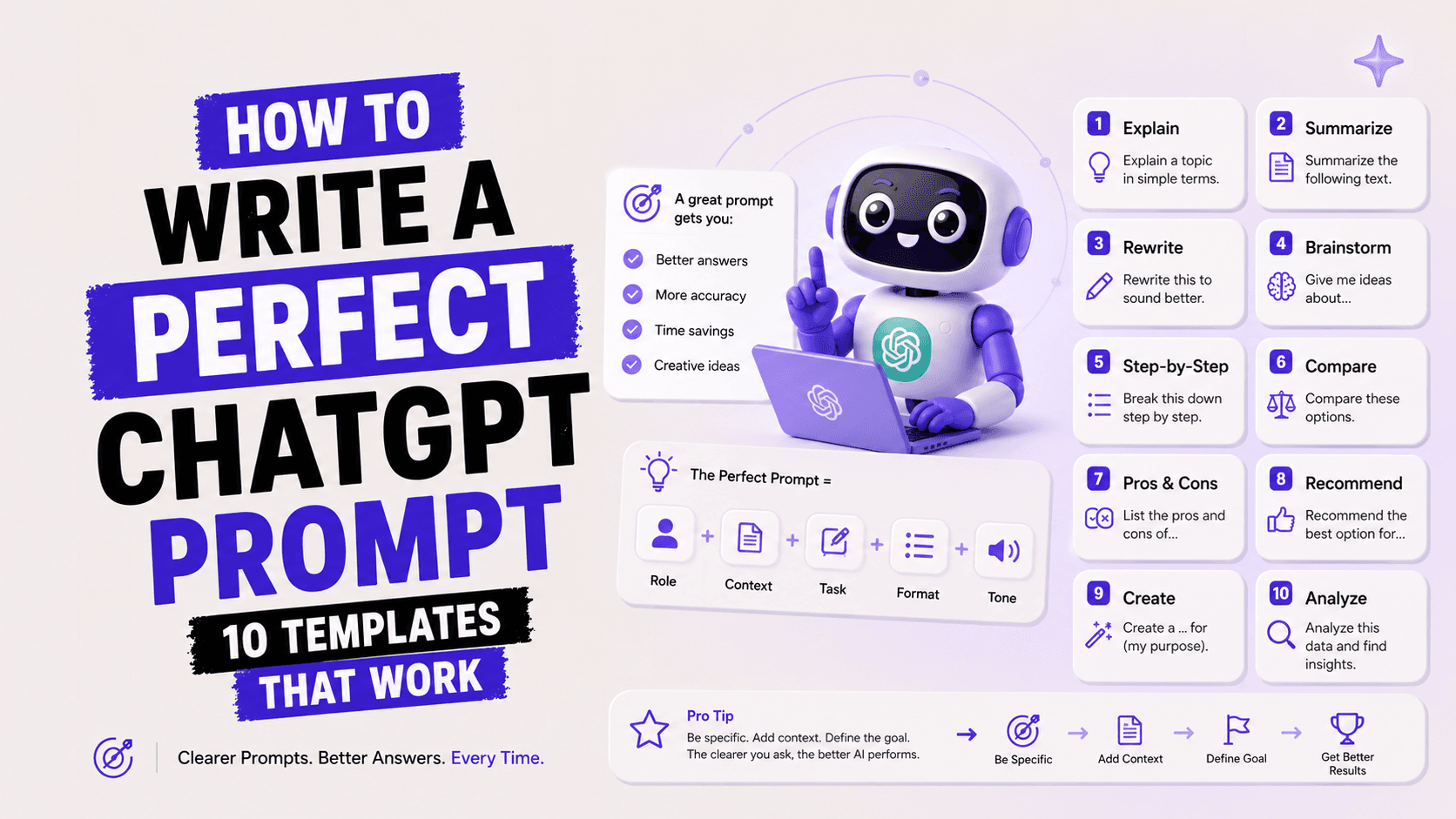
A good prompt gives ChatGPT a role, a task, the needed context, and a format for the answer. That single sentence is the core of prompt writing, and it is why some people get gold while others get mush from the same tool. I always tell colleagues to name the audience out loud, because writing for a nervous first-time customer is nothing like writing for your CFO.
In my experience the biggest jump in quality comes from adding constraints. Word count, tone, reading level, what to avoid. When I ask for a 120-word reply in a warm but professional tone that avoids jargon, I get something I can send with light edits. When I just say write a reply, I get a wall of text I have to gut. Constraints are not limits here, they are steering.
My opinion, and some will disagree, is that you should push back on ChatGPT like a picky editor. Ask it to try again, shorter, or in a different voice. The first draft is rarely the one you want, and treating it as a conversation instead of a vending machine is where the real time savings live. If you want a deeper walkthrough, the prompt-writing guide linked at the end is the best next step.
Email and communication prompts
The fastest ChatGPT prompts to save time are the ones that handle email, because most of us write the same five messages on repeat. These five cover replies, follow-ups, tough conversations, and cleanup. I lean on the follow-up and the decline prompts almost daily, and they have quietly removed the low-grade dread of a full inbox.
Reply to a long email
"Here is an email I received: [paste email]. Write a clear reply that answers each point, keeps a warm but professional tone, stays under 120 words, and ends with a clear next step."
Chase a non-response
"Write a short, friendly follow-up to [name] about [topic]. This is my [second] nudge. Keep it under 60 words, assume they are busy, and make it easy to reply with a yes or no."
Decline politely
"Help me say no to [request] from [person] without burning the relationship. Keep it warm, give a brief honest reason, and offer one small alternative if it makes sense."
Soften a blunt draft
"Rewrite this message so it sounds calmer and less blunt while keeping the same facts: [paste draft]. Flag any line that could read as passive aggressive."
Summarize a thread
"Summarize this email thread into who wants what, what was decided, and what I owe people. Then draft my reply covering my open items: [paste thread]."
Use these by pasting the real email or thread under the prompt, then asking for one tweak: shorter, warmer, or more direct. I usually send the follow-up prompt output almost untouched, but I always reread a decline before it goes out, because tone is personal and ChatGPT does not know your history with that person.
Writing and editing prompts
For writing, the best ChatGPT prompts do not write for you, they get you unstuck and tighten what you already have. These five help with blank-page dread, editing, and matching a tone. My favorite is the ruthless-editor prompt, because cutting my own words is the task I procrastinate on most.
Task
Prompt to copy
Beat the blank page
"I need to write [type of piece] about [topic] for [audience]. Give me three different opening angles and a rough outline for each, so I can pick a direction."
Ruthless edit
"Edit this for clarity and cut at least 20 percent without losing meaning. Keep my voice, flag anything vague, and show the trimmed version: [paste text]."
Match a tone
"Rewrite this in the same tone as this sample I like: [paste sample]. Here is the text to rewrite: [paste text]. Keep the facts, borrow the rhythm and word choice."
Fix the structure
"My draft feels messy. Reorganize it into a logical flow with clear sections, tell me what to cut and what to expand, and explain your reasoning briefly: [paste draft]."
Turn notes into prose
"Turn these rough bullet points into a smooth [paragraph or section] for [audience], keeping it plain and skimmable: [paste bullets]."
The trick with editing prompts is to always paste a tone sample. ChatGPT defaults to a bland, slightly corporate voice, and the fastest way past that is to show it what you actually sound like. I keep two saved samples, one casual and one formal, and drop the right one in depending on the piece.
Meetings and summaries prompts
These ChatGPT prompts for work turn messy meeting notes into something useful in under a minute. Paste a transcript or your scribbled notes and let ChatGPT do the sorting. Honestly, the action-items prompt alone justifies keeping ChatGPT open during every call I take.
Pull action items
"From these meeting notes, list every action item as owner, task, and due date in a table. Flag anything with no clear owner: [paste notes]."
Write a recap email
"Turn these notes into a short recap email for people who missed the meeting: key decisions, next steps, and one line on what changed: [paste notes]."
Prep for a meeting
"I have a meeting about [topic] with [who]. Give me an agenda, the three questions I must ask, and one risk I might be forgetting."
Summarize a long transcript
"Summarize this transcript into a one-paragraph overview, then five bullet takeaways, then open questions that were not resolved: [paste transcript]."
Decode the real ask
"Read these notes and tell me what the client actually wants versus what they literally said, and what I should clarify next: [paste notes]."
My rule is to run the action-items prompt while the meeting is still fresh, then paste the table straight into my task manager. One caution: ChatGPT will confidently invent a due date if your notes are vague, so I always scan the dates against what was actually agreed before I trust them.
Planning and productivity prompts
The best ChatGPT productivity prompts break big fuzzy goals into steps you can start today. These five help you plan a day, a project, or a decision without staring at a blank list. I use the priority-sorting prompt every Monday, and it has replaced a fair amount of anxious overthinking.
Plan a realistic day
"Here is my to-do list and I have [number] hours today: [paste list]. Sort it into a realistic schedule, flag what I should drop, and protect one focus block."
Break down a project
"Break the goal [project] into phases and concrete next actions. For each action give an estimated time and mark the one thing I should do first."
Decide faster
"I am stuck deciding between [option A] and [option B] for [situation]. Lay out the trade-offs, name what I might be avoiding, and give me your honest recommendation."
Weekly review
"Ask me five short questions to run my weekly review, then turn my answers into three priorities for next week."
Unblock a stalled task
"I have been avoiding [task] for [time]. Ask me why, then suggest the smallest possible first step that takes under ten minutes."
These work best as a back-and-forth, not a one-shot. When the decide-faster prompt gives a recommendation I disagree with, that disagreement usually tells me what I actually want. That is the real value here, not the schedule itself but the thinking it forces out of me.
Learning and research prompts
For learning, useful ChatGPT prompts 2026 explain hard things at your level and quiz you until it sticks. These five turn ChatGPT into a patient tutor. I use the explain-simply prompt constantly, and pairing it with the app I mention at the end is how I keep new AI concepts from leaking out of my head.
Task
Prompt to copy
Explain simply
"Explain [topic] to me like I am smart but new to it. Use one everyday analogy, keep it under 200 words, then give one example I would actually run into."
Build a study plan
"I want to learn [skill] in [number] weeks, spending [time] a day. Build a week-by-week plan with free resources and one small project per week."
Quiz me
"Quiz me on [topic] with five questions, one at a time. Wait for my answer, tell me if I am right, and explain what I missed before the next one."
Compare two concepts
"Explain the difference between [concept A] and [concept B], when I would use each, and the mistake beginners make in choosing between them."
Summarize an article
"Summarize this article into the main claim, three supporting points, and anything the author leaves out or overstates: [paste article]."
The quiz prompt is the sleeper hit here. Reading a summary feels productive but rarely sticks, while being forced to answer questions exposes what you only half understand. I run it after any dense article and it consistently shows me the gaps I would have missed.
Work presentations and docs prompts
These ChatGPT prompts for professionals help you draft the documents and decks that usually take a whole afternoon. Feed in your rough content and get a structured starting point. The slide-outline prompt saves me the worst part of deck building, which is figuring out the order before I touch a single slide.
Outline a deck
"I need a [number]-slide deck on [topic] for [audience]. Give me a slide-by-slide outline with a one-line message per slide and where a chart would help."
Write an exec summary
"Turn this document into a one-page executive summary for a busy [role]: the situation, the recommendation, and why it matters: [paste document]."
Draft a one-pager
"Create a one-pager for [project or product] with a headline, three benefits, how it works, and a clear call to action for [audience]."
Tighten a proposal
"Review this proposal and make it more persuasive: strengthen the opening, sharpen the value, and flag any weak or vague claims: [paste proposal]."
Anticipate questions
"I am presenting [topic] to [audience]. List the ten toughest questions they might ask and a strong, honest answer for each."
Always give the audience and the goal, because a deck for your team is a different animal from a deck for a client. My habit is to run the anticipate-questions prompt the night before any big presentation. It has saved me from being caught flat-footed more than once, and it is far less painful than being surprised in the room.
Data and spreadsheet prompts
For spreadsheets, these ChatGPT prompts to save time write formulas and explain data so you stop googling the same functions. Describe what you want in plain words and get the formula back. As someone who forgets INDEX MATCH every few months, the formula prompt has quietly ended a recurring frustration for me.
Write a formula
"I use [Excel or Google Sheets]. I want a formula that [describe what you need] using columns [describe your columns]. Give the formula and explain each part."
Fix a broken formula
"This formula returns [error or wrong result]: [paste formula]. Tell me what is wrong, why, and give me the corrected version."
Explain a dataset
"Here is a sample of my data: [paste rows]. Tell me what patterns or outliers stand out and three questions I should investigate next."
Clean messy data
"Give me a step-by-step way to clean this messy data in [tool]: inconsistent dates, extra spaces, and duplicate rows. Explain each step for a non-expert."
Build a formula plan
"I want to build a [tracker or dashboard] to monitor [metric]. Suggest the columns, the key formulas, and one chart that would make it clear."
Paste a small sample of real rows, never your whole confidential dataset, and remove anything private first. ChatGPT is genuinely strong at formulas but it cannot see your live sheet, so test every formula on a copy before you trust it with real numbers.
Social media and marketing prompts
These time-saving AI prompts turn one idea into a week of posts and sharper marketing copy. Give ChatGPT your topic and audience and let it handle the volume. I find it most useful for the first draft and the ideation, though I would never post its output without adding a real story or opinion of my own.
Repurpose one idea
"Turn this idea into five posts for [platform], each a different angle, in a [tone] voice for [audience]: [paste idea]. Keep each post short and scroll-stopping."
Write hooks
"Give me ten opening lines for a post about [topic] aimed at [audience]. Make them curiosity-driven, not clickbait, and vary the style."
Draft a newsletter
"Draft a short newsletter about [topic] for [audience]: a hook, three quick points, and one clear takeaway. Keep it warm and skimmable."
Improve product copy
"Rewrite this product description to focus on benefits, not features, for [audience]: [paste copy]. Give me two versions in different tones."
Plan a content week
"Plan a week of content for [platform] on the theme [theme] for [audience]. Give me a post idea and format for each day, with one that could go viral."
My honest take on marketing prompts is that they are a starting line, not a finish line. The output is competent and a little generic by default, so the win is speed on volume. Always add a specific example, a number, or a personal angle, because that is the part algorithms and readers actually reward.
Job search and career prompts
These ChatGPT prompts for professionals speed up the grind of applications and interview prep. Paste a job description and your background and let ChatGPT tailor the boring parts. The cover-letter and interview-prep prompts are the ones I recommend most to friends who are job hunting.
Tailor a resume bullet
"Rewrite these resume bullets to match this job description, using strong verbs and real impact: [paste bullets]. Job description: [paste JD]."
Draft a cover letter
"Write a short cover letter for this role using my background. Keep it specific, under 250 words, and not cheesy. Role: [paste JD]. Background: [paste notes]."
Prep for an interview
"I have an interview for [role] at [company type]. Give me the ten most likely questions and coach me on a strong structure for answering each."
Practice a tough answer
"Act as an interviewer for [role]. Ask me [question], wait for my answer, then give honest feedback on how to make it stronger."
Explain a career gap
"Help me explain [gap or career change] in an interview honestly and confidently, without sounding defensive. Give me two ways to phrase it."
Use the practice-answer prompt out loud, not just in your head, because interviews are a spoken skill. I would caution against sending an AI-written cover letter word for word, since recruiters can smell it. Use the draft as scaffolding and rewrite the opening in your own voice.
Personal and daily life prompts
Not every time saver is about work, and these ChatGPT prompts handle the small life admin that piles up. Meals, trips, gifts, budgets, and awkward messages. The meal-plan prompt has genuinely reduced my weekly decision fatigue, which I did not expect from a chatbot.
Plan meals
"Give me a [number]-day meal plan for [number] people with [dietary needs] and a budget of [amount]. Include a grouped shopping list I can take to the store."
Plan a trip
"Plan a [number]-day trip to [place] for [travelers] who like [interests]. Give a day-by-day outline with a rough budget and one thing tourists usually miss."
Pick a gift
"Suggest ten gift ideas for [person] who likes [interests], budget [amount]. Mix safe and creative options and tell me why each fits."
Draft a hard message
"Help me write a kind but honest message to [person] about [situation]. Keep it short, own my part, and leave room for their side."
Make a budget plan
"I earn [amount] and my main costs are [list]. Suggest a simple monthly budget, where I might be overspending, and one realistic saving to try."
Treat the money and health-adjacent ones as a starting sketch, not advice. A budget outline is useful, but ChatGPT does not know your full situation, so use it to organize your thinking and then apply your own judgment. For meals and trips, though, I let it run and rarely second-guess the result.
How to write your own great prompts
The best prompt names the role, the task, the context, and the format you want back. Once you internalize that pattern you stop needing prompt lists at all, which is honestly the goal. I think of it as briefing a sharp new assistant who has zero background on your work: the more you tell them up front, the less you fix later.
A few tips that reliably raise quality. Give an example of what good looks like. Set constraints like length, tone, and reading level. Ask for the format explicitly, whether that is a table, bullets, or a numbered plan. And when the answer misses, do not start over, just tell ChatGPT what was wrong and ask it to revise. My contrarian view is that long, detailed prompts beat clever short ones almost every time, even though short prompts feel more elegant.
1. Role: tell it who to be, such as a careful editor or a patient tutor.
2. Task: state the one job clearly, with an action verb.
3. Context: paste the real material and name the audience.
4. Format: ask for the exact shape, like a 5-row table or a 100-word summary.
5. Refine: react to the draft and ask for a specific revision.
If you want to go deeper, the two prompt guides linked below cover templates and beginner prompt engineering in more detail. I would start there once these fifty feel natural, because that is when the general skill pays off more than any single prompt ever could.
Mistakes that make ChatGPT useless
Most bad ChatGPT output comes from vague prompts, missing context, and blind trust in the first answer. I have made all three, so this is not a lecture from the sidelines. The good news is that each mistake has a fast fix, and fixing them is what separates people who love ChatGPT from people who quietly gave up on it.
· Being vague: asking write something good gives you something generic. Name the audience, tone, and length.
· Skipping context: expecting ChatGPT to know your project or inbox. Paste the actual material every time.
· Accepting draft one: the first answer is a starting point, not a final. Push for a revision.
· Overloading one prompt: cramming five tasks into a single message. Break it into steps.
· Trusting facts blindly: treating confident answers as verified truth. Check anything that matters.
The one I still catch myself doing is overloading a single prompt with too many asks. When output feels muddled, it is almost always because I bundled three jobs together. Splitting them into a short back-and-forth fixes it nearly every time, and it is faster than untangling one bloated response.
A reminder: ChatGPT can be wrong
ChatGPT can state wrong facts with total confidence, so you have to verify anything that carries real consequences. This is not a knock on the tool, it is just how these models work. They predict likely text, they do not look up truth, and that gap is where fabricated names, dates, statistics, and citations sneak in. I have been burned by a made-up figure that looked perfectly plausible, and that lesson stuck.
My rule is simple. Use ChatGPT freely for drafting, structuring, and brainstorming, where being wrong costs nothing and speed is everything. Slow down and verify for anything published, legal, medical, financial, or sent to a client. If you want to understand why these confident errors happen, the linked explainer on why ChatGPT makes up facts is worth ten minutes of your time.
Frequently asked questions
What are the best ChatGPT prompts to save time?
The best ChatGPT prompts to save time target tasks you repeat daily, like replying to email, writing meeting recaps, and drafting first versions of documents. Start with the email and meeting sections above, since those usually deliver the biggest daily savings for the least effort.
Can ChatGPT really save me an hour a day?
Yes, if you apply it to your repetitive tasks rather than one-off ones. In my experience, email drafting, meeting notes, and first drafts alone can save thirty to sixty minutes daily. The savings come from removing blank-page time and rework, not from doing anything flashy.
How do I write a good ChatGPT prompt?
Give it a role, a clear task, real context, and the format you want back. Then react to the draft instead of starting over. Specific, detailed prompts almost always beat short, clever ones, so err on the side of telling it more.
Are these ChatGPT prompts free to use?
Yes, every prompt here works on the free tier of ChatGPT. Paid plans add speed, larger context, and newer models, but none of these prompts require a subscription. If you are just starting, the free-tier guide linked below walks through setup.
What are good ChatGPT prompts for work?
Good ChatGPT prompts for work cover email, meetings, documents, spreadsheets, and presentations, since those fill most professional calendars. The categories above are organized exactly around those tasks, so pick the two that match your worst time sinks and start there.
How do I stop ChatGPT from giving generic answers?
Add specifics: name the audience, set a tone, give a length limit, and paste a sample of the voice you want. Generic answers are almost always a symptom of a generic prompt, so the fix is more detail, not a different tool.
Should I trust everything ChatGPT tells me?
No. ChatGPT can present false information confidently, so verify anything with real stakes: facts, figures, citations, legal, medical, or financial details. Use it freely for drafts and ideas, but treat factual claims as something to check, not accept.
Which ChatGPT prompts are best for beginners in 2026?
Start with the reply-to-email, summarize-a-thread, and explain-simply prompts, because they are forgiving and instantly useful. Once those feel natural, move to planning and data prompts. The prompt-engineering guide linked below is the best next step for going deeper.
Recommended blogs
If this pack helped, these next reads go deeper on writing prompts, using ChatGPT for free, and understanding when it gets things wrong.
· How to Write ChatGPT Prompts
· Prompt Engineering for Beginners
Want to actually retain this instead of bookmarking and forgetting it? Unrot teaches you AI in five minutes a day, one small lesson at a time. Build the habit, and prompts like these become second nature.
References
· OpenAI Help Center: Getting Started
· Wikipedia: Prompt Engineering
· Wikipedia: Large Language Model