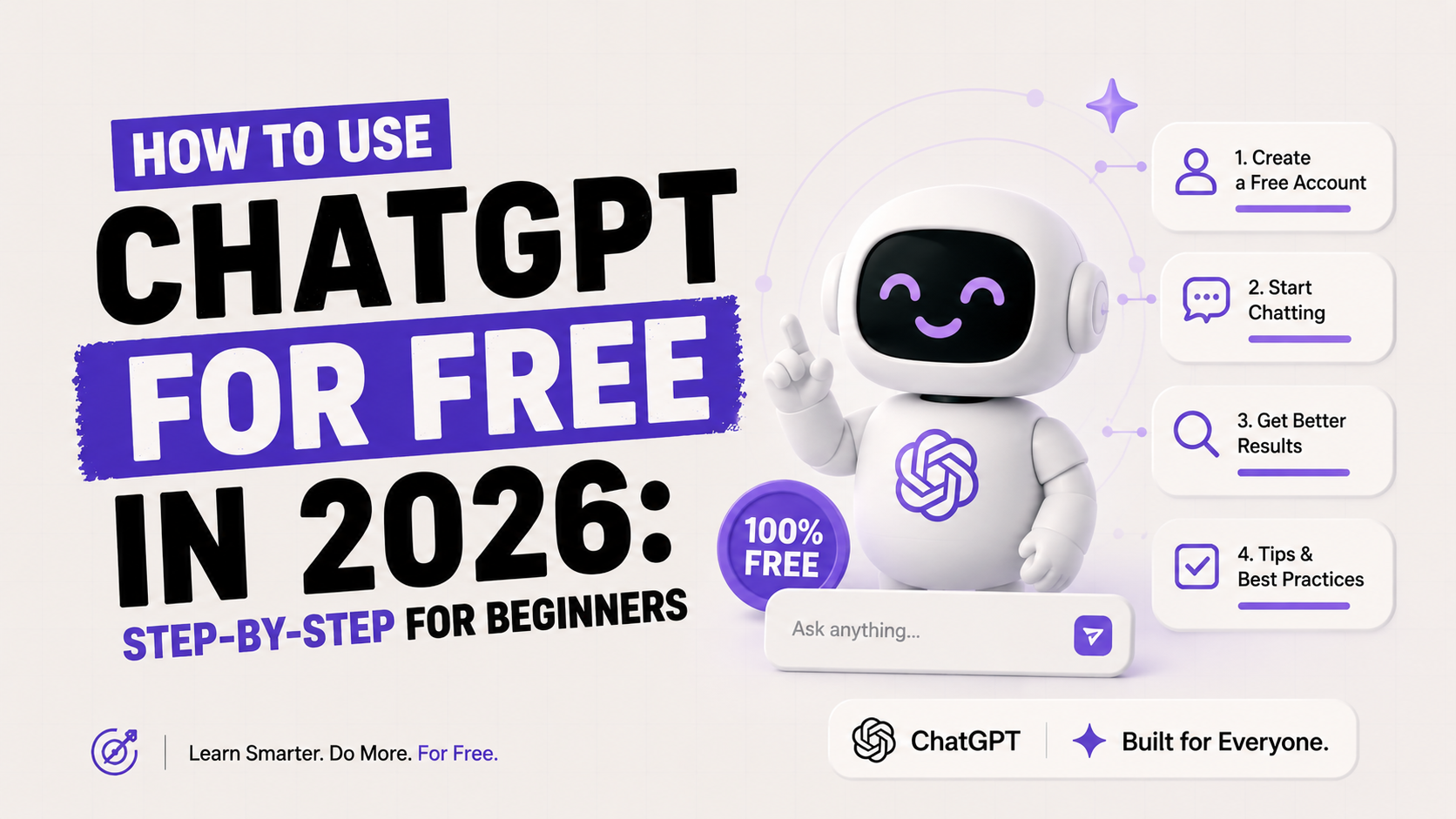
How to Use ChatGPT for Free in 2026: Step-by-Step for Beginners
900 million people use ChatGPT every week. A large number of them have never paid a rupee, a dollar, or a pound for it. And in 2026, that free access is genuinely better than what paid subscribers got just two years ago.
The problem is not access. The problem is that most beginners sign up, type one question, get a generic answer, and walk away thinking: "That's it?" It isn't. ChatGPT's free plan in 2026 includes the GPT-5.5 model, image generation, voice mode, web search, and file uploads — all at no cost. Most people never find half of these.
This guide covers exactly what you get for free, how to set it up in four minutes, where the limits actually hit, and eight practical techniques that make every free session count.
What ChatGPT's Free Tier Actually Includes in 2026
ChatGPT's free plan is more capable in 2026 than most people expect. OpenAI expanded it significantly after GPT-5 launched in early 2026, giving free users access to features that were Plus-only just a year ago.
Here is what you get at no cost, as of June 2026:
GPT-5.5 Instant — the same base model available to paying subscribers. Free users get GPT-5.5 with a usage cap; after you hit the cap, the session switches to GPT-5.5 Mini, which is noticeably less capable for complex tasks.
Web search — ChatGPT can look up current information, news, and prices directly from the chat interface. No separate search tab needed.
Image generation — Free users get access to DALL-E image generation in Instant Mode, with a soft limit of roughly 2–3 images per day. ChatGPT Images 2.0 Instant rolled out to all users on April 22, 2026.
Voice mode — ChatGPT Voice is available to free users with daily limits. You can speak your prompt and hear the response.
File uploads — You can upload documents and images for ChatGPT to analyze, summarize, or answer questions about. Free users get roughly 3 file uploads per day.
Custom GPTs (read access) — You can use GPTs from the GPT Store without building your own. The creator tool is Plus-only.
No login required (basic access) — You can use ChatGPT at chatgpt.com without creating an account for simple one-off queries. Chat history and personalization require a free account.
My honest take: the free plan is legitimately good for a beginner who uses ChatGPT a few times a day. Where it falls short is in depth and volume. If you are using it for real work — drafting documents, analyzing data, writing code — you will hit the cap faster than you expect.
How to Set Up ChatGPT for Free: Step-by-Step
Setting up a free ChatGPT account takes under four minutes. Here is the exact process:
Step 1: Go to chatgpt.com
Open any browser and navigate to chatgpt.com. You do not need to download anything. ChatGPT works on desktop and mobile browsers without an app. (There is also an official mobile app for iOS and Android, which is free to download — but the browser version works identically.)
Step 2: Create a free account
Click "Sign up" in the top right. You can register with an email address, a Google account, a Microsoft account, or an Apple ID. Email is the most straightforward option. You will receive a verification email — click the link in it and your account is active.
If you only need one quick answer and do not want to register, click "Stay logged out" to use ChatGPT without an account. You will lose chat history and personalization, but the core model works.
Step 3: Choose your default model
Once logged in, ChatGPT defaults to GPT-5.5 Instant — the standard fast model. On the free tier, you do not get a manual model picker (that is a Plus feature). GPT-5.5 will handle your messages until you hit the daily cap, at which point it silently switches to GPT-5.5 Mini.
You will know the switch happened if responses become noticeably shorter, less specific, or if you see a small model label change at the top of the chat window.
Step 4: Write your first prompt
Type a message in the text box at the bottom of the screen and press Enter or click the send button. Start simple. Ask ChatGPT to explain something you are genuinely curious about, summarize a piece of text you paste in, or help you write an email. You will understand the tool's capabilities faster by using it on real problems than by reading about it.
Step 5: Set custom instructions (optional but recommended)
Click your profile icon in the top right, go to Settings > Personalization > Custom Instructions. Here you can tell ChatGPT two things: what you want it to know about you (your job, goals, background), and how you want it to respond (tone, format, length). These instructions persist across all your chats and make every response more relevant without re-explaining yourself every time.
Free vs Plus vs Go: A Plain-Language Comparison
OpenAI has five plans in 2026. For most people, the decision is between Free, Go ($8/mo), and Plus ($20/mo). Here is an honest comparison:
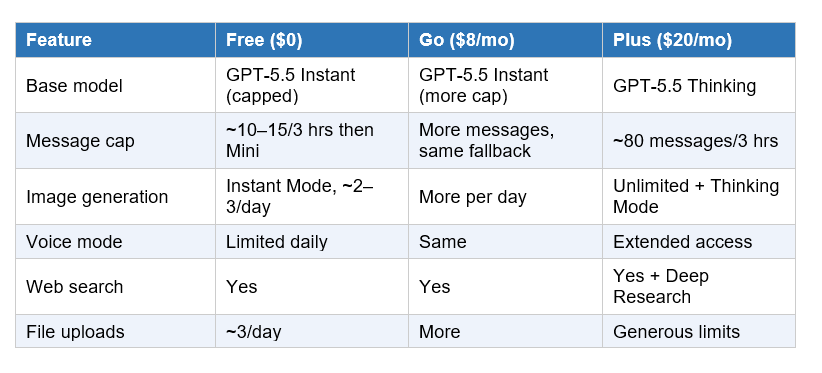
The Go plan is the awkward middle. At $8/month, you still see ads (in the US) and still miss the features that make ChatGPT genuinely powerful in 2026 — Deep Research, Agent Mode, GPT-5.5 Thinking, and Sora. Multiple reviewers, including AI analyst Jim Liu who ran all three plans for four weeks, concluded that if you can afford $8/month, the extra $12 for Plus is almost always the better value. Start with Free. If you hit the cap most days, go straight to Plus.
Where the Free Limits Actually Hit (And What To Do About It)
OpenAI does not publish its exact message caps. Based on community testing as of June 2026, free users get approximately 10–15 GPT-5.5 Instant messages per 3-hour rolling window before the session falls back to GPT-5.5 Mini. The exact number varies with server load, account age, and message complexity.
Longer conversations with large context (pasting in a full document, for example) use up your cap faster than short exchanges. A 3,000-word document upload can count as 2–3 messages worth of capacity.
What happens when you hit the cap:
ChatGPT silently switches to GPT-5.5 Mini — responses become shorter and less detailed
You see a notice that you have reached your limit and a countdown showing when it resets
You are offered an upgrade to Plus
Practical workarounds for free-tier users:
Start a new chat window. Each new conversation starts fresh. This does not reset your cap, but a new context window means ChatGPT is not carrying the weight of a long conversation history.
Use off-peak hours. Server load affects cap behavior. Early morning or late night typically gives you more messages before hitting the limit.
Keep prompts focused. One specific question per message rather than a long prompt with five embedded questions. This gets you better answers and uses fewer tokens.
Switch to Claude or Gemini when ChatGPT caps out. Both have free tiers with their own separate caps. Rotating between them means you always have a capable AI available.
8 Ways to Get More From Every Free Session
The gap between a beginner and someone who consistently gets great results from ChatGPT is almost entirely in how they write prompts. Here are eight techniques that work without paying anything:
1. Give ChatGPT a role
Start your message with who you want ChatGPT to be. "You are a financial advisor helping a 25-year-old salaried professional in India" produces a different answer than "explain investing to me." The role sets context, tone, and depth automatically.
2. Specify the format
Tell ChatGPT exactly how you want the answer. "Give me 5 bullet points" or "Write this as a table" or "Under 200 words" are all valid format instructions. Without them, ChatGPT defaults to paragraphs that are often longer than necessary.
3. Use the follow-up conversation
ChatGPT remembers everything in the current conversation window. If an answer is 80% right, tell it what is wrong. "Make it shorter," "Add an example for a student," "Rewrite this in simpler language" — these follow-ups are often faster than writing a new prompt from scratch.
4. Paste your actual text
ChatGPT works much better when you give it real content to work with. Paste the email you want edited. Paste the report you want summarized. Paste the code that is throwing an error. The more specific your input, the more useful the output.
5. Ask for multiple versions
"Give me three different versions of this paragraph" or "Write two different subject lines for this email" is a free way to get options without back-and-forth. Pick the one that works and move on.
6. Use Custom Instructions
Set your background, goals, and preferences once in Custom Instructions (Settings > Personalization). ChatGPT will apply them to every new conversation automatically. A student at IIT does not need to explain their level every time. A marketing manager does not need to say "I work in B2B SaaS" in every prompt.
7. Test voice mode for quick tasks
ChatGPT Voice is available on the free tier. For simple tasks — summarize this concept for me, help me think through a decision, explain this term — speaking your prompt and listening to the answer is faster than typing. Use it for short, conversational queries rather than complex document work.
8. Upload screenshots for visual questions
The image upload feature on the free tier handles screenshots of error messages, charts, math problems, and handwritten notes. If you are stuck on something visual, a screenshot often gets you a better answer than trying to describe what you see in words.
The Best Free ChatGPT Alternatives Worth Knowing
ChatGPT's free tier is genuinely strong, but having a backup matters when you hit the cap. Here are the alternatives that are actually worth using in 2026:
Claude (claude.ai) — Anthropic's Claude is widely regarded as the best free alternative for writing, analysis, and nuanced reasoning. The free tier gives access to Claude Sonnet with generous daily limits. If you are working on long documents or need careful, accurate writing, Claude often outperforms ChatGPT at the same price point (free).
Google Gemini (gemini.google.com) — Gemini's free tier includes a 2-million-token context window — substantially larger than ChatGPT Free. If you need to process a very long document, entire codebases, or long videos, Gemini's free tier handles this better than any other option at $0. Google Workspace integration is also built in.
Perplexity (perplexity.ai) — The best free AI tool for research and current information. Perplexity searches the web in real time and cites every source. For factual research, news, and any topic where accuracy matters, Perplexity's free tier is more reliable than ChatGPT's web search.
Microsoft Copilot (copilot.microsoft.com) — Built on GPT-5 with no login required. Solid for quick tasks in Microsoft 365 environments. Free with a Microsoft account.
My rotation: ChatGPT for drafting and brainstorming, Claude for editing and careful reasoning, Perplexity for research and fact-checking. All three are free. Together, they cover almost everything.
Who Should Upgrade and Who Definitely Should Not
Upgrade to Plus ($20/month) if:
You hit the free cap more than three days per week on real work tasks
You need Deep Research for in-depth topic analysis (a Plus-only feature that runs multi-step research across dozens of sources)
You use Agent Mode or scheduled tasks (automations that run without you)
You want Sora for AI video generation
Ads in the chat interface bother you enough to pay to remove them
Stay on Free if:
You use ChatGPT a few times a day for writing, research, or learning
You are a student exploring AI tools for the first time
You use Claude or Gemini as backups when ChatGPT caps out — the combination covers most use cases
You have not yet used all the free features (voice, image generation, web search, file uploads)
The honest answer from Reddit's r/ChatGPT community (March 2026): the free tier improved so much in 2026 that casual users genuinely do not need to pay. The people who get real value from Plus are daily power users who specifically need the higher caps and the reasoning models. If that is not you yet, stay free and build your skills first.
Frequently Asked Questions
Q: Is ChatGPT free to use in 2026?
Yes. ChatGPT is free to use at chatgpt.com with no payment required. The free plan includes GPT-5.5 Instant with daily usage caps, image generation, voice mode, web search, and file uploads. When you hit the cap, the session falls back to GPT-5.5 Mini, a less capable but still functional model. A free account is required to save chat history and use personalization features — basic no-login access exists for one-off queries.
Q: What does ChatGPT free actually include in 2026?
The ChatGPT free plan in 2026 includes: GPT-5.5 Instant (with a ~10–15 message cap per 3-hour window), DALL-E image generation in Instant Mode (roughly 2–3 images/day), voice input and output, web search for current information, file uploads (approximately 3/day), and read-only access to GPTs in the store. Custom GPT creation, Deep Research, Agent Mode, Sora video generation, and the manual model picker are Plus-only features.
Q: How do I use ChatGPT without paying anything?
Go to chatgpt.com, click "Sign up," and create a free account with an email address or a Google, Microsoft, or Apple account. The whole process takes under four minutes. If you do not want to register, you can click "Stay logged out" for single-session use, but you will lose chat history. There is no credit card required, no trial that converts to paid, and no hidden fee for the free tier.
Q: What is the ChatGPT free tier message limit?
OpenAI does not publish exact numbers. Based on community testing as of June 2026, free users get approximately 10–15 GPT-5.5 Instant messages per 3-hour rolling window before the model falls back to GPT-5.5 Mini. Complex messages with large document uploads count more against the cap than simple text queries. The limit resets on a rolling basis, not at a fixed daily time.
Q: Is the free version of ChatGPT good enough for students?
For most student use cases, yes. ChatGPT Free in 2026 handles essay brainstorming, research summaries, concept explanations, language practice, and exam preparation without any payment. The limits become relevant if you are doing intensive daily research sessions or uploading many documents. For students who hit the cap regularly, supplementing with Claude (free) and Perplexity (free) covers most academic needs without any subscription.
Q: What is ChatGPT Go and is it worth getting?
ChatGPT Go is a $8/month plan launched worldwide on January 16, 2026. It gives more message capacity than the free tier but still shows ads in the US and does not include GPT-5.5 Thinking, Deep Research, Agent Mode, or Sora. Multiple analysts and community reviews describe Go as an "uncomfortable middle ground." If your budget allows $8/month, you will almost always get more value from Plus at $20/month. The main case for Go is users in countries where ads are not yet rolled out who want more messages at the lowest cost.
Q: What are the best free alternatives to ChatGPT in 2026?
The three best free ChatGPT alternatives in 2026 are: Claude (claude.ai) by Anthropic for writing and reasoning, Google Gemini for long documents and Google Workspace integration, and Perplexity for real-time research with cited sources. All three have genuinely capable free tiers. Rotating between ChatGPT, Claude, and Perplexity gives you effectively unlimited free AI access across the three strongest platforms.
Q: How do I write better prompts to get more from the free tier?
Three techniques make the biggest difference: give ChatGPT a role ("You are a career coach..."), specify the format ("In 5 bullet points," "Under 150 words"), and paste your actual content rather than describing it. One specific question per message gets better results than long prompts with multiple embedded requests. If an answer is close but not quite right, follow up in the same chat rather than starting over — ChatGPT remembers the full conversation context.
Recommended Reads
• Prompt Engineering: The Most In-Demand AI Skill of 2026
• 10 AI Tools Every Professional Should Know in 2026
• How to Learn AI From Scratch in 2026: The Only Roadmap You Need
• What Is a Large Language Model? (Explained Simply)
Unrot teaches AI in 5 minutes a day. No jargon, no fluff, just the concepts that stick. Download the app and spend your next five minutes on something that will still matter in six months.
References
Zenken AI — ChatGPT Usage Limits 2026: Free, Plus, Pro & Team Plan Restrictions Explained
Fritz AI — ChatGPT Pricing in 2026: Every Plan, Tier, and Hidden Cost Explained
Neuronad — ChatGPT Free vs Plus (2026): Is the $20/Month Upgrade Worth It?
Pecollective — ChatGPT Free Tier 2026: What You Get, What's Limited
Global GPT — How to Use ChatGPT for Free (2026): Official Ways & Limits