Best AI Tools for Coding in 2026: Copilot, Cursor, Claude Code
GitHub's own research found that developers using Copilot completed tasks 55% faster than those working without it. That study is now old enough that the comparison itself feels outdated — the real question in 2026 isn't whether AI speeds up coding. It's which of the dozen tools that now do this actually fits how you work.
Here's what nobody tells you upfront: GitHub Copilot, Cursor, and Claude Code aren't really competing products. They're three different bets on what "AI-assisted coding" should even mean. Copilot is an extension that lives inside your existing editor. Cursor is a full IDE rebuilt from scratch around AI. Claude Code is an autonomous agent that runs in your terminal and doesn't need an IDE at all.
Picking between them isn't like picking between two phones with similar specs. It's closer to picking between a faster bicycle, a different car, and a driver you can give instructions to. This guide breaks down what each actually does, what's genuinely free, and the combination that most working developers have settled into by mid-2026.
The Three Philosophies: Extension, IDE, and Agent
Before comparing features, it helps to understand the architectural difference, because it explains almost everything else about how these tools feel to use.
GitHub Copilot is an extension. It plugs into your existing editor — VS Code, JetBrains, Neovim, Visual Studio, Xcode — and adds AI suggestions on top of whatever workflow you already have. Zero migration cost. You keep your keybindings, your extensions, your muscle memory. The tradeoff: it's constrained by what the extension API allows.
Cursor is a standalone IDE. It's a fork of VS Code rebuilt around AI as the primary interaction model, not a bolt-on. Every part of the editor — the chat panel, the inline diff view, the multi-file Composer mode — was designed with AI in mind from day one. The tradeoff: you're switching editors, even if the transition from VS Code takes most developers only a day or two.
Claude Code is a terminal-native agent. It doesn't live inside an editor at all — it runs in your terminal (also available in IDE, desktop, and browser surfaces), reads your entire codebase, plans multi-step changes, executes them across files, runs tests, and iterates on failures. You describe the goal; Claude Code does the work and you review the result, rather than guiding each individual step.
None of these is objectively "best." They solve different problems. Copilot solves "make my typing faster." Cursor solves "make my editor AI-first." Claude Code solves "hand off an entire task and review the output." Most professional developers in 2026 end up using more than one, for exactly this reason.
GitHub Copilot: The Default Choice
GitHub Copilot remains the most widely adopted AI coding assistant in the world — used by over 15 million developers across more than 77,000 organisations, including 77% of Fortune 500 companies.
What it does well: inline code completion that feels native to typing, a chat panel for asking questions about your code, and an Agent Mode (added through 2025-2026) that handles multi-step tasks rather than just single-line suggestions. It also added Next Edit Suggestions, which predicts changes you're about to make elsewhere in the file based on the edit you just made — a feature reviewers describe as surprisingly accurate.
Pricing breakdown (as of June 2026)
Free: 2,000 code completions per month, 50 premium requests (for chat and agent mode), access to GPT-5 mini and Claude Haiku 4.5, plus basic Copilot CLI access. No credit card required.
Pro ($10/month): Unlimited code completions, unlimited chat, 300 premium requests/month, cloud agent access, a code review agent, and access to third-party agents including Claude Code and OpenAI Codex. At half the price of Cursor Pro, this is widely considered the best value entry point in the entire market.
Pro+ ($39/month): 1,500 premium requests/month and access to Claude Opus 4.6 and o3. Worth it only if chat and agent mode are your primary workflow and you regularly exceed 300 requests.
Business ($19/user/month) and Enterprise ($39/user/month): Add organisation management, audit logs, policy controls, SSO, IP indemnity, and — for Enterprise — fine-tuned models trained on your own codebase. Enterprise also requires a GitHub Enterprise Cloud subscription at $21/user/month, which pushes the real total closer to $60/user/month.
My honest take: Copilot's free tier is genuinely usable for evaluation — the 2,000 completions sound generous until you realise active coding burns through that in 1-2 weeks. But the $10/month Pro tier is, almost without argument, the single best value in this entire category. If you're already in VS Code or a JetBrains IDE and want AI assistance without changing anything about how you work, start here.
Cursor: The AI-Native IDE
Cursor has become the favourite of indie developers, startup engineers, and increasingly larger teams throughout 2025 and 2026. It's not Copilot with extra features — it's an editor where every interaction assumes AI is involved.
The features that define the experience:
@-symbol context referencing — type @filename, @function, or @docs and Cursor pulls that specific context into the conversation, so the AI understands exactly what you're referring to rather than guessing from the open file.
Cmd+K inline editing — highlight any block of code, press Cmd+K, describe the change in plain English, and Cursor rewrites it in place.
Composer mode — give natural-language instructions and Cursor plans and executes changes across multiple files in a single operation. For a React component, this can take a Figma screenshot and generate working JSX with proper styling — a task that takes roughly 30 minutes with Copilot takes about 5 minutes with Cursor, according to multiple developer comparisons.
Model flexibility — Cursor isn't locked to one AI provider. You can run Claude, GPT, or Gemini as the backend model depending on the task.
Pricing breakdown (as of June 2026)
Hobby (Free): Genuinely limited — monthly usage caps that most developers describe as designed for evaluation, not sustained use. Most people upgrade within a week of regular use.
Pro ($20/month): Widely considered the best single-tool value at any price for IDE-based development. Includes visual diffs, inline completions, and full Composer access.
Pro+ ($60/month) and Ultra ($200/month): Higher usage quotas for teams and power users running Composer and Agent mode continuously throughout the day.
One developer-reported figure worth noting: teams using .cursorrules files (project-specific instructions that shape how Cursor behaves in your codebase) report a 70% reduction in PR review comments — the AI starts following your team's conventions instead of generic defaults.
My take: Cursor's free tier exists to get you hooked, and it's honest about that. If you're coding 15+ hours a week, the $20/month Pro plan is close to a no-brainer — the time saved on multi-file refactors alone covers the cost in the first session of most weeks.
Claude Code: The Terminal Agent
Claude Code is Anthropic's agentic coding system — and it operates differently from both Copilot and Cursor. It doesn't suggest the next line as you type. It reads your full codebase, plans an approach across multiple files, executes the changes, runs your tests, and iterates when something fails. You define the goal; Claude Code does the work and you review the result.
It's composable by design, following Unix philosophy — you can pipe log output into it ("tail -200 app.log | claude -p 'Slack me if you see anomalies'"), run it in CI pipelines, or chain it with other command-line tools. It's available in your terminal, IDE, desktop app, and browser, and on GitHub you can tag @claude directly in issues and pull requests.
By default, Claude Code is cautious: it asks before modifying files or running commands, and developers control how much autonomy to grant — from approving every action to letting built-in classifiers distinguish safe actions from risky ones automatically. Decisions about what code ships remain with the human reviewer.
Subagents and Agent Teams
Two features that don't have direct equivalents in Copilot or Cursor: subagents are reusable configurations defined in a project's .claude/agents/ folder — for example, a "code-reviewer" subagent that always uses a specific model and checks your style guide, invoked by name whenever needed. Agent Teams take this further: an orchestrator dispatches multiple worker agents that message each other and converge on a solution — one refactoring the data layer, another updating tests, a third reviewing the PR.
Pricing breakdown (as of June 2026)
No standalone free plan. Claude Code requires at least a Claude Pro subscription or API credits — the free Claude.ai plan does not include Claude Code access.
Pro ($20/month, or $17/month billed annually): Includes Claude Code across terminal, web, and desktop, with access to Sonnet 4.6 and Opus 4.6. Suited to focused sessions rather than running Claude Code continuously — most users get roughly 10-40 prompts per 5-hour window depending on codebase complexity.
Max 5x ($100/month): Roughly 5x Pro's usage allowance, plus priority access during high-traffic periods. The practical entry point for developers running Claude Code as a primary daily tool or experimenting with Agent Teams.
Max 20x ($200/month): Roughly 20x Pro's allowance — at this level, rate limits stop being a practical concern for most professional work.
API access: Sonnet 4.6 at $3/$15 per million input/output tokens, Opus 4.6 at $5/$25, Haiku 4.5 at $1/$5 — billed per token rather than subscription.
My take: Claude Code is the highest capability ceiling of the three for tasks that genuinely require understanding an entire codebase before making a change — large refactors, cross-file bug hunts, architectural changes. It's also the one most likely to feel like overkill for simple autocomplete, which is exactly why most developers pair it with something lighter for everyday typing.
The Free Alternatives Worth Knowing
If your budget is genuinely $0, the landscape in 2026 is better than most people realise. Here are the options that hold up:
Windsurf (formerly Codeium) — Best Free Agentic Editor
Codeium rebranded its flagship editor to Windsurf in late 2025; the underlying technology and team are the same. Windsurf's free plan gives unlimited Tab completions (inline autocomplete) plus a limited monthly quota for Cascade — its agentic engine that understands your full codebase, plans multi-file changes, runs terminal commands, and fixes its own errors.
Multiple developer reports rank Windsurf above Cursor for large codebases (500+ files) because Cascade automatically indexes the full project. The standalone Codeium extension (the pre-Windsurf product) is still offered separately as a fully free tool with unlimited completions across VS Code, JetBrains, Neovim, Eclipse, Sublime, and Xcode — no credit card, no expiry.
Google Gemini Code Assist — Most Generous Free Tier
For developers prioritising a genuinely unlimited free tier over agentic sophistication, Gemini Code Assist is repeatedly cited as having no meaningful daily limits for individual use — a rare claim in this category.
Amazon Q Developer — Best for AWS-Heavy Workflows
Formerly CodeWhisperer, Amazon Q Developer has strong support for AWS-specific APIs and integrates tightly with the AWS ecosystem. For general-purpose coding it trails the category leaders, but if your stack is built on AWS, its specialised completions and built-in security checks are worth evaluating — and its free tier is described by reviewers as "criminally under-discussed."
Tabnine — Best for Privacy-Sensitive Teams
Tabnine was named a Visionary in Gartner's Magic Quadrant for AI Code Assistants and won InfoWorld's 2025 Technology of the Year. Its standout feature is genuine on-premises, air-gapped deployment — the only major option where code never has to leave your infrastructure. If your employer prohibits sending code to the cloud, Tabnine (or a self-hosted open model via Continue.dev) is close to your only real option.
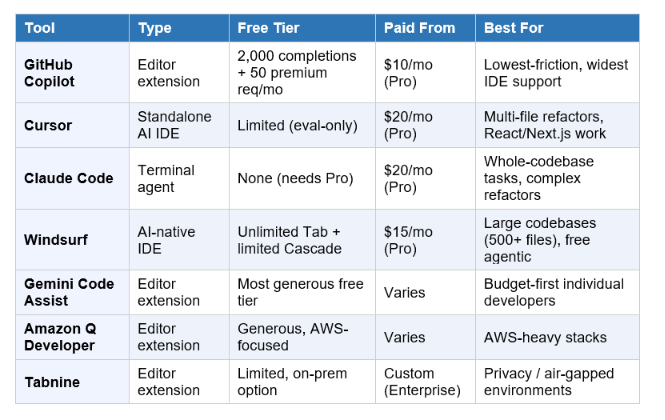
Full Comparison Table
What Developers Actually Use Together
The single most repeated pattern across every 2026 comparison and developer survey: nobody picks just one tool anymore. Over 26% of developers report using both Copilot and Claude together, and the combinations follow a logic worth understanding.
The $30/month stack: GitHub Copilot Pro ($10) for always-on completions and quick chat, plus Cursor Pro ($20) or Claude Code Pro ($20) as the primary editing and reasoning tool. This gives you fast completions, deep multi-file editing, and access to multiple frontier models without committing to a single ecosystem.
Cursor for daily work, Claude Code for hard problems: Cursor handles roughly 80% of typical development — daily editing, routine refactors, feature implementation via Composer and Agent mode. When a task requires deep codebase understanding or a complex multi-step refactor, the same developers switch to Claude Code.
Copilot in the IDE, Claude Code in the terminal: Since Copilot Pro now includes access to third-party agents including Claude Code, some developers run both from within a single subscription stack — Copilot for inline suggestions, Claude Code for autonomous multi-file tasks.
The honest framing from one 2026 comparison: "The trend is clear — AI coding is no longer optional for professional developers. The question is which tool fits your workflow." That's not marketing copy. By mid-2026, the absence of any AI coding assistant in a professional developer's toolkit is the outlier, not the norm.
Which One Should You Start With?
You're a beginner or student with zero budget: Start with GitHub Copilot's free tier (2,000 completions/month is enough to learn the workflow) plus Windsurf's free Cascade quota for your first taste of agentic multi-file editing. Together, these cost nothing and cover most of what a learner needs.
You're a working developer who wants the best $10 you'll spend this month: GitHub Copilot Pro. Unlimited completions, unlimited chat, and access to Claude Code and OpenAI Codex as third-party agents — at half the price of any standalone alternative. You're building a product and live in React/Next.js: Cursor Pro ($20/month). The Composer workflow for multi-file component generation, especially from design references, is the fastest path from idea to working UI of any tool tested.
You're working in a large, complex codebase and need deep understanding before changes: Claude Code Pro ($20/month). The terminal-agent model — describe the goal, review the result — is built for exactly this, and the subagent/Agent Teams system scales to genuinely large refactors.
Your employer won't let code touch the cloud: Tabnine's on-premises deployment, or Continue.dev with a self-hosted open model. These are close to your only options, and they're mature enough in 2026 to be genuinely usable, not just compliance theatre.
You want the single most capable free agentic tool: Windsurf. Unlimited Tab completions plus Cascade for multi-file agentic work, with no credit card and no expiry on the free plan.
If I had to pick exactly one for someone starting from zero in 2026: GitHub Copilot Pro. Ten dollars a month, works in whatever editor you already use, and gives you a bridge to Claude Code and other agents without forcing a single decision upfront. You can add Cursor or Windsurf later once you know what kind of work actually benefits from a different tool.
Frequently Asked Questions
Q: What is the best AI tool for coding in 2026?
There isn't a single best tool because the three leading options solve different problems. GitHub Copilot is the best low-friction, low-cost entry point and integrates into your existing editor. Cursor is the best standalone AI-native IDE for multi-file development, especially in frontend frameworks. Claude Code is the best for autonomous, whole-codebase tasks like large refactors. Most professional developers in 2026 use at least two of these together rather than picking just one.
Q: Is GitHub Copilot or Cursor better?
They serve different needs. Copilot is an extension for your existing editor at $10/month for Pro, with the widest IDE compatibility (VS Code, JetBrains, Neovim, Visual Studio, Xcode) and the best value for inline completions and chat. Cursor is a standalone AI-native IDE at $20/month for Pro, built specifically for AI-driven multi-file editing through its Composer mode. If you don't want to change editors, Copilot wins on convenience. If multi-file AI-driven refactoring is central to your work, Cursor's purpose-built workflow generally wins on capability.
Q: What is Claude Code and how does it work?
Claude Code is Anthropic's agentic coding system that operates at the project level rather than the line level. It reads your full codebase, plans an approach across multiple files, executes the changes, runs tests, and iterates on failures — you define the goal and review the result rather than guiding each step. It's available in the terminal, IDE, desktop app, and browser, and requires a Claude Pro subscription ($20/month) or higher; there is no standalone free Claude Code plan.
Q: Is there a free AI coding assistant that's actually good?
Yes. Windsurf (formerly Codeium) offers unlimited Tab autocomplete plus a limited free quota for its Cascade agentic engine, with no credit card required. GitHub Copilot's free tier includes 2,000 code completions and 50 premium requests per month — enough for evaluation and light use, though active developers typically exhaust it within 1-2 weeks. Google's Gemini Code Assist is frequently cited as having the most generous free tier with no meaningful daily limits for individual use.
Q: Can AI write entire applications by itself?
AI coding assistants like Copilot, Cursor, and Claude Code help you write code faster, but a developer is still in the driver's seat — making architectural decisions, reviewing changes, and verifying correctness. A separate category, AI app builders (Lovable, Bolt, v0 by Vercel, Replit), generate full applications including frontend, backend, and database schema from a natural-language description, aimed more at non-developers or rapid prototyping. Generated code from any of these tools should be reviewed before going to production, the same as code from a colleague.
Q: Is Cursor worth $20 a month?
For developers coding 15+ hours a week, most reviews conclude yes — the Composer mode's multi-file editing and the @-symbol context system save substantial time on tasks that take much longer in extension-based tools. Teams using project-specific .cursorrules files report a 70% reduction in PR review comments. For occasional or hobbyist coding, the free Hobby tier's usage caps mean you'll likely hit limits quickly, and a free alternative like Windsurf may be more appropriate.
Q: What is the difference between Copilot and Claude Code?
GitHub Copilot is an editor extension focused on inline completions and chat, with an Agent Mode added for multi-step tasks — but it operates within the constraints of the extension API of your existing editor. Claude Code is a standalone terminal-native agent that operates at the project level: it reads your entire codebase, plans changes across multiple files, executes them, and runs tests autonomously, with the developer reviewing results rather than guiding each step. Copilot Pro at $10/month now includes access to Claude Code as a third-party agent, so the two can be used together rather than as exclusive choices.
Q: Which AI coding tool is best for beginners?
GitHub Copilot's free tier is the most beginner-friendly starting point — it works inside familiar editors like VS Code, requires no workflow changes, and the 2,000 monthly completions are enough to learn how AI-assisted coding feels. Windsurf's free Cascade quota is a good second step for experiencing agentic multi-file editing without cost. Cursor and Claude Code are more powerful but assume more context about your codebase and workflow, making them better suited to developers who already have a project to work on.
Q: Do professional developers actually use AI coding tools?
Yes, at this point it's closer to the norm than the exception. GitHub Copilot alone is used by over 15 million developers across 77,000+ organisations, including 77% of Fortune 500 companies. GitHub's own research found a 55% task completion speed improvement for Copilot users. Over 26% of developers report using both Copilot and Claude together. The shift by 2026 isn't whether to use AI tools, but which combination of tools fits a given workflow.
Recommended Reads
• How to Use AI at Work in 2026: The Smart Professional's Guide
• 10 AI Tools Every Professional Needs in 2026
• What Is Agentic AI? Simple Guide for Beginners (2026)
• Prompt Engineering 101: Most In-Demand AI Skill of 2026
• How to Use ChatGPT for Free in 2026: Step-by-Step for Beginners
Unrot teaches AI in 5 minutes a day. One concept per session, zero jargon, built for people with actual jobs and actual codebases. Download the app if you'd rather learn this between standups than during a weekend course.
References
• Anthropic — Claude Code Product Page
• Simular AI — GitHub Copilot vs Cursor vs Claude Code: Which AI Coding Tool Should You Use?
• NxCode — Cursor vs Claude Code vs GitHub Copilot 2026: The Ultimate Comparison
• Pecollective — GitHub Copilot Pricing 2026: Free vs Pro vs Pro+
• SSD Nodes — Claude Code Pricing in 2026: Every Plan Explained
• ToolCenter — Best Free AI Coding Assistant 2026: 8 Real Picks
• Akoode — Best Free AI Coding Tools in 2026: 17 Actually Worth Using
• VibeCodingAcademy — Best AI Coding Assistants 2026: Cursor, Copilot & More
YUV.AI — Best AI Coding Assistants 2026: Cursor vs Copilot vs Claude Code