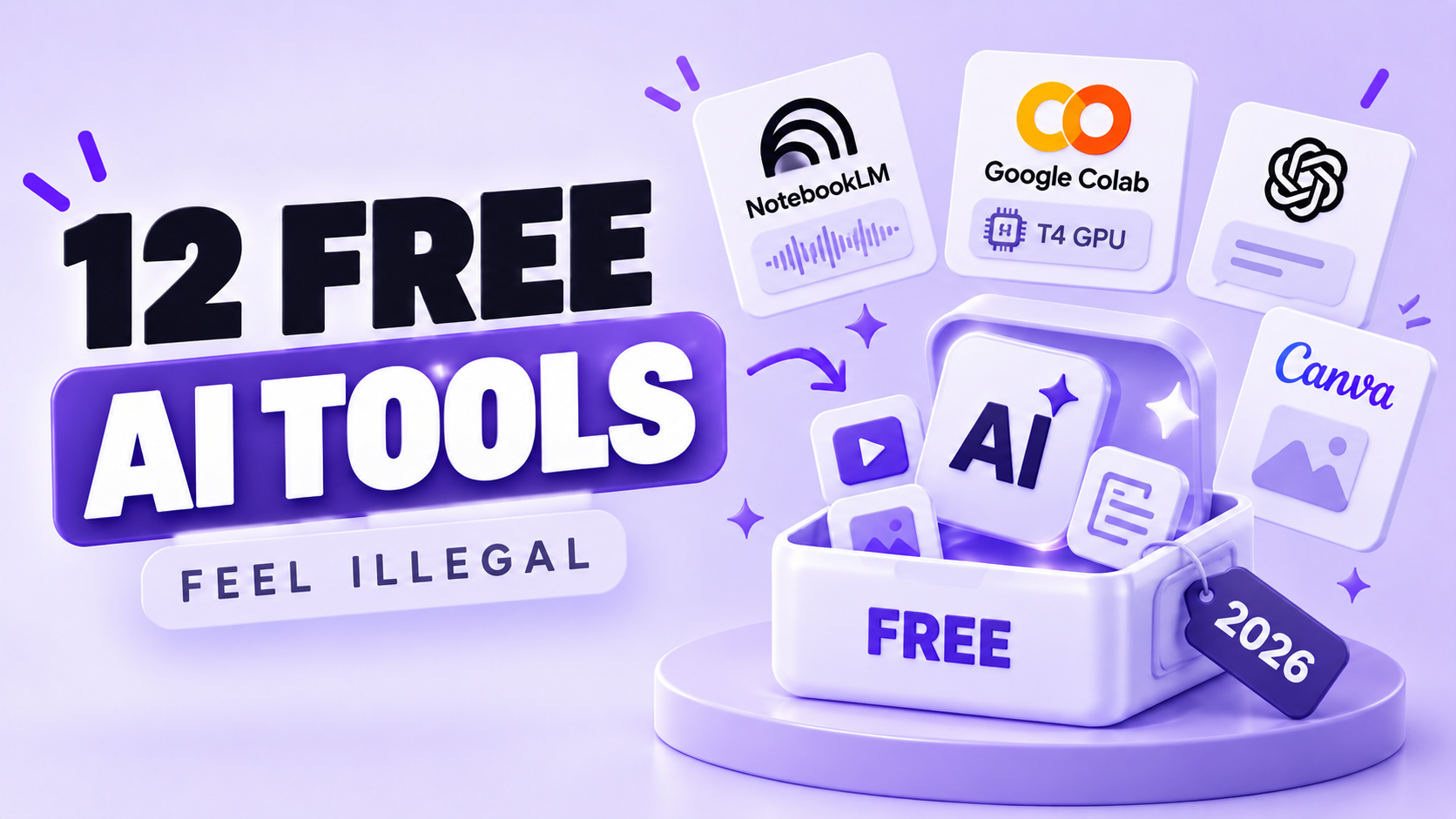
12 Free AI Tools So Good They Feel Illegal (And What They Really Cost)
Google will hand you an Nvidia T4 GPU for twelve hours. For nothing. No card, no trial countdown, no sales call, no "talk to our team" form.
That is Google Colab, and it has been quietly doing this for years while people rent cloud GPUs they use twice. I keep meeting capable, technical people paying 20 dollars a month (about Rs 1,800) for something a free tool already does better, mostly because nobody told them the free tool existed.
So I went through the free tiers properly. Not the version where somebody pastes ChatGPT, Canva and Grammarly into a numbered list and calls it research. I read the published limits, the licence terms, and what happens on day eight when the honeymoon quota runs dry. If you want the student angle specifically, I covered free AI tools for students separately, including which ones will not get your assignment flagged.
These 12 survived. Some are famous and badly underused. Two are close to unknown. At least one of them will change how you handle documents this week.
What Free Actually Means in 2026 (And How I Picked These 12)
Free in 2026 comes in four distinct shapes, and only one of them stays free forever.
The first shape is open source free. Ollama is MIT-licensed, Hugging Face Spaces are community-hosted, and the only bill you ever receive is your electricity. Nobody can revoke this. Nobody can rewrite the pricing page on you at midnight.
The second is the quota tier. NotebookLM, GitHub Copilot Free and Google Colab all work fully, then stop when you hit a number. The feature set is not crippled, the meter just runs out.
The third catches almost everybody: free to use, illegal to sell. Microsoft's own documentation states that "Designer is licensed for personal, non-commercial use with your Microsoft account." Generate whatever you like. Put it on a client invoice and you have a problem.
The fourth is the sampler. Gamma gives new accounts 400 credits once, and they never refresh. That is a demo with a generous runway, not a free tool, and I think the industry should stop filing those under free.
My filter for this list was three questions, applied to roughly 40 candidates. No credit card at signup. Output good enough to actually ship. Still useful in week two, not just week one. Anything that failed one of the three got cut, which is why several extremely famous names are missing.
Three Free AI Tools That Replace Half Your Google Searches
NotebookLM, Perplexity and Google AI Studio between them cover research, sourcing and raw model access, and all three cost nothing.
1. NotebookLM, the research tool that cannot make things up
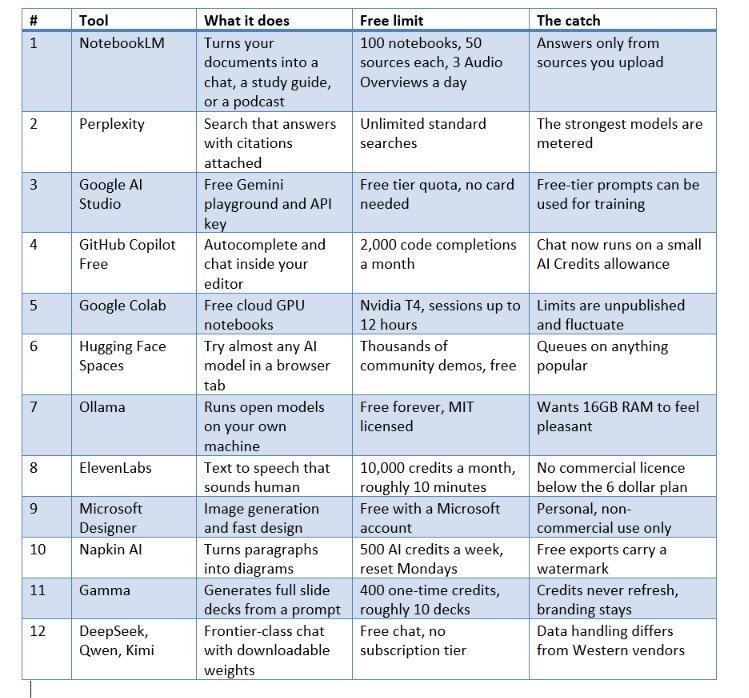
NotebookLM is the tool I recommend most often and the one people are most surprised by. You upload your own material, up to 50 sources per notebook, and it answers only from those sources. Free accounts get 100 notebooks and 50 chats a day, and every tier runs on Gemini 3 with a ceiling of 500,000 words per source.
The feature that makes people sit up is the Audio Overview. Feed it a 90-page PDF and it produces two synthetic hosts discussing your document like a podcast episode. Free users get three of those a day, plus three video overviews.
Because it is grounded in your uploads, it hallucinates far less than a general chatbot. NotebookLM cannot invent a statistic that does not appear in your sources, which is the single biggest reason I trust it with exam material and client documents.
One warning. In September 2026 Google moved chat and Studio usage onto a compute-based quota that refreshes roughly every five hours against a weekly cap, replacing the older fixed per-day counts. Treat any published number, mine included, as a snapshot rather than a promise.
2. Perplexity, search that shows its working
Perplexity answers your question and shows you where each claim came from. That is the entire product, and it is enough. Standard searches are unlimited on the free plan, and the citation trail means you can check the machine instead of trusting it.
Anything with a date attached goes through Perplexity: current pricing, launch news, whether a tool still exists this quarter. If you have never configured it properly, the walkthrough on how to use Perplexity AI covers the settings that make the free tier noticeably better.
3. Google AI Studio, the free API key nobody asks you to pay for
Google AI Studio is the one that genuinely feels like something Google forgot to lock. Sign in with a Google account and you get a full playground plus a working Gemini API key. No card. No billing profile. No approval queue.
A student in Pune can build and ship a working AI app on a Sunday afternoon for zero rupees. Free tier limits vary by model and are shown live inside AI Studio itself, with Flash-class models sitting far higher than the Pro-class ones, which are throttled hard.
Here is the trade you are making. Google's terms allow free-tier prompts to be used for model training, while the paid tier and Vertex AI do not. Prototype freely. Do not paste a client's confidential data into a free API key and assume it evaporates.
The Free AI Tools That Write and Run Your Code
Two free tools cover the entire developer loop: GitHub Copilot Free writes the code, Google Colab runs it on a GPU you do not own.
4. GitHub Copilot Free gives every GitHub account 2,000 code completions a month at no cost. That is the figure in GitHub's own plan documentation, and for a student or a weekend builder it is genuinely hard to burn through.
The chat side changed this year. GitHub moved to usage-based billing with AI Credits on 1 June 2026, so the old flat allowance of 50 chat requests a month became an AI Credits allowance instead. Free accounts also get automatic model selection only, with no manual model picking and no third-party agents.
My honest opinion after using all of them: Copilot Free is not the best AI coding assistant in 2026, and it does not have to be. It is the best free one, and free beats marginally better when the alternative costs 10 dollars a month. The full ranking, Cursor and Claude Code included, sits in the best AI tools for coding breakdown.
5. Google Colab still feels like a bug that shipped. A free Google account gets a hosted Jupyter notebook with an Nvidia T4 GPU attached, and notebooks can run for up to 12 hours per session.
Google is refreshingly blunt about the catch. Its FAQ says Colab does not publish its limits "in part because they can vary over time", that access to accelerators in the free tier is "heavily restricted", and that GPU types available "vary over time". Independent testing across accounts in early 2026 put median free GPU availability near 22 hours a week.
Use it as free compute for learning and prototyping, never as production infrastructure. Fine-tune a small model. Run a Whisper transcription job on three hours of lecture audio. Train a classifier for a college project. Do not build a business on a runtime that can vanish because somebody in another timezone wanted a GPU more than you did.
Free AI Voice and Images, and the Licence Trap Nobody Mentions
Free voice and image generation is real in 2026, and the licence is exactly where free tiers quietly stop being free.
6. ElevenLabs still produces the most convincing synthetic speech most people have ever heard. The free plan includes 10,000 credits a month, which maps to roughly 10,000 characters of text and about 10 minutes of audio on the Multilingual v2 model, where one credit equals one character.
Ten minutes is not much. It is precisely enough to voice a reel, narrate a product demo, or prove to yourself that your podcast idea works before committing money to it. The quality gap between this and the stock voices built into your operating system is not small, it is embarrassing.
Now the part the excitable thumbnails skip. The free plan carries no commercial licence. Commercial rights begin at the Starter plan at 6 dollars a month. Put free-tier audio in a paid client video and you are outside the terms, however many times a video titled it "100% free forever".
7. Microsoft Designer hands you image generation and template-driven design with nothing but a Microsoft account, and the output is well past the point where it matters for social posts, thumbnails and quick mockups.
Same trap, stated even more plainly. Microsoft's support documentation says "Designer is licensed for personal, non-commercial use with your Microsoft account". Broader publishing and commercial rights arrive with a Microsoft 365 subscription, which also brings the Copilot Copyright Commitment defending commercial customers against IP infringement claims.
Which brings me to my least popular opinion about this entire genre of article. Most free image and voice tiers are not free tools, they are free demos with a legal fence around the exit. Generating is free. Selling the output is not. Almost nobody writing these listicles opens the terms page, and their readers discover the difference during an invoice dispute.
Two Free Tools That Turn Text Into Visuals in Under a Minute
Napkin AI and Gamma both take plain text and return something that looks designed, and both have free tiers that are honest about their edges.
8. Napkin AI takes a paragraph you already wrote and turns it into a diagram, a flowchart, a mind map or an infographic. You paste text, select it, and pick from generated visual options. The free plan runs on 500 AI credits a week that reset every Monday, with roughly one credit consumed per word selected.
Do the arithmetic and 500 credits is about five passes over a 100-word passage. Not generous, genuinely useful. Free exports cover PNG and PDF with unlimited visual editing, unlimited file imports and real-time collaboration, while SVG and PPTX export sit behind the paid plan and free exports carry a Napkin watermark.
Why does this feel illegal? Because the alternative used to be an hour in a diagramming tool arranging boxes nobody would look at for more than four seconds.
9. Gamma generates an entire slide deck from a one-line prompt, and the decks do not look like 2015 PowerPoint templates. New free accounts get 400 credits. A full deck costs about 40 credits and each AI edit costs 10, so you get roughly 10 decks before the meter empties.
The catch is sharper than most. Those 400 credits are a one-time allocation that never refreshes. You earn more through referrals at 200 credits each, or you pay. Free decks also carry Gamma branding, and the Free plan caps you at 10 cards per single prompt.
Ten free decks still beat zero free decks, and for a college presentation or an internal review that covers the entire year. Just do not plan a client workflow around it.
The Free AI Tools Power Users Do Not Talk About
These two are the reason experienced people rarely pay for AI experimentation, and neither shows up in the usual roundups.
10. Hugging Face Spaces is a directory of tens of thousands of live AI apps built by the community, running in your browser, mostly free. Image upscalers, pose estimators, video generators, text-to-speech models, 3D reconstruction demos, visual question answering. Many run on shared Zero GPU allocations, which is why they cost you nothing.
The practical use is brutal efficiency. Before you pay a subscription for an AI feature, search Spaces for the underlying model. Half the time somebody has already wrapped it in a working interface and published it. You test the thing for free, decide it is not for you, and keep your money.
Popular Spaces queue during peak hours, and some go stale when their maintainer moves on. Both are acceptable prices for a free browser tab that runs a model you would otherwise never touch.
11. Ollama is the one that ends the subscription conversation entirely. It is MIT-licensed, free, and it downloads open models onto your own laptop where they run with no internet connection and no account. More than 9 million developers use it.
Hardware reality check, because this is where the videos lie to you. A machine with 16GB of RAM and either Apple Silicon or a GPU with 6GB or more of VRAM will run a 3B to 7B model at Q4 quantisation comfortably. On CPU alone, a 7B model generates roughly 3 to 8 tokens per second, which is fine for background jobs and painful for conversation. Models above 30B parameters want a discrete GPU with 24GB or more of VRAM.
So it is slower and dumber than ChatGPT. It is also completely private, permanently free, works on a flight with no wifi, and cannot raise its prices. For summarising confidential documents or writing code against internal repositories, that trade is not close.
The Free Frontier Models Most People Still Have Not Tried
12. DeepSeek, Qwen and Kimi give away frontier-class chat with no subscription tier at all, and publish downloadable weights on top of it.
Qwen Chat from Alibaba is free with no paid tier to upsell you into. DeepSeek offers free chat alongside a cheap API with peak and off-peak pricing. Kimi provides unlimited free chat, metering only its agent products. Most of the Qwen family ships under Apache 2.0, DeepSeek's largest tiers are MIT-licensed, and Kimi K3 weights went public on 27 July 2026 under a custom licence.
Open weights matter more than the free chat. A model you can download cannot be deprecated out from under you. Whatever OpenAI or Google decide about pricing next year, an Apache 2.0 checkpoint sitting on Hugging Face keeps working forever, which is why I think open weights are the most underrated force in consumer AI right now.
The honest caveat: data handling and jurisdiction differ from Western vendors, and if your work is sensitive that matters more than benchmark scores. If you want the mainstream comparison instead, I put ChatGPT vs Claude vs Gemini side by side on real tasks.
What Free AI Tools Actually Cost You
Free AI tools cost you four things: your data, your time, your legal position, and occasionally your entire workflow when a tool dies.
Your data comes first. Almost every major assistant trains on your conversations by default on free and personal plans. ChatGPT Free and Plus train unless you opt out, while Team, Enterprise and the API do not. Consumer Gemini may be used for training and human quality review, while Workspace and Vertex AI are excluded. Claude Free may train unless you opt out.
Read that again, because it contains a genuinely useful insight: upgrading to a personal paid plan usually buys you features, not privacy. If privacy is what you actually want, the business tier or a local model is the answer, and one of those is free.
Your time is second. Twelve tools means twelve accounts, twelve interfaces and twelve quota ceilings to track. Plenty of people end up spending more time managing free tiers than the 20 dollars would have cost them in the first place. Pick three. Ignore the rest until you have a reason.
Your legal position is third, already stated twice above, because it is the single cost that turns into an actual invoice dispute.
The fourth cost is fragility. Free tiers shrink. Colab publishes no limits and says openly that they fluctuate. NotebookLM's quota model changed in September 2026. GitHub's changed in June 2026. Anything you build on a free tier should survive that tier getting worse, because eventually it will.
One more thing worth knowing before you trust any of these outputs. Free models are usually smaller and more error-prone than paid flagships, so verification matters more, not less. I wrote about why your AI answers are wrong and how to fix them, and every technique in it applies double when you are on a free tier.
How to Use All 12 in One Week Without Losing a Day
Do not sign up for all 12 today. Adopt one a day for a week and keep whatever survives.
· Day 1, NotebookLM. Upload the longest document you have been avoiding. Ask it three questions. Generate one Audio Overview and listen to it on your commute.
· Day 2, Perplexity. Run every factual question through it instead of Google for one full day. Notice how often you click a source.
· Day 3, Google AI Studio. Get the free API key. Build one tiny thing, even a script that summarises your email. You now have a free model in your own code.
· Day 4, Copilot Free plus Colab. Write something small with Copilot, then run it on a free T4 in Colab. Total spend, zero.
· Day 5, visuals. Napkin for one diagram, Gamma for one deck, Microsoft Designer for one image. Personal projects only, given the licences.
· Day 6, voice and models. Spend the ElevenLabs 10 minutes on something you will actually publish, then browse Hugging Face Spaces for 20 minutes with no goal at all.
· Day 7, install Ollama. Pull a 7B model. Ask it something confidential you would never paste into a chatbot. Feel the difference.
By Sunday you will have kept maybe four of the twelve, and that is the correct outcome. Nobody uses twelve AI tools. People use three well.
The other multiplier is prompting, which costs nothing and improves every tool on this list at once. A weak prompt into a paid model beats nothing, but a strong prompt into a free model beats both, and the ChatGPT prompt templates I use transfer cleanly to Gemini, DeepSeek and local models.
Would you rather pay 1,800 rupees a month for a tool you use twice a week, or spend one week learning four free ones properly? I know which one I would pick, and I have paid for both.
Frequently Asked Questions
Are free AI tools safe to use for work documents?
Not by default. Consumer free tiers at OpenAI, Google and Anthropic may use your conversations for training and human quality review unless you opt out in settings. For anything confidential, use a business tier, or run a model locally with Ollama where nothing leaves your machine.
Which free AI tool is best for research?
NotebookLM, because it answers only from the sources you upload. Free accounts get 100 notebooks, 50 sources per notebook and 3 Audio Overviews a day, with a ceiling of 500,000 words per source. For questions about the open web instead of your own files, Perplexity is the better pick.
Can I sell work made with free AI tools?
It depends entirely on the licence, and two popular tools say no. Microsoft's documentation states that "Designer is licensed for personal, non-commercial use", and ElevenLabs grants commercial rights only from its 6 dollar Starter plan upward. Open-weight models under Apache 2.0 or MIT, run through Ollama, are the cleanest option for commercial output.
How much does a free GPU on Google Colab actually give you?
A free Colab session can run up to 12 hours on an Nvidia T4, though Google states that accelerator access in the free tier is "heavily restricted" and that limits fluctuate without being published. Independent testing in early 2026 found median availability around 22 hours a week, which is plenty for coursework and prototypes.
Do any free AI tools work without a credit card?
All 12 in this list do. Google AI Studio is the standout, since it issues a working Gemini API key on a plain Google account with no billing profile attached. GitHub Copilot Free also activates on any GitHub account and includes 2,000 code completions a month.
Is ChatGPT still the best free AI tool in 2026?
For general chat it is excellent, but it is no longer the obvious winner. Qwen Chat is free with no paid tier, Kimi offers unlimited free chat, and DeepSeek combines free chat with MIT-licensed downloadable weights. For document work specifically, NotebookLM beats all of them because it will not invent facts that are absent from your sources.
What is the catch with free AI tools that feel too good?
Usually one of four: your data trains the model, the licence blocks commercial use, the quota is one-time rather than recurring (Gamma's 400 credits never refresh), or the limits are unpublished and can shrink overnight. Check which one applies before you build a workflow around any free tier.
Can I run a real AI model on a normal laptop?
Yes, if you have 16GB of RAM. That is enough for a 3B to 7B model at Q4 quantisation through Ollama, which is MIT-licensed and free forever. Expect 3 to 8 tokens per second on CPU alone, and reserve models above 30B parameters for machines with 24GB or more of GPU VRAM.
Recommended Blogs
1. Free AI Tools for Students in 2026
2. Best AI Tools for Coding in 2026:
3. 10 AI Tools Every Professional Should Know in 2026
4. Best AI Image Generators 2026: Free vs Paid (Honest Review)
5. How to Use Perplexity AI: The Research Tool Beating Google in 2026
References
6. GitHub Copilot plans, official documentation on Free plan limits
7. Google Colab FAQ, published policy
8. NotebookLM plan limits, Google Support
9. Gemini API rate limits, Google AI for Developers
10. ElevenLabs pricing, free plan credits