

How to Use Perplexity AI: The Research Tool Beating Google
Google still controls 90% of global search. Perplexity has 45 million active users and growing 66% year-on-year. Those two facts are not contradictions. They tell you something important: Perplexity is not trying to replace Google for every search. It is eating a specific category of query where Google has always been frustrating, the kind where you know exactly what you want to understand but you do not want to click through a dozen tabs to find it.
If you have ever searched for something technical, medical, financial, or just genuinely complex and felt like you were doing a lot of work to extract a simple answer, that is the gap Perplexity fills. And it fills it with citations, so you can verify what it tells you.
I have been watching how Indian professionals and students are adopting this tool. Perplexity reached 2.8 million downloads in India in a single quarter after the Airtel partnership in 2025, making it the number one free app in the Indian App Store at peak. That kind of adoption does not happen without the product working. This guide explains how to use it, from the first search to the features most people never find.
What Is Perplexity AI and Why Does It Exist?
Perplexity AI is an AI-powered answer engine. That is a deliberately different category from a chatbot or a search engine. It launched in August 2022, built by Aravind Srinivas, Denis Yarats, Johnny Ho, and Andy Konwinski, all of whom came from OpenAI, DeepMind, and Berkeley AI Research.
The founding insight was simple: Google retrieves documents, it does not answer questions. If you want to know whether ibuprofen and paracetamol can be taken together, Google gives you links. Perplexity gives you a direct answer with the sources cited inline, so you can check the evidence yourself.
Under the hood, Perplexity runs on what is called Retrieval-Augmented Generation (RAG). When you ask a question, the system first performs a live web search, retrieves the most relevant pages, and then uses a large language model (its own Sonar models, built on open-source Llama architecture, plus optional access to GPT-4o, Claude, and Gemini on Pro) to synthesize those sources into a coherent answer. Every claim is traceable to a numbered citation you can click.
The result is something that sits between a search engine and a research assistant. It is faster than reading ten articles. It is more verifiable than asking ChatGPT, which pulls from training data with no live sources. And it is more direct than Google, which assumes you want to do the reading yourself.
For a broader look at how AI models like Perplexity's Sonar are trained, see our post on how AI models are trained.
How to Get Started in 3 Minutes
Getting into Perplexity takes less time than making a Google account. Here is the exact process.
Step 1: Go to perplexity.ai
Open perplexity.ai in any browser. You do not need to create an account to start searching. The search bar is front and centre. You can type your first question immediately.
Step 2: Sign up (optional but recommended)
Click Sign Up at the top right. Use Google, Apple, or email. Signing up gives you: saved search history, organised Spaces (more on those below), personalised follow-up suggestions, and access to the Discover tab for curated news. None of these features require a paid plan. Free accounts unlock all of this.
Step 3: Ask a real question, not a keyword
Type a full question, not keyword fragments. The single most common mistake beginners make is typing like they are using Google. That kills your results.
Instead of: best AI tools 2026
Ask: What are the best AI tools for a marketing manager in 2026 who needs to automate content and social media?
Perplexity is built for natural language. The more specific and conversational your question, the better the answer.
Step 4: Read the answer and check the citations
Every Perplexity answer includes numbered citations on the right side of the screen, or inline superscripts depending on your view. Click any number to open the source article in a new tab. This is the feature that separates Perplexity from every AI chatbot: you can verify every claim within 10 seconds.
If a source looks weak (a random forum post, an outdated article) note it. Perplexity is only as good as what it retrieves. Checking sources is not optional, it is the point.
Step 5: Ask follow-up questions
Perplexity keeps context within a thread. After your first answer, you can ask a follow-up without restating everything. Start with a broad question, then drill down. This is called threading, and it transforms Perplexity from a lookup tool into a genuine research session.
The 4 Search Modes and When to Use Each
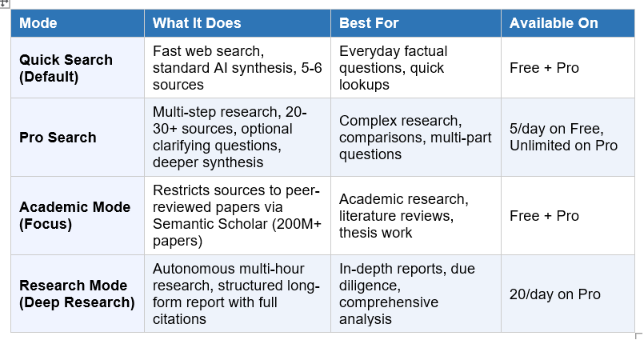
Perplexity has four main search modes. Most beginners never leave the default. That is leaving most of the product unused.
When to use Quick Search
Use Quick Search for the kind of questions you previously Googled. What is the current repo rate in India? Who founded Infosys? How does RAG work in simple terms? Quick and clean, no waiting.
When to use Pro Search
Pro Search is where Perplexity earns its Pro subscription. When you turn it on (toggle in the search bar), Perplexity may ask a clarifying question first, then dispatches multiple parallel searches across 20 to 30 sources, synthesizes them, and returns a structured, deeply cited answer. A question like 'What are the regulatory differences between launching a fintech startup in India versus Singapore in 2026?' produces an answer that would take 30 to 45 minutes of manual research.
Free users get five Pro Searches per day. Save them for questions that actually matter.
When to use Academic Mode
In the search bar, there is a Focus option. Set it to Academic to restrict Perplexity's sources to Semantic Scholar's database of over 200 million peer-reviewed papers. This is the mode students and researchers should know about. It is especially strong for literature reviews, finding conflicting studies on a topic, and verifying medical or scientific claims. No content farm results. No SEO-optimised blog posts. Just primary research.
When to use Research Mode (Deep Research)
Research Mode is a different beast. Instead of returning an answer in seconds, it runs a multi-step autonomous research process over several minutes, reading dozens of sources, resolving contradictions, and producing a long-form structured report. Use it when you need something close to what a human research assistant would produce: a deep competitive analysis, a literature summary, a due diligence report. Pro users get 20 Deep Research queries per day.
Perplexity Free vs Pro vs Max: Which Plan Do You Actually Need?
Perplexity offers three main tiers for individual users as of June 2026. Here is the honest breakdown.
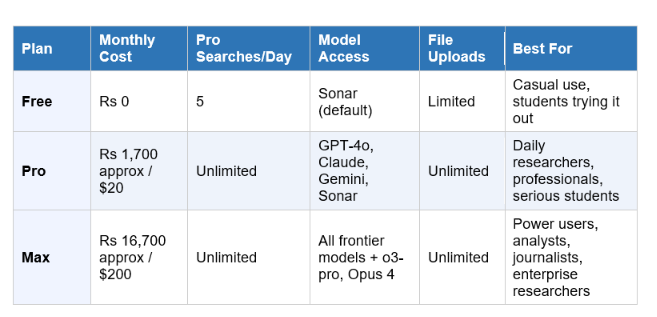
My honest take: the Free plan is more useful than most people expect. Unlimited basic searches with citations is already better than a raw Google search for informational queries. The cap on Pro Searches is the real constraint, not the model access.
Pro at $20 per month (or $200 per year, which works out to roughly Rs 1,400 per month) is worth it if you use Perplexity for serious research more than a few times a week. The unlimited Pro Searches, multi-model access, and file upload capability (upload a PDF and ask questions about it) transform the product significantly.
Max at $200 per month is for people using Perplexity as core professional infrastructure. The headline exclusive feature is Model Council, which runs your query across GPT-5.4, Claude Opus 4.8, and Gemini 3.1 Pro simultaneously and shows you where the models agree and disagree. Useful for high-stakes decisions. Not necessary for most people.
Student discount
If you are a student at an accredited university, Perplexity offers Education Pro at $10 per month through SheerID verification at perplexity.ai/student. In some promotional windows, this has dropped to $5 per month. During the 2025 referral campaign, if your university reached 500 referrals, every student received a full year free. Check the current offer before paying full price.
Indian users: Airtel deal
Airtel subscribers in India received Perplexity Pro free as part of a carrier partnership in 2025. Check the Airtel Thanks app or airtel.in to see if your plan includes an active Perplexity Pro subscription. Tata Neu users also received promotional access. These deals change, but Perplexity has committed $400 million to the Indian market in 2026 and more carrier partnerships are expected.
7 Real Use Cases for Students and Professionals
Knowing a tool exists and knowing what to actually do with it are different things. Here are the seven use cases I see Perplexity handle better than any alternative.
1. Literature reviews and academic research
Switch to Academic Focus mode. Ask your research question in full. Perplexity searches Semantic Scholar's 200 million paper database and synthesises findings with citations. Use it to identify which studies exist on a topic, what the consensus is, and where researchers still disagree. Do not use it as a final source. Use it as a map before you go read the actual papers.
2. Competitive research before a pitch or project
Before a client pitch, job interview, or investor meeting, use Pro Search to ask: 'What are the key competitors in the Indian edtech market in 2026, their funding, user base, and differentiators?' Perplexity will produce a sourced briefing faster than any manual research process.
3. Understanding complex news stories
When a major event happens, Google gives you the headlines. Perplexity gives you the context. Ask: 'Explain the SpaceX IPO in June 2026 and what it means for the AI industry.' You get background, significance, and sourced analysis in one read.
4. Medical and health fact-checking
Perplexity's Academic mode is strong for health questions because it pulls from peer-reviewed research rather than content farms. Ask whether a supplement combination is safe, or what the current evidence is on a treatment. Always verify with a doctor, but Perplexity gives you the actual evidence to bring to that conversation.
5. PDF and document analysis (Pro)
Upload a PDF, research paper, legal document, or financial report and ask questions about it. 'Summarise the key risks in this contract' or 'What methodology did this study use and how was the sample size determined?' This is available on the Pro plan and is one of its most underused features.
6. Crafting better prompts for other AI tools
Use Perplexity to research the best prompt structure for a specific task before you run it in ChatGPT or Claude. Ask: 'What is the most effective prompt structure for generating a detailed product requirements document using Claude?' Perplexity will pull real-world examples and techniques.
Speaking of prompts, our complete guide to prompt engineering for beginners walks through the core techniques that make every AI tool more useful.
7. Market research and consumer insights
Ask Perplexity what people are saying about a product, company, or topic on Reddit, social media, and news. Use the Focus filter set to Reddit or Web for different signal types. This is how marketers and founders get a fast pulse on what their audience actually thinks without spending hours scrolling.
5 Mistakes Most Beginners Make (and How to Fix Them)
Mistake 1: Typing keywords instead of questions
Perplexity is trained on natural language. Keyword-style queries ('best phone India 2026 under 20000') produce worse results than full questions ('What is the best smartphone under 20,000 rupees in India in June 2026 for a person who prioritises camera quality and battery life?'). Specificity is the single biggest lever.
Mistake 2: Trusting the answer without checking sources
Perplexity's accuracy for factual queries scores around 94% on benchmarks according to multiple independent evaluations in 2026. That sounds high. It means roughly 1 in 17 claims is wrong. For anything important, click the numbered citations. If a source is a thin blog post or an undated page, treat that claim with scepticism and search further.
Mistake 3: Using Quick Search for complex questions
Quick Search reads 5-6 sources. Pro Search reads 20-30. For any question with multiple factors, trade-offs, or conflicting information in the world, Quick Search will give you a surface-level answer. Toggle Pro Search on for anything that matters. Free users: treat those five daily Pro Searches like a finite resource and spend them wisely.
Mistake 4: Never using follow-up questions
A single Perplexity search is the starting point, not the endpoint. After your first answer, ask: 'Can you go deeper on the second point?' or 'What are the counter-arguments to this?' or 'Summarise this for a non-technical reader.' The follow-up loop is what makes Perplexity genuinely useful for research rather than just lookups.
Mistake 5: Ignoring Spaces
Perplexity Spaces are collaborative research workspaces. You can create a Space for a project, upload relevant documents, set standing instructions ('Always focus on Indian market context' or 'Cite peer-reviewed sources only'), and invite teammates to search and contribute. Most users never find this. For anyone doing ongoing research on a topic, Spaces are the feature worth discovering.
Perplexity AI vs Google vs ChatGPT: The Honest Comparison
This is the question I get most often. The honest answer is: they are solving different problems, and the tool you need depends on the task.
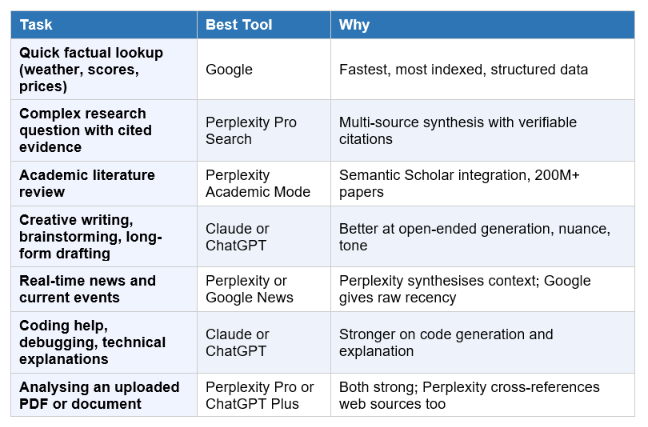
Perplexity's structural advantage over ChatGPT is live web access with citations. ChatGPT's structural advantage is better at open-ended generation, creative tasks, and complex reasoning without a research grounding. Most power users in 2026 use both.
Perplexity's structural advantage over Google is synthesis. Google gives you the links. Perplexity does the reading for you. The trade-off is that Perplexity is only as good as what it retrieves, and for very new events (breaking news, same-day developments) Google's recency advantage still shows.
For a full head-to-head, our post on ChatGPT vs Claude vs Gemini 2026 compares the main AI tools across the dimensions that actually matter for everyday use.
Perplexity in India: What You Need to Know
Perplexity's India growth story is one of the most interesting distribution plays in AI in 2026. In Q2 2025, after Airtel introduced free Perplexity Pro for all subscribers, Indian users grew 640% year-on-year. App downloads hit 2.8 million in that quarter alone. The app ranked number one in both the Indian App Store and Google Play at peak.
The platform ranks #89 in India by web traffic as of 2026, making India one of its top markets globally. Perplexity has committed $400 million in investment specifically for the Indian market and CEO Aravind Srinivas has publicly stated India is one of their major growth engines for 2026.
What this means for Indian users: Perplexity queries in English work extremely well. Hindi queries and regional language support is improving but still weaker than English. The platform supports 46 languages officially, but depth of coverage varies.
For students and professionals in India, the tool's specific value is in research quality. Indian users have historically had to navigate lower-quality local content in search results. Perplexity's source synthesis, which pulls from global academic and news databases, often gives better signal on technical and professional questions than a standard Google search.
The Airtel free Pro subscription has ended for most users as of mid-2026, but check the Airtel Thanks app for current offers. Tata Neu promotional access may also be available depending on your plan.
Frequently Asked Questions
What is Perplexity AI and how does it work?
Perplexity AI is an AI-powered answer engine that combines real-time web search with large language models to deliver direct, cited answers to questions. When you search, it retrieves relevant web pages, reads them, and synthesises a structured answer with numbered citations you can verify. It launched in August 2022, is headquartered in San Francisco, and reached 45 million monthly active users and a $20 billion valuation by 2026, according to Reuters and DemandSage.
Is Perplexity AI free to use?
Yes. Perplexity's Free plan includes unlimited basic searches with source citations, mobile apps, a browser extension, and five Pro Searches per day at no cost. The Pro plan at $20 per month (or Rs 1,700 approximately) removes the Pro Search cap, adds multi-model access (GPT-4o, Claude, Gemini), unlimited file uploads, and 20 Deep Research queries per day. For most casual users, the free plan is sufficient.
How is Perplexity AI different from ChatGPT?
Perplexity searches the live web in real time and cites every source inline. ChatGPT generates answers from training data with a knowledge cutoff and does not automatically cite sources (unless using the Browse feature). Perplexity is better for research, fact-checking, and current events. ChatGPT is better for creative writing, complex reasoning, coding, and open-ended generation. According to independent benchmarks cited by BuyerSprint (April 2026), Perplexity achieved 92% factual accuracy on real-time queries versus ChatGPT's 87% for that category.
How is Perplexity AI different from Google?
Google retrieves a list of links and leaves you to do the reading. Perplexity reads those sources for you and synthesises a direct answer, with citations so you can verify. Google is faster for simple lookups and better for very recent breaking news. Perplexity is more useful for questions where you need a synthesised answer rather than ten tabs to read. As of May 2026, Google holds 90.39% of global search market share (Statcounter), while Perplexity processes an estimated 30 million queries per day from 45 million monthly active users.
What is Pro Search in Perplexity AI?
Pro Search is Perplexity's advanced research mode. Instead of a single web lookup, it may ask a clarifying question, then dispatches multiple parallel searches across 20 to 30 sources, cross-references them, and produces a more thorough, structured answer. Free users get five Pro Searches per day. Pro subscribers get unlimited. Toggle it on using the button in the search bar before sending your query.
Is Perplexity AI accurate?
Perplexity scores approximately 93.9% on the SimpleQA benchmark with 94% overall factual accuracy and 97% citation accuracy according to multiple independent evaluations in 2026, making it among the most accurate AI search tools available. That said, roughly 1 in 17 claims may contain errors. Always click the numbered citations for anything consequential and verify with primary sources.
What is Perplexity AI used for?
Perplexity is most useful for research-intensive queries: academic literature reviews, competitive analysis, market research, understanding complex news stories, medical fact-checking, and professional due diligence. It is used by students, researchers, journalists, marketers, founders, and knowledge workers who need synthesised, cited answers faster than manual research. 41% of Perplexity users work in knowledge-intensive industries like technology and finance, according to Famewall data cited in 2026.
What is the best way to use Perplexity AI?
Ask full natural-language questions instead of keywords. Use Pro Search for complex multi-part questions. Switch to Academic Focus for research requiring peer-reviewed sources. Ask follow-up questions within the same thread to drill deeper. Check the citations for important claims. Organise ongoing research projects in Spaces with standing instructions for better contextualisation. Save your five free Pro Searches per day for the questions that genuinely matter.
Is Perplexity AI safe to use?
Yes. Perplexity does not sell user data and allows you to opt out of data use for model training in your account settings. Enterprise Pro users get additional data privacy guarantees ensuring company searches are not used to train public models. Perplexity's source-citation model also makes it easier to audit what the AI is drawing on, reducing the risk of confidently wrong answers going unnoticed.
Recommended Reads
• ChatGPT vs Claude vs Gemini 2026
• How to Use AI at Work: The Practical Guide
• Best AI Tools for Professionals in 2026
The people winning with AI aren't the ones who studied the most. They're the ones who never stopped.
References
• GetPanto -- Perplexity AI Statistics 2026
• DemandSage -- Perplexity AI Statistics 2026
• Perplexity AI -- Getting Started Guide
• Finout -- Perplexity Pricing in 2026
• AI Business Weekly -- Perplexity AI
• Incremys -- Perplexity AI Statistics 2026
.png&w=3840&q=75)