

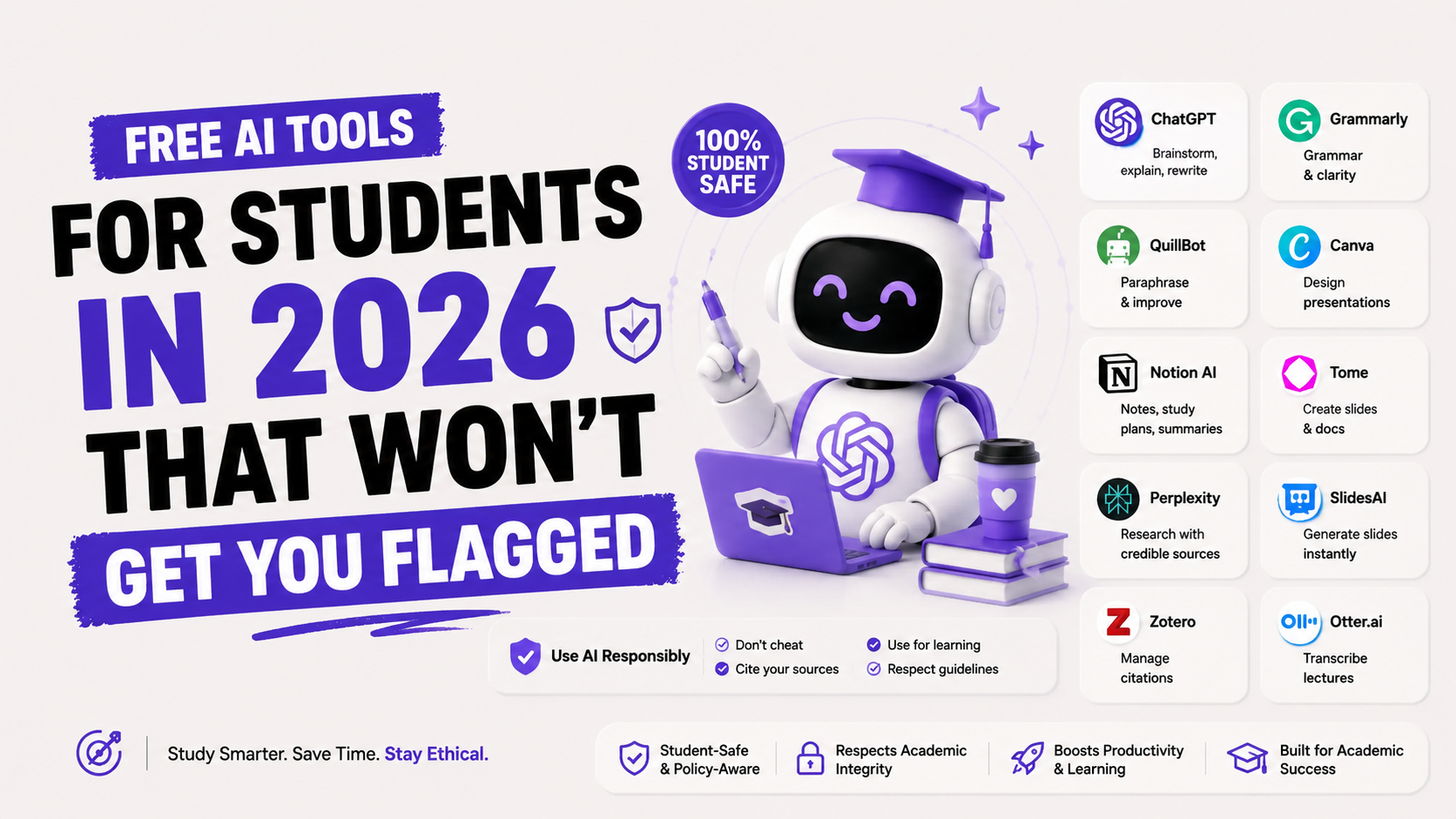
Free AI Tools for Students in 2026 That Won't Get You Flagged
A Stanford study on AI detectors found that 61% of essays written by non-native English students were flagged as AI-generated — even when they weren't. No AI involved. Just a student writing in their second or third language, penalised for it.
That statistic alone should tell you that the "will I get flagged" question is more complicated than people admit. Turnitin is not a perfect lie detector. It is a statistical pattern-matching system — and it makes mistakes, especially against international students, structured academic writing, and anyone who writes concisely.
The real question isn't just "which tools are safe." It's: which tools genuinely help you learn, which ones create risk you don't know about, and how do you use them in a way that even your strictest professor would be fine with?
Here are 7 free AI tools that hold up under all three criteria — plus the honest truth about how Turnitin actually works and what actually gets students in trouble.
What Actually Gets Students Flagged (It's Not What You Think)
Before picking tools, you need to understand what Turnitin and similar AI detectors actually do — because most students have the wrong mental model.
Turnitin runs two completely separate checks when you submit a paper. The first is a similarity check: it compares your text against a database of billions of web pages, academic publications, and previously submitted student work, looking for matching passages. This is the original plagiarism check and it is quite accurate.
The second check is AI detection — and this is where things get complicated. The AI detector does not know whether you used ChatGPT. It looks for statistical patterns: low perplexity (how predictable each word is given the ones before it), low burstiness (how much sentence length varies), and certain structural patterns common in machine-generated text.
The practical consequences of this:
• Submitting ChatGPT output without any editing is the highest-risk behaviour. Raw AI text has very distinctive patterns that detectors reliably catch.
• Using Grammarly, Hemingway, or a spell-checker does not increase AI detection risk. These tools improve grammar and clarity — they do not generate text and their output does not look AI-generated to detectors.
• Using AI to brainstorm, outline, and explain concepts — then writing yourself — is generally safe. The writing that comes out of this process is yours, and it will read as yours.
• Some universities have disabled Turnitin AI detection entirely. Vanderbilt University did this explicitly, citing false-positive risk. Temple University's independent test found Turnitin's AI detector only 77% accurate, with a 7% mis-flag rate on genuine human writing.
What does get students in trouble — consistently and deservingly — is submitting AI-generated paragraphs as original analysis, especially in courses that assess your thinking rather than your information. Professors who have read thousands of student papers can usually tell. Even if a detector doesn't flag it.
The tools below are grouped by what they actually help you do. None of them write your essays for you. That is by design.
The 7 Best Free AI Tools for Students in 2026
1. Perplexity AI — Best for Research With Real Citations
Perplexity is the single most academically safe AI tool on this list. Unlike ChatGPT, which can confidently cite papers that don't exist, Perplexity searches the web in real time and shows you its sources inline — journal articles, institutional websites, news publications — for every claim it makes.
For a student writing a literature review or trying to find credible sources fast, Perplexity does in 30 seconds what used to take 20 minutes of tab-switching. You still need to verify and read the sources before citing them in your paper, but at least they are real sources pointing to real places.
Free tier: Perplexity offers students free Pro access for 12 months with a valid .edu email. The free tier without that is still very capable.
AI detection risk: None. You are using Perplexity to find sources and understand them, then writing in your own words. Nothing Perplexity produces goes into your submitted work directly.
Best for: Research papers, literature reviews, finding credible sources fast, fact-checking claims before you write.
2. Google NotebookLM — Best for Studying Your Own Materials
NotebookLM is the most underused tool on this list and the one I would recommend first to any student who has a stack of lecture slides, textbooks, or readings to get through.
You upload your own course materials — PDFs of papers, lecture notes, textbook chapters — and then you can ask questions about them, get summaries, generate study guides, and create practice questions. The critical detail: NotebookLM only answers from what you gave it. It cannot hallucinate facts that are not in your materials, because it has no access to outside information.
Google launched an Audio Overview feature in late 2024 that turns your uploaded materials into a podcast-style conversation between two AI hosts explaining the concepts. For auditory learners or students on a commute, this is genuinely useful.
Free tier: Completely free with a Google account. No paid tier exists — NotebookLM is entirely free.
AI detection risk: Zero. You are using it to understand your own course materials, not to generate text for submission.
Best for: Exam preparation, understanding dense readings, creating study guides from your own notes, revision across large volumes of material.
3. Consensus — Best for Science and Evidence-Based Research
Consensus is a research AI built specifically for academic papers. You ask a research question — "Does intermittent fasting improve metabolic health in adults?" — and instead of giving you a general answer, it returns evidence directly from peer-reviewed studies, flagging where the research agrees, disagrees, or is inconclusive.
Every answer comes with direct citations to actual published papers, so you can pull the DOIs, verify the studies, and cite them properly. This is particularly useful for STEM students, pre-med, psychology, and any field where evidence-based argument is central to the work.
Free tier: The free tier allows a generous number of searches per month. The Premium tier ($11.99/month) unlocks unlimited searches and the AI synthesis feature.
AI detection risk: None. Consensus helps you find sources — you do the reading and writing.
Best for: Science students, anyone writing research-heavy essays, finding peer-reviewed evidence for specific claims.
4. Claude (Free Tier) — Best for Writing Feedback and Essay Structure
Claude is Anthropic's AI assistant, and its free tier is widely regarded as one of the best alternatives to ChatGPT Plus for writing work. The distinction matters: use Claude for feedback on your own writing, not to generate writing for you.
Paste in a paragraph you have written and ask Claude to identify weak arguments, flag unclear sentences, suggest where you need more evidence, or improve the flow between paragraphs. This is the AI equivalent of a thoughtful tutor session. The ideas, analysis, and words remain yours.
Claude also handles long documents unusually well. If you need to analyse a 50-page report or synthesise multiple readings, Claude's free tier can hold significantly more context than the ChatGPT free tier.
Free tier: Claude free gives you access to Claude Sonnet with daily message limits that are generous enough for normal student use.
AI detection risk: Depends entirely on how you use it. Feedback on your own writing: zero risk. Asking it to write paragraphs for submission: high risk.
Best for: Essay feedback, argument refinement, clarity improvements, analysing long documents, brainstorming angles before you write.
5. Grammarly Free — Best for Polishing Final Drafts
Grammarly catches grammar errors, spelling mistakes, punctuation issues, and sentence clarity problems that a standard spell-checker misses entirely. It is the most widely used writing assistance tool among students worldwide, and its free tier covers the fundamentals well.
The question students ask: does Grammarly trigger AI detection? No. Grammarly does not generate your text. It makes corrections and suggestions to text you have already written. Turnitin and similar tools look for patterns of AI-generated writing, not for the presence of grammar edits. Grammarly's output does not carry AI writing signatures because Grammarly is not writing anything.
The premium version ($12/month, with student discounts available) adds tone detection, vocabulary enhancement, and a plagiarism checker. For most students, the free tier is sufficient for grammar and clarity work.
Free tier: Genuinely free with a browser extension. No word limit. The free tier handles grammar, spelling, and basic clarity. Premium adds style and plagiarism checking.
AI detection risk: None. Using Grammarly is equivalent to having a grammar-aware friend proofread your work.
Best for: Final draft polishing, catching embarrassing grammar errors, improving sentence clarity in essays and lab reports.
6. Hemingway Editor — Best for Clarity and Readability
Hemingway is not an AI tool in the modern sense — it does not use a language model. It is a readability analyser that highlights sentences that are too complex, passive voice, adverbs, and phrases that could be simpler. It assigns your writing a grade level and tells you how hard it is to read.
For students whose essays are technically correct but hard to follow, Hemingway is one of the most useful tools you can use, and it is free to use in the browser at hemingwayapp.com. The desktop app costs $19.99 as a one-time purchase, but the browser version covers all the core functionality.
The reason it belongs on this list: it forces you to write more clearly, which paradoxically makes your writing sound more human. AI-generated text is often verbose and over-hedged. Hemingway pushes you in the opposite direction.
Free tier: The browser version at hemingwayapp.com is fully free. No account required.
AI detection risk: Zero. This is a readability tool — it does not generate text.
Best for: Students who write complex, dense sentences and want to make essays easier to read without making them simplistic.
7. ChatGPT Free Tier — Best for Brainstorming and Concept Explanation
ChatGPT belongs on this list, but with the clearest usage distinction of any tool here. The free tier (now running on GPT-5.5 Instant as of June 2026, with daily usage caps) is excellent for two student workflows that carry essentially zero risk: brainstorming and explanation.
Use ChatGPT to generate 5 different angles you could take on an essay question. Ask it to explain a concept from your lecture that didn't make sense. Have it walk you through a historical event or scientific process in plain language before you open the textbook. Use it to identify weaknesses in an argument you are developing.
What you should not do is paste ChatGPT output directly into an assignment. Even with editing, raw AI paragraphs are detectable, and more importantly, they represent someone else's thinking — which defeats the entire point of your education.
Free tier: Approximately 10–15 messages per 3-hour window on GPT-5.5 Instant, then falls back to GPT-5.5 Mini. Includes web search, voice, and limited image generation.
AI detection risk: Zero if you use it for brainstorming and explanation. High if you submit its output directly.
Best for: Generating essay angles, understanding difficult concepts, preparing discussion questions, studying definitions and examples.
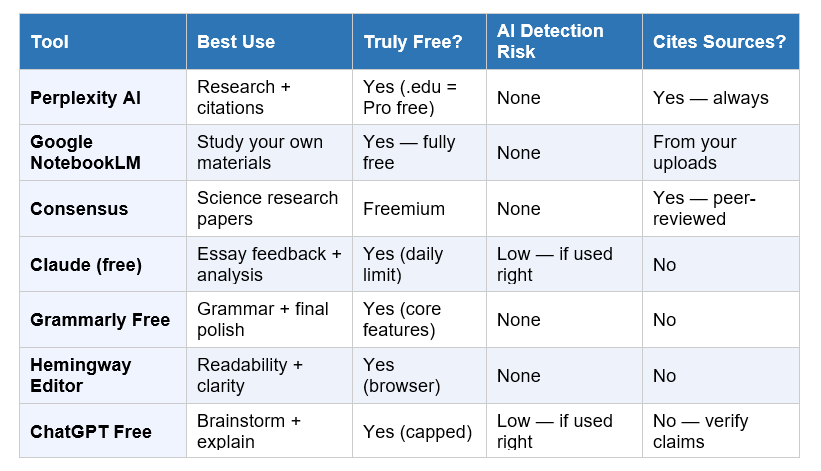
7 Free Student AI Tools: Side-by-Side Comparison
The Ethical Line: Where AI Help Ends and Cheating Begins
Most universities have now updated their AI policies. The language they use is increasingly specific, and "I didn't know" is no longer a plausible defence.
The general principle across Cambridge, Oxford, most Indian universities, and the majority of US institutions: using AI to assist your thinking is permitted in most contexts; submitting AI-generated work as your own is not. The line is about authorship.
These uses are generally permitted at most universities:
• Using AI to brainstorm topics and angles for an essay
• Using AI to explain a concept you find confusing
• Using AI to check grammar and improve sentence clarity
• Using AI to find and verify research sources
• Using AI to generate practice exam questions from your notes
• Using AI to summarise readings you have already engaged with
These uses are generally prohibited:
• Submitting AI-generated paragraphs as your own written analysis
• Using AI to write sections of a dissertation or thesis without disclosure
• Asking AI to answer exam questions during a timed assessment
• Having AI generate arguments you then present as your own thinking
My honest take: the distinction is not just about rules. It is about what you are actually getting from your degree. If AI writes your essays, you are paying tuition for a certificate your AI earned. That is a bad deal for you, not just your institution.
The students who use AI well use it to understand faster, research more efficiently, and write more clearly. They still do the thinking. That is the version of AI use that makes you genuinely better over time.
The Student AI Stack That Keeps You Safe
You do not need all seven tools. Most students need three, used in a clear sequence. Here is the recommended starting stack:
For a standard essay or research paper:
Research phase: Use Perplexity to find credible sources with citations. Use Consensus if your paper requires peer-reviewed evidence. Verify every source before using it.
Study and understanding phase: Use ChatGPT or Claude to explain concepts from your readings that are unclear. Ask it to summarise, explain, and give examples — then go back to the original source to verify.
Writing phase: Write the essay yourself. Use Claude to give feedback on a draft you have written. The question to ask Claude: "What is unclear, what arguments need more evidence, and what could be cut?"
Polishing phase: Run your final draft through Grammarly for grammar and Hemingway for readability. These take 10 minutes and consistently improve the quality of the final submission.
For exam preparation:
Upload your notes, lecture slides, and past papers to NotebookLM. Then ask it to generate practice questions, explain difficult sections, and quiz you on key concepts. Everything it tells you comes from your own uploaded materials — no hallucinated facts.
The whole stack is free. The whole stack is safe. And the whole stack makes you a better student rather than a better copy-paster.
A Note for International Students
If you are a non-native English speaker studying in the UK, US, Australia, or Canada, you face a risk that native English students do not: a higher false-positive rate on AI detection tools.
A Stanford Human-Centered AI study found that AI detectors flagged 61% of essays written by non-native English students as AI-generated, compared to a much lower rate for native English speakers. The reason is that simpler vocabulary, shorter sentences, and more formulaic structures — common in non-native academic writing — statistically overlap with patterns that detectors associate with AI output.
This is a known, documented problem. Turnitin has acknowledged it. Some universities have disabled AI detection as a result. But not all of them have, and you should protect yourself:
• Keep drafts, notes, and planning documents in Google Docs. Version history is your evidence if a flagging challenge becomes necessary.
• Do not clean up your writing so aggressively that you remove all traces of your own voice. Some natural roughness is actually helpful for detection risk.
• If you are flagged, you have the right to appeal. Version history, rough notes, and your planning process are your strongest evidence that you wrote the work.
• Use Perplexity and Consensus for research — they help you write more confidently in English because you understand your sources better.
The AI tools that are most useful to international students are the ones that help you understand content faster and structure your ideas more clearly — so that the writing you produce sounds more fluently like you, not like a machine.
Frequently Asked Questions
Q: Will Turnitin flag me for using Grammarly or Hemingway?
No. Grammarly and Hemingway are grammar and readability tools — they do not generate text. Turnitin's AI detector looks for patterns in the writing that indicate machine generation. Editing and correcting human-written text does not create those patterns. You can use Grammarly freely without any AI detection risk.
Q: Does Turnitin detect ChatGPT in 2026?
Turnitin detects text that matches statistical patterns associated with AI-generated writing. Raw ChatGPT output submitted without editing has a high probability of being flagged. However, Turnitin's detector is not 100% accurate — Temple University's independent test found a 77% accuracy rate, with a 7% mis-flag rate on genuine human writing. Non-native English students face a disproportionately higher false-positive rate, as documented in a 2023 Stanford HAI study.
Q: Is it cheating to use AI for brainstorming?
At most universities, no. The general distinction in AI policies is between using AI to assist your thinking (permitted) and submitting AI-generated work as your own (prohibited). Using ChatGPT to generate five possible angles for an essay, then choosing one and developing it yourself, is broadly considered legitimate use. Check your specific institution's policy, as some courses explicitly prohibit all AI use.
Q: Which free AI tool is best for writing a research paper?
For research papers, use Perplexity (to find cited sources) and Consensus (for peer-reviewed evidence in STEM fields). Use Claude's free tier for feedback on your draft. Use Grammarly for the final grammar pass. This stack is entirely free, covers every stage of the paper, and keeps your own writing at the centre of the process.
Q: Is NotebookLM safe to use for coursework?
Yes. NotebookLM is one of the safest AI tools for students because it only works with materials you upload. It cannot generate information outside of those sources, which means it cannot hallucinate citations or facts that aren't in your course content. You use it to study and understand material, not to generate text for submission. Google offers it completely free with no paid tier.
Q: Can I use Perplexity Pro for free as a student?
Yes. Perplexity offers 12 months of free Pro access to students with a valid .edu email address. The Pro tier removes daily search limits and unlocks additional features including file upload analysis and access to more powerful underlying models. Without the .edu email, the standard free tier still allows a generous number of searches per month and is strong enough for most student research needs.
Q: What happens if I'm falsely flagged by a plagiarism or AI detector?
If you are flagged and you wrote the work yourself, you have the right to challenge the finding. Your strongest evidence is a documented writing trail: Google Docs version history showing your draft evolving over time, rough notes, planning documents, and any source annotations. Turnitin and most universities treat AI detection scores as signals for investigation, not as final verdicts. Turnitin's own published guidance states that scores below 20% should be interpreted conservatively and that the tool is not designed to be used as sole evidence in academic misconduct proceedings.
Recommended Reads
• How to Use ChatGPT for Free in 2026: Step-by-Step for Beginners
• Prompt Engineering: The Most In-Demand AI Skill of 2026
• 10 AI Tools Every Professional Should Know in 2026
• How to Learn AI From Scratch in 2026: The Only Roadmap You Need
Unrot teaches AI in 5 minutes a day — the concepts that actually matter for students and professionals, without the jargon. Download the app and spend your next five minutes on something that compounds.
References
• Stanford HAI — Study on AI Detector Bias Against Non-Native English Writers (2023)
• Turnitin — AI Writing Detection Methodology and Accuracy
• AdvocatED — Turnitin AI Detection False Positive: How to Fight Back (2026)
• Popular AI — Turnitin False Positives in 2025 and 2026: Why AI Detectors Cannot Be Proof
• Axis Intelligence — Best AI Tools for Students 2026: 15 Tools Tested
• Zemith — Best AI Research Assistant for Students in 2026: 10 Tools Tested
• Brighton SEO Tools — 11 Free AI Research Tools for College Students in 2026