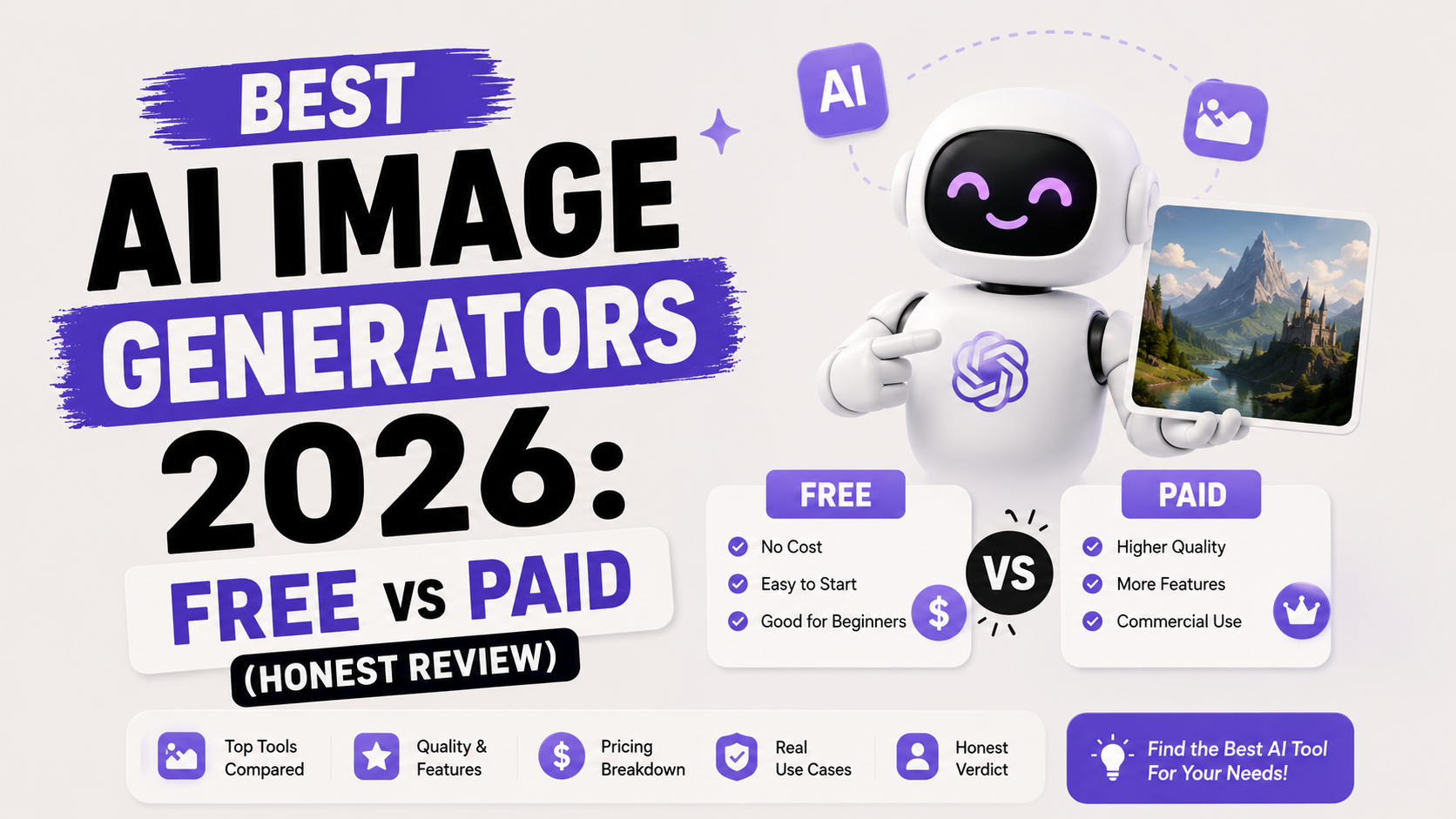
Best AI Image Generators 2026: Free vs Paid (Honest Review)
Two years ago, AI-generated hands had six fingers and AI-generated text looked like someone having a stroke. Today, FLUX 2 Pro generates 4K images in under 5 seconds that are genuinely difficult to distinguish from professional photography.
The technology has matured faster than anyone predicted. The market hasn't. Most comparison guides in 2026 still recommend tools based on marketing claims, not actual testing — and they bury the truth about free tiers under vague promises of "limited access."
I'm going to be direct about what each tier actually gives you, what the real limits are, and which tool wins for each specific use case. No affiliate rankings. No vague superlatives. Just the honest breakdown a beginner needs before spending time or money on any of these.
How AI Image Generators Actually Work (in 60 seconds)
Every AI image generator starts with the same basic idea: you type a description, the AI produces an image that matches it. But the mechanics underneath vary significantly, and those differences explain why some tools are better at portraits, others at text, and others at photorealism.
Most modern tools use a process called diffusion. The model starts with random noise and gradually refines it into a coherent image, guided by your text prompt. The quality of that refinement process — how well the model was trained, how large it is, how much compute it uses per image — determines the output quality.
What matters for a beginner is simpler: different tools are optimised for different things. Midjourney V7 is tuned for artistic aesthetics. Ideogram is tuned for getting text right inside images. FLUX 2 Pro is tuned for photorealism and versatility. Adobe Firefly is tuned for safety — it was trained on licensed content so commercial use carries less legal risk.
The prompt you give the tool matters as much as which tool you choose. A well-written prompt on a good free tool will almost always beat a lazy prompt on a premium one.
The State of the Market in 2026: Three Tools Pulled Ahead
The AI image generation market has consolidated. After a period where dozens of tools competed, three have emerged as the clear quality leaders for different use cases:
Midjourney V7 (paid only, from $10/month) — the aesthetic benchmark. If you want images that look like they belong in an art book or a premium campaign, Midjourney is still the standard. It shipped its first video model in April 2026 and keeps iterating fast.
FLUX 2 Pro (Black Forest Labs, via API and third-party platforms) — the versatility leader. FLUX.1 and its successors consistently top the LM Arena leaderboard for overall image quality across use cases. It's the go-to for developers and creators who need one model that handles everything well at a reasonable per-image cost (~$0.03/image).
Ideogram 3 (freemium) — the text specialist. If your image needs readable words — a poster, a product label, a social graphic with a headline — Ideogram is still the only tool that reliably gets typography right inside images. Every other tool still struggles with this.
Below these three, Adobe Firefly, Microsoft Designer, Leonardo AI, and Canva AI each hold specific niches that are worth knowing. But understanding the top three first gives you a mental framework for every tool that follows.
Free Tier Tools — What You Actually Get
"Free" means different things across these platforms. Some give you unlimited slow-queue generation. Some give you 25 credits per month and then nothing. Some technically free tools are so limited they are not worth including in any real workflow. Here's the honest breakdown:
Microsoft Designer (Bing Image Creator) — Best Free Tool Overall
Microsoft Designer, powered by a combination of DALL-E 3 and Microsoft's own MAI-Image-1 model (added November 2025), is the strongest completely free option in 2026. It does not require a credit card, gives you 15 boosted (fast) image generations per day, and then unlimited slower generation after that.
Output quality is solid for general-purpose use — portraits, landscapes, product mockups, social media graphics. It won't match Midjourney's artistic depth, but for the average person who needs a usable image without paying, it is the rational first choice.
Free tier: 15 boosted generations/day then unlimited slower generation. No watermark. Commercial use permitted (verify current TOS).
Limitation: Aesthetic tends toward a polished stock-photo look rather than distinctive artistic style. Slow-queue generation can take 1–2 minutes per image.
Ideogram — Best Free Tool for Text in Images
Ideogram's free tier gives you 10 slow-queue generations per day. It sounds limited, but if your use case is social media graphics, quote cards, poster designs, or anything requiring readable text inside the image, Ideogram is effectively mandatory regardless of its limits.
No other tool in 2026 matches Ideogram's text rendering accuracy. Midjourney V7 has improved significantly, but Ideogram is still the specialist — purpose-built for typography-heavy image work. For photorealistic output without text requirements, Ideogram's quality is solid but not class-leading.
Free tier: 10 slow-queue generations/day. No watermark. No credit card required.
Limitation: 10 images per day is genuinely limiting for production workflows. The slow queue adds meaningful wait time.
Leonardo AI — Best Free Tier for Volume
Leonardo AI gives free users 150 tokens per day — the most generous free allowance of any serious AI image generator currently available. Tokens are consumed based on the image size and model selected, so the effective number of images you can generate varies, but it is consistently higher than competitors.
Leonardo's real strength is model variety. It hosts dozens of fine-tuned models contributed by its community, covering anime, fantasy, product photography, architectural visualisation, and more. For digital artists and game designers who want to experiment across styles without paying, Leonardo's free tier is excellent.
Free tier: 150 tokens/day resetting every 24 hours. No credit card required. Commercial use permitted on free tier under non-exclusive license.
Limitation: The platform is more complex than Microsoft Designer or Ideogram. Beginners may find the model selection and parameter options overwhelming at first.
Adobe Firefly — Best for Commercial Safety
Adobe Firefly occupies a unique position: it is the only major AI image generator explicitly trained on licensed content, which makes it the safest choice for commercial work from a legal standpoint. If you are generating images for client deliverables, product listings, or anything being sold, Firefly's provenance is genuinely valuable.
The catch is the free tier: 25 generative credits per month. That is not a daily or weekly allowance — it is the total for the entire month. For testing and occasional use, it is adequate. As a production workflow tool, the free tier runs out quickly.
Free tier: 25 credits/month. No watermark. Commercial use explicitly permitted. Integrates with Photoshop and Illustrator for Creative Cloud subscribers.
Limitation: 25 credits is not enough for serious production use. The Standard paid plan at $9.99/month (2,000 credits) is the real entry point if you need volume.
Canva AI — Best if You Already Use Canva
Canva's built-in AI image generator won't win quality competitions. But if your workflow already lives in Canva — and for a large number of marketers, social media managers, and students, it does — the integration value is real. Generate an image and drop it directly into a Canva design without switching tabs or exporting files.
The free tier gives you 50 lifetime generations on the free Canva plan. That is not per day or per month — that is total, ever. After that, you are on the paid plan. Worth being aware of before you burn through them quickly.
Free tier: 50 lifetime generations (new accounts). No watermark. Best for users already in the Canva ecosystem.
Limitation: Lifetime limit is unusually stingy. Image quality is behind standalone tools. Only worthwhile if Canva is already your design home.
Paid Tools — When Paying is Worth It
Midjourney V7 — The Artistic Standard (from $10/month)
Midjourney has no free tier. It never really did, and it does not offer one in 2026. The cheapest plan starts at $10/month (Basic), which gives you approximately 3.3 hours of fast GPU time — roughly 200 standard images per month.
What Midjourney delivers for that cost is the highest quality aesthetic output of any tool tested. The V7 model has strong prompt adherence, produces consistently beautiful images across styles, and handles colour, composition, and mood with a sophistication that free tools simply don't match. The web interface (launched to complement the original Discord bot) makes it significantly more accessible to non-technical users.
Midjourney is the right choice when image quality is genuinely important — for professional creative work, marketing campaigns, book covers, game concept art, or anything where you need visuals that stand out rather than look generic.
Plans: Basic $10/month, Standard $30/month, Pro $60/month, Mega $120/month. Annual billing reduces costs by roughly 20%.
Best for: Creative professionals, marketers, designers, artists — anyone for whom image quality is a competitive differentiator.
FLUX 2 Pro via API — The Developer and Power User Choice
FLUX 2 Pro, developed by Black Forest Labs, is not available as a standalone subscription. You access it through APIs, third-party platforms like WaveSpeed, NightCafe, or dedicated FLUX-powered tools, or self-hosted configurations. The per-image cost through the API is approximately $0.03 — making it extremely cost-effective for volume generation.
FLUX's distinction is versatility. Where Midjourney excels specifically at artistic aesthetics and Ideogram excels specifically at text, FLUX performs at a top tier across photorealism, illustration, product photography, and everything in between. Multiple independent comparisons place Flux 2 Pro at or near the top of the LM Arena leaderboard — the closest thing the field has to an objective quality benchmark.
Access: Via API (~$0.03/image), or through third-party platforms with varying free credit amounts on signup. No single monthly subscription.
Best for: Developers building image generation into products, power users needing versatility at scale, creators who want one model for everything.
Stable Diffusion (Self-Hosted) — Unlimited Free, If You Have the Hardware
Stable Diffusion 3.5 is open-source and can be run locally on your own computer for zero ongoing cost — truly unlimited generation. The catch: you need a capable NVIDIA GPU with at least 12GB of VRAM, and setting it up requires more technical comfort than any other tool on this list.
For anyone with a gaming PC with a recent RTX graphics card, Stable Diffusion via ComfyUI or AUTOMATIC1111 is the most powerful free option available. No usage caps, no watermarks, no internet connection required, no privacy concerns about your prompts being stored. The tradeoff is setup time and the learning curve of managing model files and configurations.
Cost: Free software. Hardware cost is the only barrier. NVIDIA RTX 3080 or better recommended for practical use.
Best for: Technical users, developers, privacy-conscious creators, and anyone who generates images at high volume and wants unlimited free output.
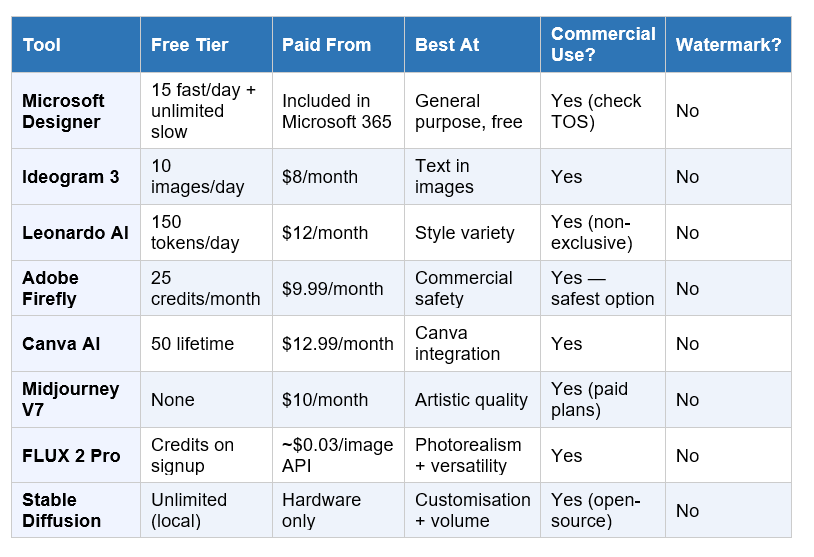
Head-to-Head Comparison: The Full Table
How to Write a Prompt That Gets Good Results
The single most common mistake beginners make: typing too little. "A sunset" is not a prompt — it is a subject. The AI has been trained on millions of sunsets and has no idea which version you want.
A well-structured prompt has up to six components. You do not need all six for every image, but knowing them gives you control:
Subject: The main thing in the image. Be specific. "A weathered Rajasthani woman in a bright orange dupatta" beats "a woman."
Environment/Setting: Where the subject exists. "In a narrow old market street in Jaisalmer, early morning" locates the image.
Style or medium: "Photorealistic," "watercolour illustration," "3D render," "cinematic film still" — style instructions have a large impact on output.
Lighting: "Golden hour light," "dramatic side lighting," "soft diffused natural light." Lighting is one of the highest-leverage prompt elements and beginners consistently skip it.
Camera/perspective: "Wide angle," "close-up portrait," "bird's eye view," "shot on 85mm lens." These control composition and framing.
Mood or atmosphere: "Melancholic," "energetic and chaotic," "calm and minimal." Mood shapes the colour palette and overall feel.
A full example: "A weathered Rajasthani woman in a bright orange dupatta, standing in a narrow old market street in Jaisalmer, early morning golden hour light from the left, photorealistic style, shot on 85mm lens, warm and serene mood."
That prompt will produce something specific and usable. "An Indian woman at a market" will produce something generic and forgettable. Same tool. Same cost. Completely different results.
One more thing: your first generation is a draft. Generate, evaluate, then adjust one element at a time. Most great AI images come from 3–5 iterations, not one lucky shot.
Which Tool Should You Start With?
Here is the decision tree, cut down to what actually matters:
You need images with readable text (posters, social graphics, quote cards): Start with Ideogram. It is not optional for this use case. No other tool is as reliable.
You need general-purpose images with no budget: Microsoft Designer. 15 fast generations per day, no credit card, no watermark, solid output quality for everyday use.
You need volume for free: Leonardo AI. 150 tokens per day is the most generous free allowance in the market. More complex than Designer but more capable.
You need images for commercial work and care about legal clarity: Adobe Firefly. The only tool explicitly trained on licensed content. Expensive at the free tier (25 credits/month), but the cleanest commercial option.
You already use Canva for design: Canva AI. The workflow integration offsets the quality ceiling. Just be aware of the 50-image lifetime limit on free plans.
Image quality is genuinely important to your work: Midjourney V7 at $10/month. It is still the aesthetic benchmark. Worth it if you create visual content professionally.
You are a developer or technical creator who wants versatility at scale: FLUX 2 Pro via API. The closest thing to a one-model-for-everything solution, at $0.03/image.
You have a gaming GPU and want truly unlimited free generation: Stable Diffusion locally. Higher setup cost in time and effort, but zero ongoing cost and complete privacy.
My personal starting recommendation for someone with zero experience and zero budget: start with Microsoft Designer for general images, and add Ideogram the first time you need text in an image. Between the two, you can cover 90% of beginner use cases before spending anything.
Frequently Asked Questions
Q: What is the best completely free AI image generator in 2026?
Microsoft Designer (Bing Image Creator) is the strongest completely free option in 2026 — no credit card required, 15 fast generations per day plus unlimited slower generation, no watermarks, and decent commercial use rights. For images requiring readable text, use Ideogram's free tier alongside it (10 slow-queue images per day). Together, they cover the majority of beginner use cases at zero cost.
Q: Is Midjourney worth the $10/month in 2026?
For someone who creates visual content professionally or regularly, yes. Midjourney V7 consistently produces the highest aesthetic quality output of any tool tested — better colour, mood, composition, and style coherence than free alternatives. If image quality is a competitive differentiator in your work (design, marketing, creative projects), the $10/month Basic plan is justified. For casual use or occasional image needs, the free tiers of Microsoft Designer and Ideogram are sufficient.
Q: Can I use free AI-generated images for commercial purposes?
It depends on the tool. Adobe Firefly explicitly permits commercial use on its free tier and is the safest option legally because it was trained on licensed content. Microsoft Designer, Leonardo AI, and Ideogram generally permit commercial use on free tiers, but you should verify the current Terms of Service before using images in paid commercial projects. Midjourney paid plans permit commercial use; the platform has no free tier. Always check the current TOS — these policies change.
Q: What is the difference between DALL-E and Midjourney?
DALL-E 3 (built into ChatGPT) prioritises prompt accuracy — it follows instructions precisely and is better for literal, specific image requirements. Midjourney V7 prioritises aesthetic quality and artistic style — it produces more visually striking images but interprets prompts more creatively, which can mean ignoring some details. Use DALL-E when you need the image to look exactly like your description. Use Midjourney when you want the image to look exceptional, even if it interprets your prompt loosely.
Q: Which AI image generator is best for generating text inside images?
Ideogram 3 is the clear specialist for text-in-image generation in 2026. It was built specifically for typography accuracy and consistently renders readable words, logos, signs, and headlines inside generated images. Most other tools — including Midjourney V7, which has improved significantly — still struggle with letter jumbling and mirrored characters in complex text layouts. For any image that requires readable text, Ideogram is the tool to use.
Q: What is FLUX AI and how does it compare to Midjourney?
FLUX is a family of open image generation models developed by Black Forest Labs. FLUX 2 Pro is considered by many technical reviewers to be the most versatile image model available in 2026 — consistently ranking at or near the top of the LM Arena leaderboard across photorealism, illustration, and general-purpose generation. The key difference from Midjourney: FLUX is accessed via APIs and third-party platforms rather than a single subscription, and it excels at photorealism and versatility where Midjourney excels specifically at artistic aesthetics.
Q: Does Adobe Firefly have a genuinely free tier?
Yes, but it is very limited: 25 generative credits per month total. Most free tier tools give you daily credits that reset; Firefly's 25 credits are your entire monthly allowance. For testing and occasional use this is adequate. For any production workflow, the Firefly Standard paid plan at $9.99/month (2,000 credits) is the practical entry point. The reason to use Firefly despite this is commercial safety — it is the only major AI image generator trained exclusively on licensed content, making it the lowest legal-risk option for commercial work.
Q: How do I write a better prompt for AI image generation?
Specify six things: your subject (be specific, not vague), the setting or environment, the visual style or medium (photorealistic, watercolour, 3D render), the lighting (golden hour, soft diffused, dramatic side light), the camera angle or framing (wide shot, close-up portrait, bird's eye view), and the mood or atmosphere. You do not need all six every time, but adding lighting and style alone will significantly improve your results compared to prompts that only describe the subject. Treat your first generation as a draft and iterate.
Recommended Reads
• How to Use ChatGPT for Free in 2026: Step-by-Step for Beginners
• Free AI Tools for Students That Won't Get You Plagiarism Flagged
• Prompt Engineering: The Most In-Demand AI Skill of 2026
• 10 AI Tools Every Professional Should Know in 2026
Unrot covers the AI concepts and tools that actually matter — in 5 minutes a day. Download the app and spend your next five minutes on something that compounds.
References
• AI Magicx — Midjourney vs FLUX vs Ideogram v3: Which AI Image Generator Wins in 2026?
• Effloow — AI Image Generation Tools Compared 2026: Midjourney vs DALL-E vs Stable Diffusion vs Flux
• Digitbin — Best Free AI Image Generator in 2026: Tested for a Full Month
• Revoyant — Best Free AI Image Generators in 2026: Create Images At No Cost
• Gradually — The 9 Best AI Image Generation Models in 2026
• Bitsfrombytes — Best AI Image Generator 2026: Free and Paid Options Ranked
SurePrompts — How to Write AI Image Prompts: The 6-Part Formula (2026)