


7 AI Skills That Actually Get You Hired in 2026
Here is the uncomfortable truth: most "learn AI" advice will not help you get hired. It tells you to "understand machine learning" or "stay curious," and then wishes you luck. That is career advice written by people who have never sat on a hiring panel. This guide is the opposite. These are the specific AI skills that get you hired in 2026, the ones I actually see move a candidate from the reject pile to a real offer.
I have reviewed hundreds of resumes and sat through more interviews than I can count. The pattern is boringly consistent. Employers are not looking for people who can recite what a transformer is. They are looking for people who can use AI to do the job faster and better than the person sitting next to them. That is the whole game. If you want AI skills in demand 2026 hiring managers will pay for, this is the short list, and I will tell you exactly how a beginner learns each one fast.
My honest take before we start: you do not need a computer science degree, and you do not need six months. Most of the seven skills below can be learned to a hireable level in a few weeks of daily practice. Let me show you the exact skills, why employers want them, and the fastest path to each one.
Why AI skills matter for getting hired in 2026
AI skills matter in 2026 because employers now assume AI fluency the way they once assumed you could use email, and candidates who cannot show it get filtered out early. This is not hype. The World Economic Forum's Future of Jobs research has flagged AI and big data as the fastest-growing skill category for several years running, and LinkedIn's own hiring data keeps showing AI-related skills climbing faster than almost anything else.
Here is what changed. Three years ago, "AI skills" on a resume meant you were a specialist applying for a specialist role. In 2026, a marketer who cannot use AI is at a disadvantage against a marketer who ships twice the output with it. Same for recruiters, analysts, designers, salespeople, and support staff. The Stanford HAI AI Index has documented how fast adoption spread across industries, and the effect on hiring is simple: AI is now a horizontal skill, not a vertical job.
My opinion, and it is a strong one: the phrase "AI will not take your job, a person using AI will" is annoying because it is repeated endlessly, but it is also true. I have watched two candidates with nearly identical backgrounds get very different outcomes purely because one could demonstrate she used Claude and ChatGPT to cut a research task from two days to two hours. She got the offer. The other talked about wanting to "explore AI someday." Someday does not get hired.
There is a contrarian point worth making too. Not every flashy AI skill is worth learning. A lot of people wasted 2024 chasing "prompt engineer" job titles that mostly evaporated. The durable skills are the practical ones that make you useful at a normal job, not the trendy ones that depend on a single tool staying popular. Every skill on this list passes that test.
Skill 1: Prompt engineering and talking to AI well
Prompt engineering is the skill of giving an AI model clear instructions, context, and examples so it produces exactly what you need, and it is the foundation every other AI skill sits on. Forget the scary name. At its core, this is just knowing how to ask well, and then how to correct the answer when it misses.
Why employers want it. A person who prompts well gets a usable draft in one try. A person who prompts badly gets garbage, blames the tool, and goes back to doing everything manually. That difference in output is huge over a week. Wikipedia's entry on prompt engineering frames it as a real emerging discipline, and while I do not think most companies will hire dedicated "prompt engineers" anymore, they absolutely reward employees who prompt like pros inside their normal role.
A concrete example. Say your boss asks for a competitor analysis. A weak prompt: "write about our competitors." A strong prompt: "You are a market analyst. Here are our three main competitors and their pricing pages (pasted below). Compare them to us on price, target customer, and one weakness each. Output a table, then three bullet points on where we can win. Keep it under 300 words." The second prompt gives role, context, format, and constraints. That is the whole skill in one sentence.
How a beginner learns it fast. Pick one model, ChatGPT or Claude, and use it every single day for two weeks on real tasks. Each time the output is off, do not start over, tell the model exactly what was wrong and ask it to fix that one thing. That back-and-forth is where the skill actually lives. I learned more from correcting bad outputs than from any prompt template list. If you want a structured start, our own beginner guide to prompt engineering walks through the patterns step by step.
Quotable line: prompt engineering is not about magic words, it is about being the clearest person in the room, including when the room is a chatbot.
Skill 2: Using AI tools daily at work
This skill is simply fluency across the everyday AI tools, ChatGPT, Claude, Gemini, and Microsoft Copilot, so you can pick the right one for a task and fold it into your normal workflow. It sounds obvious. It is also the single most requested AI skill I see in real job descriptions, and most applicants still cannot demonstrate it.
Why employers want it. Companies are paying for these tools whether staff use them well or not. A team that actually uses Copilot inside Office or Gemini inside Google Workspace gets real return on that spend. A team that ignores it is burning money. When you can say "I use Claude for long-document analysis, ChatGPT for quick drafts, and Copilot for email and spreadsheets," you sound like someone who will make the tool budget pay off. That is a hire.
A concrete example. In a single afternoon, a fluent user might summarize a 40-page report with Claude, draft five client emails with ChatGPT, clean a messy spreadsheet with Copilot, and fact-check a claim with Gemini's search grounding. None of that is advanced. It is knowing which tool is good at what, and OpenAI's ChatGPT, Anthropic's Claude, and Google's Gemini each have genuine strengths and weaknesses worth learning by hand.
How a beginner learns it fast. Do not try to master all four at once. Spend one week each on ChatGPT and Claude for writing and analysis, then a week trying Copilot or Gemini inside whatever office suite you already use. The goal is not depth in one, it is a working mental map of which tool to reach for. Our guide on how to use AI at work is built exactly around this, and it is the fastest way I know to go from casual user to someone who looks fluent in an interview.
My hot take: listing "proficient in ChatGPT" on a resume is now as pointless as "proficient in Google." Show the workflow instead. Name the tools, name the tasks, name the time saved. Specifics get you hired, buzzwords get you skimmed past.
Skill 3: AI-assisted coding and vibe coding
AI-assisted coding is using tools like GitHub Copilot, Cursor, and Claude to write, debug, and understand code far faster than by hand, and yes, non-programmers can now build working software this way. The casual name for the beginner version is vibe coding: describing what you want in plain English and letting AI generate the code.
Why employers want it. Developers who use AI assistants ship more, full stop. But the bigger shift is that non-developers can now automate their own work. A marketer who builds a small script to pull campaign data, or an analyst who writes SQL with AI help, is suddenly worth more. Employers are noticing that the line between "technical" and "non-technical" roles is blurring, and people who cross it get hired and promoted first.
A concrete example. I watched a friend with zero coding background use Cursor to build a working internal dashboard for her small team over a weekend. It was not elegant, but it worked, and it saved her team hours a week. In her next interview, that project mattered more than any certificate. She could point at something real and say "I built this with AI, here is how."
How a beginner learns it fast. Start with one small, real problem you actually have. Do not learn Python in the abstract. Open Cursor or use Claude, describe the tool you want, and build it, breaking every error into a question you paste back into the AI. You will learn syntax by fixing it, which sticks far better than tutorials. Our roundup of the best AI tools for coding covers which assistant to pick as a beginner. Fair warning, my contrarian point: vibe coding gets you a working prototype, not production software. Do not oversell it. Say you build fast prototypes with AI and are learning the fundamentals underneath, and you will sound honest instead of naive.
Quotable line: vibe coding turned "I am not technical" from a permanent identity into a temporary excuse.
Skill 4: Data literacy and working with AI on data
Data literacy is the ability to read, question, and draw honest conclusions from data, and paired with AI it means using models to analyze spreadsheets and datasets you could not handle alone. This is quietly one of the most valuable AI skills for resume impact, because almost every role touches data now.
Why employers want it. AI can crunch numbers in seconds, but it cannot decide which numbers matter or catch a misleading chart. A person who understands data and can direct AI to analyze it is dangerous in the best way. They ask the right question, get AI to do the heavy lifting, then sanity-check the answer. That combination is rare and very hireable, especially in marketing, operations, finance, and product roles.
A concrete example. You upload three months of sales data to Claude or ChatGPT's data analysis feature and ask it to find the top drivers of churn. It returns a chart and a claim. The literate person notices the sample is too small for one segment, asks the model to re-run it excluding outliers, and only then trusts the result. The illiterate person copies the first chart into a slide and presents a wrong conclusion to leadership. Guess who keeps their job.
How a beginner learns it fast. You do not need statistics 101. Learn four ideas well: averages versus medians, correlation versus causation, sample size, and what a percentage is actually measuring. Then practice by feeding real spreadsheets to an AI tool and asking it to explain what the data shows, while you argue back. Coursera has solid data literacy courses if you want structure. Two weeks of poking at real data with AI beats a semester of theory you never apply.
My opinion: data literacy is the most underrated skill on this list precisely because it is not flashy. Nobody brags about it on LinkedIn, which is exactly why demonstrating it makes you stand out.
Skill 5: AI content and design tools
This skill is using AI to produce writing, images, video, and design assets at speed, with tools like ChatGPT, Midjourney, Canva's AI features, and the growing wave of AI video generators. If your work touches marketing, social media, communications, or any kind of creative output, this is close to mandatory in 2026.
Why employers want it. Content used to be expensive and slow. A small team can now produce what used to need an agency, if they know the tools. Employers want people who can generate a first draft of a blog, a set of social graphics, and a short video script before lunch, then apply human taste to make it good. The taste part is the job. The AI just removes the blank-page problem.
A concrete example. A social media manager I know produces a full week of posts in an afternoon: captions drafted with ChatGPT, images generated and edited in Canva, and a short explainer video assembled with an AI video tool. Her output tripled and her boss noticed. The skill was not any single tool, it was orchestrating them into a pipeline and knowing when the AI output was good enough to ship versus obviously AI slop that needed a human rewrite.
How a beginner learns it fast. Pick your lane. If you write, master AI-assisted writing first. If you are visual, start with an image tool and Canva. Recreate real content you admire, then tweak it into your own. The fastest learners I know set themselves a weekly output challenge, like "ship five social posts made with AI," and just keep shipping. Volume plus honest self-critique beats any course. And a warning: employers can smell generic AI content instantly, so the skill that actually sells is knowing how to make AI output not look like AI output.
Quotable line: AI content tools give everyone a printing press, but taste is still the thing that gets you paid.
Skill 6: Building simple AI workflows and agents
This skill is connecting AI to your other tools so work happens automatically, using no-code platforms like Zapier and Make, plus the newer world of AI agents that can carry out multi-step tasks on their own. It is where AI stops being a chatbot you talk to and starts being a worker you delegate to.
Why employers want it. One person who can build automations can do the work of several. When you set up a workflow that reads incoming emails, drafts replies with AI, and logs everything to a spreadsheet, you have automated a role's worth of busywork. Companies are desperate for people who can find repetitive work and quietly make it disappear. This is arguably the highest-impact skill on the list for getting promoted after you are hired.
A concrete example. A support lead builds a workflow where every customer ticket gets auto-summarized by AI, tagged by urgency, and routed to the right person, with a draft response already written. Response times drop, the team scales without new hires, and she becomes the person leadership cannot lose. She did not write complex code. She connected existing tools with an AI brain in the middle.
How a beginner learns it fast. Start with one annoying repetitive task in your own life or work. Build a single Zapier or Make automation that handles it, adding an AI step to summarize or draft something. Once you have built one, the second is easy. For the agent side, experiment with the agent features now built into ChatGPT and Claude, and read up on how agentic AI works before you trust it with anything important. My honest take: most "AI agents" in 2026 are still unreliable for complex jobs, so the skill that impresses is knowing where a simple, well-scoped automation beats a fancy autonomous agent that breaks.
Quotable line: the future of work is not doing tasks faster, it is building the little machines that do the tasks for you.
Skill 7: AI judgment, ethics, and verification
AI judgment is the skill of knowing when an AI is wrong, when to trust it, and how to verify its output, along with a working grasp of the ethical and privacy risks. This is the most human skill on the list, and paradoxically the one AI cannot replace, which is exactly why it gets you hired.
Why employers want it. AI models make things up. They hallucinate confident, wrong answers. They carry bias. They can leak sensitive data if you paste the wrong thing into them. An employee who blindly trusts AI is a liability. An employee who uses AI heavily but always verifies the important stuff is a safe pair of hands. In regulated fields like finance, law, and healthcare, this skill is not optional, it is the whole ballgame.
A concrete example. An AI drafts a market report citing a statistic that sounds perfect. The person with judgment traces the number to its source, finds it does not exist, and removes it before it reaches a client. The person without judgment ships it, and the company looks foolish or worse. I have seen a fabricated citation get all the way into a published document because nobody checked. That single verification habit is worth more than most technical skills.
How a beginner learns it fast. Build one reflex: for any AI output that carries risk, ask "how would I check this?" and then actually check it. Learn the common failure modes, hallucination, outdated training data, and bias, so you know where to look. Read a little on AI safety and ethics so you can speak to it in an interview. This is less about tools and more about a skeptical mindset, which is good news, because you already have the raw material. Just point it at the AI.
My strongest opinion in this whole piece: as AI gets better at producing output, human judgment about that output becomes the scarce, valuable, and permanently hireable skill. Everyone will have the same tools. Not everyone will know when to hit stop.
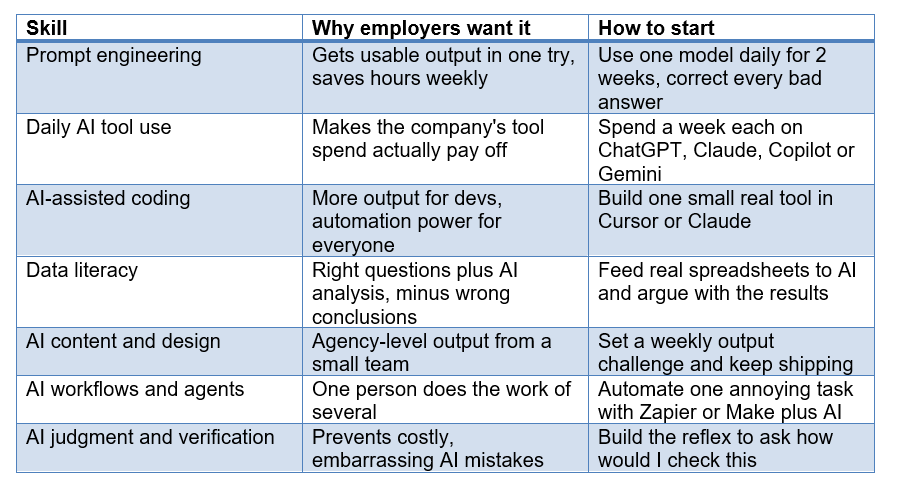
The 7 AI skills at a glance
Here is the full list in one place, so you can see why employers want each skill and where a beginner should start. If you skimmed everything above, read this table twice.
Which skills matter most for your role
Not every skill matters equally for every job, so here is where I would focus depending on the kind of role you are chasing. Learn the top two for your lane deeply, then get basic fluency in the rest.
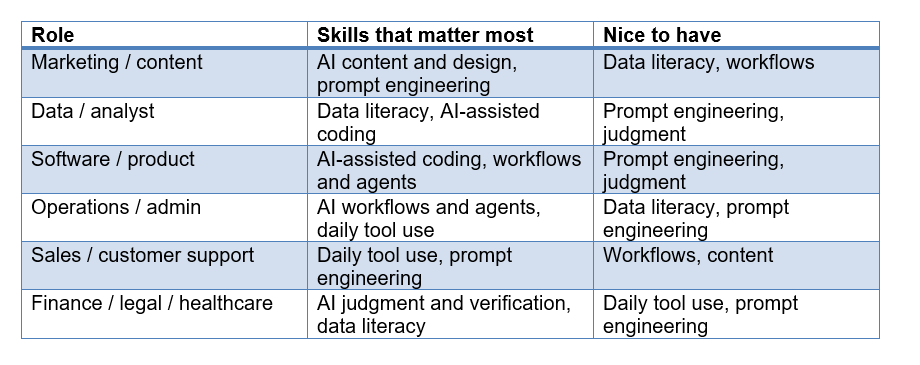
Notice that prompt engineering and daily tool use show up almost everywhere. That is not an accident. Those two are the base layer. If you only have time for two skills before your next interview, start there, because they make every other skill easier to pick up.
How to learn these skills in 5 minutes a day
You learn AI skills fast not by binging a 12-hour course once, but by using AI a little every single day until it becomes a habit, which is exactly the bet behind microlearning. I am biased here, since Unrot is built on the idea of learning AI in 5 minutes a day, but I believed it before I worked on it, because it matches how I actually got good at this stuff.
Here is the plain version. Consistency beats intensity. Fifteen minutes a day for a month will teach you more usable AI skill than a weekend bootcamp you forget by Tuesday. The reason is simple: these skills are muscle memory. You cannot cram a reflex. You build it by reaching for AI on real tasks, over and over, until not using it feels weird.
A practical 30-day approach that works: spend week one on prompt engineering with one model, week two adding a second tool and trying data analysis, week three building one small automation or coding project, and week four practicing verification and cleaning up your resume with real examples. If you want a ready-made structure, our learn AI in 30 days plan and our learn AI from scratch guide both lay out a day-by-day path so you are not guessing what to do next.
The trick that separates people who stick with it from people who quit: attach the practice to real work you already have to do. Use AI on your actual emails, reports, and problems. The learning becomes a side effect of getting your real work done faster, which means you never have to find extra motivation.
Mistakes to avoid
The biggest mistake people make learning AI skills is chasing certificates and theory instead of building a portfolio of things they actually made with AI. Here are the traps I see most, and how to dodge them.
· Collecting courses instead of shipping work. A certificate proves you sat through a course. A project proves you can do the job. Employers care about the second one. Build things, then talk about them.
· Trying to learn everything at once. Seven skills does not mean seven at the same time. Pick the two that matter for your target role, get good, then expand. Scattered effort produces scattered results.
· Memorizing prompt templates. Templates are training wheels. If you cannot explain why a prompt works, you cannot adapt it when it fails. Learn the reasoning, not the recipe.
· Trusting AI output blindly. I put this on the skills list for a reason. The fastest way to lose credibility in a new job is to present something an AI made up. Verify anything that matters.
· Ignoring the human layer. AI handles the mechanical part. Your taste, judgment, and communication are what actually make the output valuable. Do not outsource the part that makes you worth hiring.
· Waiting until you feel ready. You will never feel ready. The people getting AI jobs in 2026 started using the tools badly, in public, and improved. Start now, be bad, get better.
Frequently asked questions
What AI skills are most in demand in 2026?
The most in-demand AI skills in 2026 are prompt engineering, daily fluency with tools like ChatGPT and Claude, AI-assisted coding, data literacy, AI content creation, building automations and agents, and AI judgment. The first two are close to universal across roles, which is why they are the best place for beginners to start.
Can I get an AI job without a degree or coding background?
Yes. Most of the AI skills that get you hired in 2026 do not require a computer science degree. Prompt engineering, daily tool use, AI content, and data literacy are all learnable without code. Even AI-assisted coding is now accessible to beginners through vibe coding, where you describe what you want in plain English. A portfolio of real projects beats a degree in most hiring conversations.
What AI skills should I put on my resume in 2026?
Put specific, demonstrated skills, not buzzwords. Instead of "proficient in AI," write "used Claude and ChatGPT to cut research time by 60 percent" or "built a Zapier automation that handles inbound leads." Name the tools, the tasks, and the measurable result. Specifics get read, vague claims get skipped.
How long does it take to learn AI skills for a job?
You can reach a hireable level in most single skills in two to four weeks of daily practice. A rounded set covering several skills takes a couple of months if you practice consistently. The key is daily use on real tasks rather than occasional long study sessions, because these skills are habits more than facts.
Is prompt engineering still a real skill in 2026?
Prompt engineering is still very much a real and valuable skill, even though the standalone job title "prompt engineer" has mostly faded. It is now expected as part of nearly every knowledge role. Knowing how to get precise, reliable output from AI models is a baseline competency employers assume you have.
What is the highest paying AI skill right now?
The highest pay still goes to deep technical machine learning roles, but those need years of study. For most people, the best return on effort is combining AI-assisted coding or workflow automation with strong judgment, because that combination lets one person do the work of several and is directly tied to business value, which is what commands raises and offers.
Do I need to know how to code to work with AI?
No. Many high-value AI roles and tasks require no coding at all. That said, basic AI-assisted coding is now so accessible that picking up a little goes a long way, and it opens doors to automation. You do not need to become a developer, but being willing to build small things with AI help is a real advantage.
How do beginners start learning AI skills?
Beginners should pick one AI model, use it daily on real work for two weeks, then add a second tool and a small project. Focus on prompt engineering and daily tool use first, since they underpin everything else. Structured plans like a 30-day learning path help you avoid guessing what to do next, and short daily sessions beat rare marathon ones.
Recommended blogs
If you want to go deeper on any of the skills above, these guides are the natural next step.
· Prompt Engineering for Beginners
Ready to actually build these skills instead of just reading about them? Unrot teaches you AI in 5 minutes a day, one small lesson at a time, so the habit sticks. Start today and be the candidate who uses AI, not the one who talks about it.
References
· World Economic Forum: Future of Jobs
· Stanford HAI: AI Index Report