

How to Use ChatGPT to Study Any Subject Faster
Here is the uncomfortable truth: most students use ChatGPT to finish work, not to learn. They paste the question, copy the answer, and move on. It feels productive. It is not. The information never reaches long-term memory, and by exam week it is gone.
I want to show you the opposite approach. Used the right way, ChatGPT becomes a private tutor that explains any subject in plain English, quizzes you until ideas stick, and builds a study plan around your real schedule. That is the point of learning how to use ChatGPT to study: not to skip the thinking, but to do more of the thinking that matters, in less time.
This guide gives you seven core methods, a full prompt pack, a tool comparison, subject-by-subject tactics, and a 5-minute daily routine. No paid upgrade required. Free ChatGPT (built on OpenAI's GPT models) is enough to start today. Let me walk you through the exact system I would use if I had an exam in three weeks.
Can ChatGPT actually help you study?
Yes, ChatGPT can genuinely help you study, but only when you use it as a tutor that tests you, not as an answer machine that thinks for you. That single distinction decides whether you remember anything at all.
Decades of learning science point to two habits that beat almost everything else. The first is active recall, which means forcing your brain to retrieve an answer instead of rereading it. The second is spaced repetition, reviewing material at growing intervals so it never fully fades. In a widely cited 2006 study, psychologists Henry Roediger and Jeffrey Karpicke found that students who practiced retrieving information remembered far more a week later than students who simply reread their notes. Rereading felt easier. Testing worked better.
Here is why ChatGPT fits this so well. It can generate a quiz in seconds, mark your answers, explain what you missed, and do it again tomorrow with harder questions. A human tutor doing that costs money and needs scheduling. ChatGPT does it at 2 a.m. for free, in any subject, at whatever level you set.
My honest take: the tool is not magic, and the hype around it oversells the easy wins. A lazy prompt gives you a lazy tutor. Every method below is really a way of giving ChatGPT a clear job, so it coaches you instead of just answering you. Do that, and a phone becomes the most patient study partner you have ever had.
Set ChatGPT up as your personal tutor
Before you study any subject, spend 30 seconds telling ChatGPT how to behave. This one setup prompt changes every reply that follows, because it forces the model to teach rather than dump information.
Paste this into a fresh chat:
"You are my patient study tutor for [SUBJECT]. My level is [beginner / intermediate / advanced]. Explain ideas in simple language with real examples and analogies. After each explanation, ask me one question to check I understood before moving on. Never give me the full answer to a practice question until I have tried first."
Two design choices make this work. First, you state your level, so a biology student and a law student get different explanations of the same word. Second, you order the model to pause and question you, which quietly builds active recall into every single reply instead of leaving you to read passively.
If you use ChatGPT often, save this in Custom Instructions, found under Settings and then Personalization. Once it is saved, every new chat already knows to act as your tutor, and you never retype it. Small setup, large payoff over a whole semester.
One more tip most people miss: tell ChatGPT what you struggle with. A line like "I panic in timed exams and I mix up similar terms" makes it adjust its coaching, drill you on confusable pairs, and simulate time pressure. The more context you give, the more it feels like a tutor who actually knows you
Method 1: Turn any topic into a simple explanation
To understand a hard topic fast, ask ChatGPT to explain it at three levels: to a 10-year-old, to a beginner, then to an exam-ready student. Layering the explanation shows you exactly where your understanding breaks down.
Prompt to copy:
"Explain [topic] three times: first like I am 10, then like I am a beginner student, then at the depth an exam would test. End with the 3 points examiners care about most."
Say you are stuck on photosynthesis, or on how a transformer model works, or on the causes of World War 1. The 10-year-old version hands you the core idea with an analogy you cannot forget. The beginner version adds the real vocabulary. The exam version tells you what actually earns marks. More often than not, you discover the concept was simpler than the textbook made it feel, buried under jargon nobody explained.
Then follow up with the most powerful two-word study prompt there is: "why?" Keep asking it. Each answer pushes one layer deeper, and within four or five "why" questions you usually hit the bedrock idea that everything else is built on. That bedrock is what you actually need to memorize; the rest you can rebuild from it.
A quick warning I stand by: if ChatGPT gives an analogy that feels slightly off, say so. Ask for a different one. A wrong analogy that sticks is worse than no analogy, because you will confidently reproduce the mistake in an exam.
Method 2: Make ChatGPT quiz you (active recall)
The fastest way to lock in knowledge is to be tested on it, so tell ChatGPT to quiz you instead of explaining to you. This flips it from a lecturer into an examiner, which is where real memory gets built.
Prompt to copy:
"Quiz me on [topic] with 8 questions, one at a time. Wait for my answer before the next. After each, tell me if I am right, give the correct answer, and a one-line reason. Start easy and get harder."
Answer from memory, not from your notes. Getting a question wrong here is the point, because the effort of struggling to recall is exactly what strengthens the memory trace. Ask ChatGPT to keep a running list of everything you missed, then re-quiz you only on those at the end. That is targeted practice, the same principle behind flashcard apps like Anki and Quizlet, except you never made a single card.
For exam prep, add one line: "Write these in the style of a [board or exam name] paper." The closer your practice feels to the real test, the smaller the shock on the day. If your exam is multiple choice, ask for plausible wrong options so you learn to spot traps. If it is essay based, ask for a question plus a marking scheme, then have ChatGPT grade your answer against it.
I will say the quiet part out loud: this is uncomfortable, and that is why it works. Reading a chapter feels smooth and productive and teaches you almost nothing. Being wrong eight times in a row feels awful and teaches you the whole chapter
Method 3: Build a spaced-repetition study plan
Ask ChatGPT to turn your syllabus and deadline into a day-by-day plan that revisits each topic several times before the exam. Spacing your reviews beats cramming because memory fades on a predictable curve, and every repeat review flattens that curve.
Prompt to copy:
"I have [X days] until my [exam]. Topics: [list them]. Build a daily study plan that introduces each topic, then reviews it after 1 day, 3 days, and 7 days. Keep each day under [60] minutes and tell me exactly what to do each day."
What you get is a schedule where nothing is learned once and abandoned. Monday's topic quietly returns on Tuesday, Thursday, and the following week, each time as a fast quiz rather than a full reread. This is the Ebbinghaus forgetting curve working for you instead of against you: German psychologist Hermann Ebbinghaus showed in the 1880s that we forget most new information within days unless we revisit it, and spacing is the fix.
Paste the plan into your calendar or a free task app. When you fall behind, and you will, because life happens, just tell ChatGPT "I missed two days, rebuild the plan around what is left" and it adjusts instantly. Try getting that flexibility from a printed revision timetable taped to your wall.
Honest limitation: ChatGPT does not know your real energy levels. If it schedules your hardest subject for 11 p.m. when your brain is fried, override it. You are the manager here; the AI is the assistant that does the boring scheduling math
Method 4: Summarize notes, PDFs, and videos
When you are drowning in material, paste it into ChatGPT and ask for the core ideas, then quiz yourself on that summary. Condensing is itself a study act, as long as you test the summary instead of only reading it.
Prompts that pull their weight:
"Summarize these notes into the 7 most important points, in the simplest language possible."
"Turn this text into 10 flashcards, question on one line, answer on the next."
"Here is a video transcript. Give me the key takeaways and 3 questions to test myself."
For long PDFs and lecture slides, ChatGPT can crush a 20-page chapter into a single revisable page. For your own documents specifically, Google's NotebookLM is purpose-built: you upload your sources and it answers only from them, with citations, which cuts down on invented facts. Both are strong. The rule that matters is the second step: once you have the summary, close it and have ChatGPT quiz you on it. A summary you only read is a summary you will forget by Friday.
Watch one trap here. A summary flattens nuance. For subjects where the detail is the point, such as legal cases or the exact steps of a proof, use the summary as a map, then go back into the full material for the parts your exam will actually grade
Method 5: The teach-back loop (Feynman technique)
Explain the topic back to ChatGPT in your own words and ask it to catch every gap or mistake. Teaching something is the hardest test of understanding, which is exactly why physicist Richard Feynman built his whole learning method around it.
Prompt to copy:
"I am going to explain [topic] in my own words. Act as a strict tutor: point out anything wrong, missing, or vague, and then ask me a follow-up question on the weakest part of my explanation."
When you try to teach an idea and stall halfway through a sentence, you have found the precise spot you did not truly understand. Your own brain lets that hand-wave slide when you reread; ChatGPT does not. This single loop, run for ten focused minutes, often beats an hour of passive highlighting, because highlighting feels like studying while teaching actually is studying.
My favorite version is a little contrarian: explain it badly on purpose, then ask ChatGPT to rewrite your explanation correctly. Seeing your rough version sitting next to the clean one shows you the exact gap between what you think you know and what you actually know. That gap is your entire revision to-do list
Method 6: Turn ChatGPT into an exam and debate partner
For subjects that reward argument and application, tell ChatGPT to challenge you: play devil's advocate, run a mock viva, or argue the opposite side. Defending an idea out loud forces deeper understanding than reciting it ever will.
Try prompts like these:
"Debate me on [topic]. Take the opposing view and push back on every point I make."
"Run a 10-minute mock oral exam on [subject]. Ask follow-ups based on my answers."
"Give me an exam scenario for [topic] and grade how I apply the concept, not just define it."
This works beautifully for essay subjects, medicine, law, economics, and any interview prep. History and politics students can argue causes and counterfactuals. Business students can defend a strategy while ChatGPT plays a skeptical investor. The point is application: exams increasingly test whether you can use an idea under pressure, not just recite its definition, and this is the cheapest pressure simulator you will ever find.
A caution worth repeating: ChatGPT will sometimes argue a weak position convincingly, or concede too easily when you push. Do not treat its debate stance as authoritative truth. Treat it as a sparring partner that keeps your guard up, then verify the actual facts elsewhere.
Method 7: Fix your weak spots with error analysis
After any practice test, paste your wrong answers into ChatGPT and ask it to find the pattern behind your mistakes. Studying your errors is more efficient than studying everything again, because it targets the exact 20 percent of material costing you 80 percent of your marks.
Prompt to copy:
"Here are the questions I got wrong and my answers: [paste them]. Group my mistakes by type, tell me the root cause of each, and give me 3 targeted practice questions for my single biggest weakness."
Most students revise what they already know because it feels good. Error analysis drags you toward what you do not know, which is uncomfortable and far more valuable. You might learn that you are not bad at chemistry in general, you just consistently misread mole ratios, or that your essays lose marks on structure and not content. Once ChatGPT names the pattern, the fix is usually small and fast.
This is the method I would keep if I could keep only one. Everything else builds knowledge; error analysis stops the specific leaks that cost you grades.
The best ChatGPT prompts for studying
You do not need to memorize prompt wording. Keep this table handy and adapt the brackets to whatever you are studying. These cover the situations students hit most, from a confusing definition to a full exam simulation.
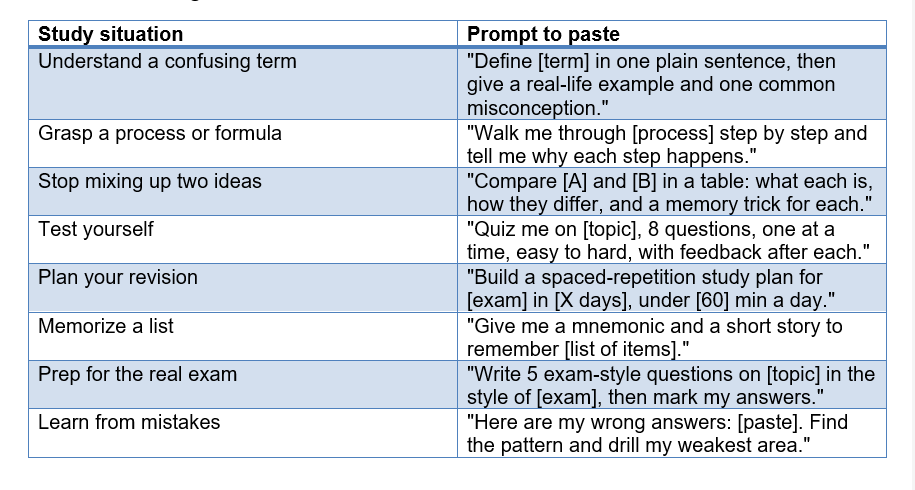
Save the three or four you use most as a note on your phone. The students who get the most out of ChatGPT are not the ones with secret prompts; they are the ones who reuse a few good ones every day.
ChatGPT vs Quizlet, Anki, and NotebookLM
ChatGPT is the most flexible study tool, but it is not always the best one for every job. The honest answer is that they work best together: ChatGPT to generate and explain, dedicated apps to drill and store. Here is how they compare.
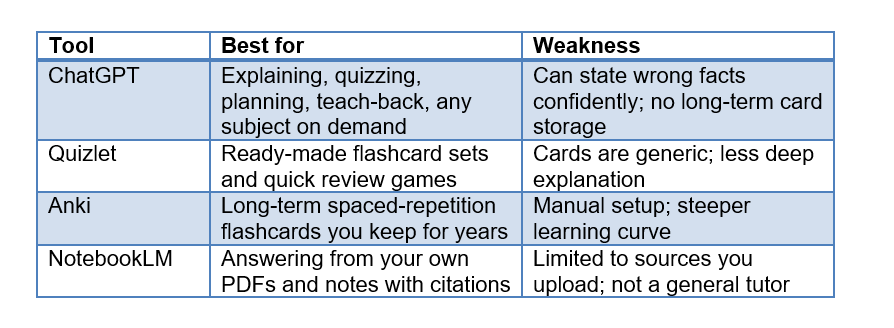
My workflow, if you want a template: use ChatGPT to explain a topic and generate flashcards, paste those cards into Anki so a proven algorithm schedules them for years, and use NotebookLM when I need answers grounded strictly in my own lecture notes. ChatGPT is the brain, Anki is the memory, NotebookLM is the fact-checker. You do not need all three, but knowing the split saves you from expecting one tool to do everything.
How to study specific subjects with ChatGPT
The method changes slightly by subject, because a maths exam and a history exam reward completely different skills. Match the tool to the test. Here is a quick starting prompt for the most common subjects.
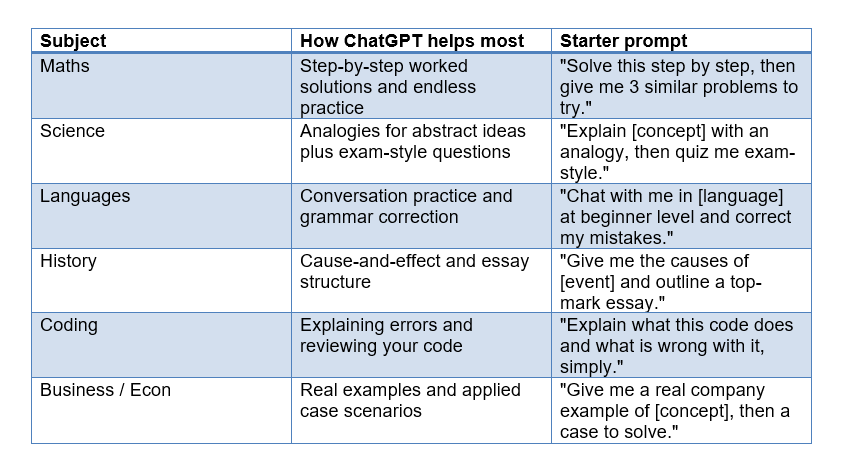
A word on maths specifically, because it is where ChatGPT slips most. It can make arithmetic and algebra mistakes that look completely convincing. Always redo the final calculation yourself, and if a step feels wrong, it might be. Use ChatGPT to understand the method, not to trust the number.
Language learners get an unfair advantage here. A patient conversation partner who never judges your accent, is free, and corrects you gently is exactly what most learners lack. Set your level, ask it to keep replies short, and talk to it daily. For deeper tool guides, our walkthroughs on using Claude and Gemini cover other strong options too.
Your 5-minute daily study routine
You do not need a two-hour session for any of this to work. A focused 5 minutes a day, repeated, beats a panicked weekend of cramming every single time, because consistency is what moves knowledge into long-term memory.
Here is the daily loop, done entirely inside one ChatGPT chat:
1. Minute 1: Ask for a one-line summary of yesterday's topic.
2. Minutes 2 to 3: Have ChatGPT quiz you on it, and answer from memory.
3. Minute 4: Teach back the one thing you got wrong.
4. Minute 5: Ask for tomorrow's small next step.
That is the whole routine. Five minutes, active the entire time, zero passive reading. Do it daily and a semester of tiny sessions quietly outperforms the all-nighter, without the stress or the crash. This is the exact idea Unrot is built on, learning AI and other hard topics in five minutes a day, because the habit beats the marathon almost every time.
If you miss a day, do not try to make it up with a giant session. Just start again tomorrow. The magic is in the streak, not in any single heroic study block
Mistakes to avoid when studying with ChatGPT
The biggest mistake is trusting ChatGPT blindly, because it can state wrong facts with total confidence. These confident errors are called hallucinations, and in study terms they mean a date, formula, or citation can simply be invented and sound completely real.
Protect yourself with a few firm habits:
Verify facts, numbers, and quotes against your textbook or a trusted source, especially in maths, medicine, and law where a wrong detail costs real marks.
Do not paste a question and copy the answer. That is the old shortcut in a new outfit, and your memory gains nothing from it.
Give context every time. "Explain the French Revolution" is weak. "Explain the causes of the French Revolution for a Year 10 history exam" is strong and gets a far better answer.
Never submit AI text as your own work. Use ChatGPT to understand, then write in your own words. Many schools and universities now run detection and treat this as misconduct.
Do not outsource the struggle. If you never sit in the discomfort of not knowing, the learning does not happen, no matter how good the tool is.
So is studying with ChatGPT cheating? Using it to think for you is. Using it to explain, quiz you, and plan your revision is just a smarter tutor. The honest line is simple: if your brain is doing the work, you are studying. If the AI is doing the work, you are not.
Frequently Asked Questions
Can ChatGPT help you study effectively?
Yes. ChatGPT works best as a study tutor that quizzes you and explains concepts simply, not as an answer key. Research on active recall and spaced repetition, including Roediger and Karpicke's 2006 study, shows that being tested on material helps you remember far more than rereading it, and ChatGPT can run both techniques on demand for free.
How do I use ChatGPT for studying?
Start by telling ChatGPT to act as a patient tutor for your subject and level. Then use it to explain topics in plain language, quiz you one question at a time, build a spaced-repetition plan, summarize notes, and let you teach concepts back. Always answer quiz questions from memory before checking the answer.
Is it cheating to study with ChatGPT?
It depends on how you use it. Asking ChatGPT to explain a concept, quiz you, or plan your revision is not cheating. Copying its output and submitting it as your own work is. A simple rule: if your brain is doing the thinking, you are studying, not cheating.
Can ChatGPT create a study plan?
Yes. Give ChatGPT your topics, your exam date, and a daily time limit, and it will build a day-by-day plan that reviews each topic after 1, 3, and 7 days. If you fall behind, tell it how many days you missed and it will rebuild the schedule instantly.
Can ChatGPT make quizzes and flashcards?
ChatGPT can generate quizzes, practice exams, and flashcards from any topic or from your own notes in seconds. Ask it to quiz you one question at a time and keep a list of what you missed, or ask it to turn a chapter into question-and-answer flashcards you can review like Anki or Quizlet cards.
Is ChatGPT free for students?
Yes. OpenAI offers a free version of ChatGPT that is enough for studying, including explanations, quizzes, and study plans. Paid tiers add more advanced models and higher limits, but every method in this guide runs on the free plan.
Which is better for studying, ChatGPT or Google?
They do different jobs. Google is better for finding sources, official documents, and verifying facts. ChatGPT is better for explaining concepts your way, quizzing you, and building study plans. The strongest approach is to learn with ChatGPT and fact-check anything important with Google.
How do I stop ChatGPT from giving me wrong information?
You cannot fully stop it, so verify anything that matters. Ask it to show its reasoning, give context in your prompt, cross-check facts against your textbook, and use a source-grounded tool like NotebookLM for your own documents. Treat ChatGPT as a smart tutor who is occasionally confidently wrong
Recommended Blogs
· Prompt Engineering for Beginners
· How to Use Claude AI for Free
· Learn AI in 30 Days: Free Plan
Daily beats cramming, every time. Five focused minutes with a tutor in your pocket will outlearn a weekend of panic. That is the whole idea behind Unrot
References
· OpenAI Help Center: Getting Started
· RetrievalPractice.org: The Science of Retrieval Practice
· Wikipedia: Testing Effect (Active Recall)
· Wikipedia: Forgetting Curve (Ebbinghaus)