
How to Use Claude AI for Free: Step-by-Step Guide
Claude reached 952.6 million monthly web visits in May 2026, up 855% year-on-year, making it the fastest-growing major AI chatbot by any metric, according to Momentic and Similarweb. Most of those new users arrived on the free plan and were surprised by what they found.
The free plan includes web search, file uploads, memory that persists across conversations, Projects, and Artifacts. No credit card. No trial period. No expiry. You sign up and start. Most beginners do not know half of what the free plan includes until they have been using it for a week.
This guide walks you through the whole thing: how to create your account, what you actually get on the free plan, how the daily limits work and what to do when you hit them, and the five use cases where Claude consistently outperforms every other free AI tool. I use Claude daily. The step-by-step below reflects what actually works, not what looks good in a screenshot.
What Is Claude AI? (The 60-Second Version)
Claude is an AI assistant built by Anthropic, a safety-focused AI company founded in 2021 by Dario and Daniela Amodei along with other former OpenAI researchers. Anthropic uses a training approach called Constitutional AI, which teaches Claude to reason about its own behaviour against written principles rather than just optimising for human approval ratings.
In practice, that means Claude is unusually good at three things: writing that reads like a person wrote it, working with long documents without losing track of context, and following precise, detailed instructions without adding unwanted filler.
Claude runs on several models. The free tier gives you Claude Sonnet 4.6, which is a capable general-purpose model. The paid tiers add access to Claude Opus 4.8 (Anthropic's most capable standard model as of June 2026) and Claude Fable 5 (the flagship, launched June 9, 2026).
By February 2026, 70% of companies' first AI budget went to Anthropic, according to data cited by Suprmind. Claude hit the number one spot on the US Apple App Store in early March 2026. If you have heard it mentioned at work or in a WhatsApp group and want to understand what the fuss is about, the free plan is where you start.
If you want the technical picture of what makes Claude different from other AI tools, our post on what generative AI is covers the underlying architecture in plain English.
How to Sign Up for Claude: Step-by-Step
Getting into Claude takes under two minutes. Here is the exact process.
Step 1: Go to claude.ai
Open any browser and visit claude.ai. No download required to start. The website works on any device, mobile or desktop. You see a clean interface with a text box front and centre. Do not type yet. Create your account first so your conversations are saved.
Step 2: Click Sign Up
Click the Sign Up button at the top right. You have three options: sign in with Google, sign in with Apple, or register with an email address. Google sign-in is the fastest. If you use Gmail, click Continue with Google and your account is created in one step with no additional form-filling.
If you use email and password, enter your email address, create a password, then check your inbox for a verification link from Anthropic. Click it to confirm. The whole process takes about 90 seconds.
You must be at least 18 years old to use Claude. You must also be in one of Anthropic's supported regions, which includes India, most of Asia-Pacific, North America, Europe, and Latin America. If the signup flow works when you visit claude.ai, the service is available in your region.
Step 3: Complete the quick setup
After verifying your account, Claude asks two quick questions: what you plan to use it for (writing, coding, research, etc.) and your experience level with AI. Answer honestly. These responses help Claude personalise its first interactions with you. You can skip them if you want to jump straight in.
Step 4: Send your first message
You are now on the free plan. No credit card was entered. Type your first question or task into the message box and press Enter or click the arrow button. Claude responds in seconds. You are now a Claude user.
Step 5: Download the mobile app (optional but recommended)
Anthropic has official free apps on both Google Play (Android) and the App Store (iOS). Search for Claude in either store, install it, and sign in with the same account. The mobile app gives you the same free-tier access and is well-designed for quick queries on the go. Your conversation history syncs across web and mobile automatically.
What You Get on the Free Plan (Full List)
The free plan as of June 2026 is significantly more capable than it was even six months ago. Anthropic expanded free-tier features substantially in February and March 2026. Here is the complete list of what is included at no cost.
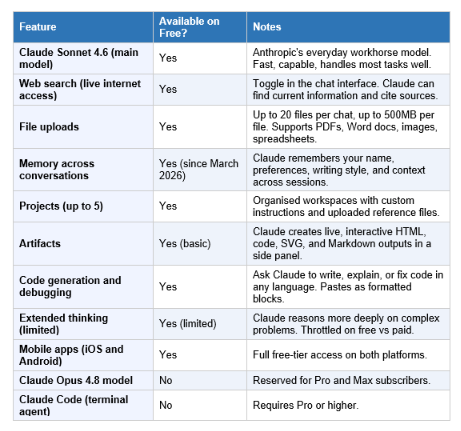
The features that surprise most new users: web search is genuinely live (Claude can find today's news and cite sources), memory actually persists (you do not re-introduce yourself every session), and Projects are available even without paying (you can upload your CV, style guide, or reference documents and every conversation in that Project automatically reads them).
How Claude's Daily Limits Actually Work
This is the section every beginner guide buries or skips. Understanding the limit system prevents frustration.
Claude does not use a fixed daily message count. It uses a rolling 5-hour window system. When you send your first message, a 5-hour clock starts. You can send roughly 15 to 40 messages within that window on the free plan, depending on message complexity. When the window ends, your capacity refills and a new 5-hour window can begin.
The reason the number varies is that Claude measures usage in tokens, not messages. A short question like 'What is photosynthesis?' costs very few tokens. A request to analyse a 40-page PDF, write a 1,500-word report based on it, and then edit the report costs many times more. Longer inputs and outputs, file attachments, and extended thinking all consume more of your window.
According to Anthropic's official help centre, 'the number of messages you can send will vary based on demand, and we may impose other types of usage limits to ensure fair access to all users.' Translation: during peak hours (roughly 9 AM to 5 PM on workdays in US time zones), your effective limit may be lower than during off-peak hours. Indian users in IST (UTC+5:30) who use Claude in the early morning or late evening typically experience less throttling because US peak demand is lower.
When you hit the limit, Claude shows you a message saying when your next window opens. Typical waits are 1 to 5 hours. You cannot pay a small amount to get more messages. The only options are to wait, to switch to a different AI tool for that task, or to upgrade to Pro.
Three practical workarounds for free users
• Keep conversations focused. Each new conversation starts fresh, which means Claude does not carry context from previous ones. This is a feature (privacy) but also means starting fresh conversations for unrelated tasks keeps each conversation shorter and uses fewer tokens.
• Use Projects for recurring context. Instead of pasting your company background, writing style, or role description at the start of every conversation, put it in a Project once. Claude reads it automatically. You save tokens every single session.
• Ask for one thing at a time. A single prompt that asks Claude to research a topic, write an article, edit it, format it as a table, and summarise it in three bullets will consume significantly more capacity than breaking those into five separate messages. For complex tasks, sequencing is more efficient than stacking.
The 5 Best Things to Do With Claude for Free
Claude has real strengths that differ from other AI tools. These five use cases are where the free plan delivers the most value for a beginner, with example prompts you can use immediately.
1. Writing and editing
Claude's writing quality is consistently described as more human and less formulaic than alternatives. Where ChatGPT often produces outputs that read like a press release, Claude's default register is closer to how a thoughtful person would actually write.
Example prompt: 'I need to write a follow-up email to a potential client who attended our webinar last week. The client is a marketing manager at a mid-size Indian FMCG company. I want to be warm but professional, reference the webinar without being generic, and suggest a 20-minute call. Keep it under 150 words. Here is some context about our product: [paste 2-3 sentences about your product].'
That level of specificity, providing the recipient's role, company type, tone target, action goal, and word limit, is what separates a useful output from a generic template. Claude handles detailed instructions better than most alternatives.
2. Summarising and analysing documents
Upload a PDF, Word file, or image of a document and ask Claude specific questions about it. Claude can read contracts, research papers, annual reports, lecture notes, or textbooks and answer targeted questions, pull out key facts, compare sections, or flag contradictions.
Example prompt: 'I have uploaded a 22-page research report on electric vehicle adoption in India. Please give me: (1) the three most important findings, (2) the key methodology used, (3) any numbers that relate to tier-2 and tier-3 cities specifically, and (4) one paragraph summary I could share with a non-technical colleague.'
The 200,000-token context window on Claude means it can hold approximately 500 pages of text in a single conversation. This is roughly 2.5 times larger than GPT-4o's default 128K window, which matters when you are working with large documents.
3. Research with web search
Turn on the web search toggle (it appears as an icon in the chat interface next to the upload button) and Claude can search the internet in real time, read multiple sources, and synthesise a cited answer. This is different from asking Claude without web search, where it draws only from its training data with a cutoff around January 2026.
Example prompt (with web search on): 'What are the three most important developments in AI regulation in India in the last 30 days? Cite your sources and note if any of the information conflicts across sources.'
Web search on Claude is slower than Perplexity but the quality of synthesis is often higher because you can ask more complex, structured questions. For pure research tasks, I use Perplexity for speed and Claude for depth.
Our detailed guide on how to use Perplexity AI explains when to use it versus Claude for research tasks.
4. Learning and explaining concepts
Claude is an excellent patient explainer. It follows your instruction level precisely, whether you ask for an explanation suitable for a 10-year-old, a university student, or an industry professional. It does not add disclaimers when you did not ask for them, and it does not truncate explanations unless you set a word limit.
Example prompt: 'Explain how a transformer neural network works. I have a basic understanding of how neural networks function but I have never studied transformers. Use one concrete analogy and then walk through the actual mechanism. Keep it under 400 words.'
Claude's ability to honour length constraints and maintain a chosen analogy through an explanation is genuinely better than alternatives. For students studying AI, data science, finance, law, or any technical field, Claude on the free plan is a more useful tutor than most paid study tools.
5. Brainstorming and structured thinking
When you need to think through a decision, plan a project, or generate ideas across multiple angles, Claude is unusually good at structured brainstorming. It does not just list ten generic options. If you give it constraints, it operates within them. If you tell it to steelman a position you disagree with, it does so seriously.
Example prompt: 'I am a freelance graphic designer in Pune considering starting a YouTube channel about design. Give me five distinct angles for the channel, each targeting a different potential audience. For each angle, describe the content format, the ideal viewer, and one reason it might fail. Be honest about the downsides.'
The instruction to 'be honest about the downsides' is important. Most AI tools default to supportive, validation-heavy responses. Claude will comply with a direct instruction to give you the uncomfortable version.
Claude Free vs Pro vs Max: Which Plan Do You Need?
The free plan is a real, functional tool. The question of when to upgrade has a specific answer.
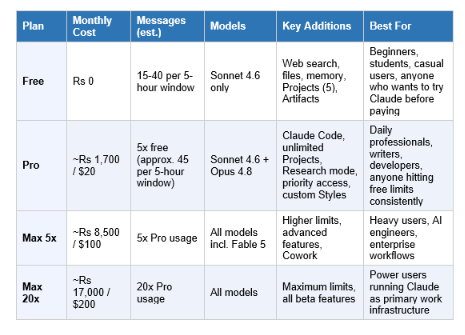
My honest take: do not upgrade preemptively. Use the free plan until the usage limits interrupt your actual work, not your imagined future work. For a student using Claude a few times a day for assignments, the free plan is sufficient. For a professional who uses Claude for 2 to 3 hours of active work daily, you will hit the limit regularly and Pro is worth the Rs 1,700 per month.
The one case where Pro is worth it even for light users: if you need Claude Code (the terminal-based coding agent), which is Pro-only. Claude Code is not a chatbot plugin. It reads your entire codebase, writes across multiple files, and runs commands autonomously. For developers, that capability alone justifies the subscription.
For a full head-to-head of the three major AI assistants on price, features, and strengths, see our comparison of ChatGPT vs Claude vs Gemini.
5 Beginner Mistakes That Waste Your Free Limit
These are the patterns I see most often from new Claude users that burn through the free limit without producing good results.
Mistake 1: Prompts that are too short
'Write me an email' produces a mediocre, generic output. It also uses almost as many response tokens as a good output would, because Claude still has to generate a full email. You wasted tokens on something you will not use. 'Write a follow-up email to a client who attended our product demo, thanking them for attending, referencing one specific feature they asked about (automated invoicing), and suggesting a 15-minute call next week. Tone: warm but professional. Length: under 120 words.' produces something you can send.
Mistake 2: Asking Claude to do everything in one message
A prompt that says 'Research the Indian EV market, summarise the key findings, write a 500-word analysis, and format it as a slide deck' will consume significantly more of your window than breaking this into three focused messages. More importantly, each step will be better if Claude can focus on it individually and you can course-correct between steps.
Mistake 3: Not using Projects for recurring context
If you work in the same domain every day (marketing for a specific company, studying for a specific exam, writing in a specific style), not using a Project means you re-explain your context on every session. A Project with your company description, target audience, and writing guidelines uploaded once pays back immediately from the second conversation onwards. Free users get five Projects, which is enough for most workflows.
Mistake 4: Using Claude for tasks it is not best at
Claude does not generate images. For image generation, you want Midjourney, DALL-E, or Adobe Firefly. Claude's voice mode is limited compared to ChatGPT's real-time audio. For voice-first interactions, ChatGPT is the better choice. Using Claude for tasks where another free tool does better wastes your Claude limit on suboptimal results.
Our post on best free AI tools for students maps different tools to different task types so you can use each where it is strongest.
Mistake 5: Not turning on web search when you need current information
Claude's training data has a cutoff of approximately January 2026. Without web search, it cannot tell you about anything that happened after that date. It will sometimes generate plausible-sounding but outdated information with confidence. When your question involves anything time-sensitive, recent events, or current prices, turn on web search. The toggle is in the message input bar. It is off by default.
Using Claude in India: What to Know
Claude is available in India and works in English. Hindi support works reasonably well for general conversation but the quality drops for technical, professional, or nuanced prompts. Tamil, Telugu, Kannada, and other regional languages work at a basic level but are not at the same quality as English output. For serious professional work in India, English prompts consistently produce better results.
The usage pattern among Indian users has changed fast. Claude web visits in India grew substantially through late 2025 and early 2026, with Indian users being one of Anthropic's fastest-growing non-US segments. According to Anthropic's data cited by multiple tech outlets, Claude grew 855% year-on-year and 228% in a single quarter (February to May 2026) globally, with India contributing significantly to that growth.
Privacy is a real consideration for Indian users. On the free plan, Anthropic's privacy policy states that conversations may be used to improve models. If you are working with confidential client data, internal company documents, or sensitive personal information, avoid pasting that content into the free-tier Claude chat. On Pro, Max, Team, and Enterprise plans, Anthropic does not train on your data by default.
You can opt out of data use for model training on any plan, including free. Go to Settings in your Claude account, navigate to Privacy, and look for the Data Usage settings. Opting out means your conversations are not used for training, though Anthropic may still retain them for safety review purposes according to their privacy policy.
Indian IST users who use Claude in the mornings (before 9 AM) or evenings (after 9 PM) typically encounter fewer rate-limit restrictions because the US-based peak demand period (roughly 9 AM to 5 PM EST, which is 7:30 PM to 3:30 AM IST) overlaps with Indian night hours. For professionals who can schedule AI work time, this is worth knowing.
For a comparison of Claude against Perplexity specifically for research and study tasks, see our post on how to use Perplexity AI which covers that tool in the same depth.
Frequently Asked Questions
Is Claude AI free to use?
Yes. Claude has a genuine free plan at claude.ai with no credit card required and no expiry. The free plan gives you access to Claude Sonnet 4.6, web search, file uploads (up to 20 files per chat, up to 500MB per file), memory across conversations, up to 5 Projects, and basic Artifacts. Usage is limited to roughly 15 to 40 messages per 5-hour rolling window depending on message complexity and current server demand. According to Anthropic's official help centre, limits vary based on demand and the complexity of your prompts.
How do I access Claude AI for free?
Go to claude.ai in any browser, click Sign Up, and register with Google, Apple, or an email address. No payment information is requested. Email registration requires verifying your address via a link sent to your inbox. The whole process takes under two minutes. You must be 18 or older and in a supported region. India is a supported region. Claude is also available as a free app on the App Store (iOS) and Google Play (Android) using the same account.
What can you do with Claude AI for free?
On the free plan you can write and edit documents, summarise and analyse uploaded files (PDFs, Word docs, images, spreadsheets), search the live web for current information, generate code in any programming language, brainstorm and plan in structured conversations, and create interactive outputs like HTML pages, charts, and visualisations through Artifacts. You can also organise ongoing work into up to 5 Projects with custom instructions. What you cannot do on free: access the Opus 4.8 model, use Claude Code for terminal-based development, or use Research mode.
How many messages can I send on Claude for free?
Anthropic does not publish an exact number because the limit is token-based rather than message-based. As a rule of thumb, free users can send approximately 15 to 40 messages per 5-hour rolling window. Short simple messages use fewer tokens and extend your window. Long messages with file uploads, detailed instructions, and extended thinking responses consume more. During peak hours (9 AM to 5 PM US time zones), the effective limit may be lower. When the window is exhausted, Claude shows when it will reset, typically 1 to 5 hours later.
Is Claude better than ChatGPT for free users?
It depends on what you need. Claude's free plan is better for long document analysis (200K token context vs ChatGPT's 128K), nuanced writing that sounds human, and precise instruction-following. ChatGPT's free plan is better for image generation (which Claude cannot do), voice mode, and plugin ecosystem breadth. Claude includes memory on the free tier since March 2026, which ChatGPT also offers. For students and knowledge workers who primarily write, research, and analyse, most users find Claude more useful. For creative tasks involving images, audio, or the GPT plugin ecosystem, ChatGPT wins.
What is the difference between Claude free and Claude Pro?
Claude Pro costs $20 per month (approximately Rs 1,700) and provides roughly 5 times more usage than the free plan, access to Claude Opus 4.8 (the most capable standard model), unlimited Projects (vs 5 on free), Claude Code for terminal-based agentic coding, Research mode for deep multi-source research, priority access during peak hours so you do not wait in queue, and custom Style profiles for saving writing preferences. The free plan is sufficient for casual and moderate use. Pro becomes worth it when you hit free limits regularly during actual work sessions.
Does Claude AI require a credit card?
No. The free plan at claude.ai requires only an email address (or Google or Apple sign-in). No credit card, no payment information of any kind. There is no trial period that converts to a paid subscription. You sign up and use it indefinitely at the free tier until you choose to upgrade. If you upgrade to Pro, Max, or another paid plan, that is when payment information is collected.
Can I use Claude on my phone for free?
Yes. Anthropic has official free apps for both Android (Google Play) and iOS (App Store). Download the Claude app, sign in with your account, and you have the same free-tier access as the web version. Your conversation history syncs across devices. The mobile app is well-designed and handles the same tasks as the browser version, including file uploads, web search, Projects, and Artifacts. The usage limits are shared across all platforms: using Claude on your phone and on your computer draws from the same rolling window.
How do I write better prompts for Claude?
The four elements that improve Claude prompts most reliably are: specificity (describe the exact output you want, not the general direction), context (tell Claude who you are and why you need this), constraints (set a word limit, tone, format, or reading level), and a follow-up instruction (tell Claude what to do if it is uncertain, e.g. 'ask me for clarification rather than guessing'). The single biggest improvement is replacing 'write me an email' with 'write me a 120-word professional email to a client in the retail industry following up after a product demo, thanking them for their time and suggesting a follow-up call next Tuesday or Wednesday.'
Our full guide to prompt engineering for beginners covers all the techniques with copy-paste examples you can use immediately.
Recommended Reads
• How to Use Perplexity AI: The Research Tool
• How to Use ChatGPT for Free: Step-by-Step
• ChatGPT vs Claude vs Gemini 2026
• Prompt Engineering 2026: Write Better Prompts
• Best AI Tools for Professionals in 2026
Free does not mean limited. It means a starting point. What you do with it is entirely up to you.
References
• Anthropic Help Centre -Get Started
• Anthropic Help Centre - How Do Usage
• Momentic Marketing - Top Generative AI Chatbots by Market Share
• Engadget - Claude AI: What's Free in 2026
• FreeAcademy.ai - Claude Free Plan Limits
• FreeAcademy.ai - Claude Pro vs Max vs Free
• Suprmind Claude Features 2026
• AItomation Academy - Claude Pricing in 2026