How to Use Google Gemini: A Complete Beginner's Guide
Most people open Google Gemini, ask it one question like they would Google, get an answer, and close it. They just used maybe five percent of it. Gemini is not a search box with a personality. It is a research assistant, a document builder, an image and video studio, and a set of custom AI helpers, all in one app that is free to start.
Gemini is Google's AI, and by 2026 it is woven through everything Google makes: it answers in Search, lives in its own app, and reaches into Gmail, Docs, and Calendar. That deep integration is its biggest advantage over rivals, and also the reason it is easy to underestimate, because it hides so much power behind a simple chat box.
This guide fixes that. I will walk you through getting started, the models and what the names mean, the four features that make Gemini special, the honest free versus paid breakdown, and the prompt habits that separate a frustrating session from a genuinely useful one. No technical background needed, just a Google account and a few minutes
How to Start Using Gemini in 2 Minutes
To start using Gemini, go to gemini.google.com or download the Gemini app, sign in with a free Google account, and type your question in the box. That is the entire setup. If you have a Gmail address, you already have access, and the core features cost nothing.
Once you are in, three things are worth knowing immediately:
The chat box is the heart of it. Type or speak a request, and Gemini answers. You can keep the conversation going, and it remembers the context of your current chat.
You can give it files and images. Upload a PDF, a photo, a spreadsheet, or a document, and ask questions about it. This is where Gemini goes beyond a search engine.
Gemini Live is voice mode. Tap the voice icon and you can have a natural spoken conversation, useful hands-free or for practicing a language.
If Gemini is your first AI tool, it helps to understand what is happening underneath. It runs on a large language model, the same kind of technology behind ChatGPT and Claude, which predicts helpful responses from the patterns it learned in training. Knowing that shapes how you talk to it, as the prompt section below explains.
One habit to build from day one: treat it like a capable assistant you are briefing, not a search engine you are querying. That single shift changes everything about the results you get, and it is the theme running through this whole guide.
Gemini's Models: What Flash and Pro Actually Mean
Gemini comes in two main flavors, Flash for speed and Pro for harder thinking, and knowing which you are using matters. Flash is the fast, efficient default that handles the vast majority of everyday tasks, while Pro is the stronger model for complex reasoning, long documents, and difficult problems.
As of mid-2026, the free app defaults to a Flash model for general chat, which is quick and more than capable for most requests: writing, summarizing, brainstorming, quick questions. When you hit something genuinely hard, a knotty analysis, a long document, tricky code, you want Pro, and the free tier gives you a daily allowance of it before asking you to wait or upgrade.
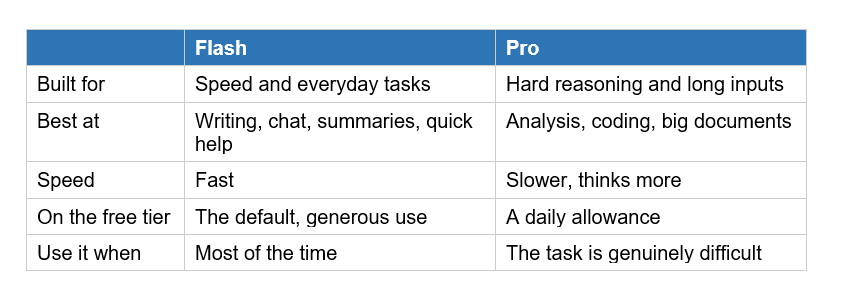
The practical rule is simple: stay on Flash for daily work, and switch to Pro only when Flash gives you a shallow or wrong answer on something hard. Using Pro for a simple email is like driving to the corner shop in a race car, slower to get going and no better for the trip. Match the model to the difficulty.
Google updates these models often, and the exact version numbers change through the year. We track each release with benchmarks and pricing in our coverage comparing ChatGPT, Claude, and Gemini, if you want to know which specific model is current.
Deep Research: Your Personal Analyst
Deep Research is Gemini's standout feature: you give it a topic, and it performs hundreds of web searches, reasons across the sources, and delivers a long, cited report. It is like handing a research assistant a brief and getting back a structured document an hour later, except it takes minutes.
To use it, select Deep Research, type what you want to know, and Gemini first shows you a research plan. You can edit that plan before it starts, which is the step most people skip and shouldn't. Then it goes off, reads across many sources, and returns a report with citations you can check. The free tier includes a handful of these reports per month, which is plenty to see why it matters.
The difference between a weak report and a great one is entirely in how you brief it. A vague request gets a vague report. Instead of research electric cars, tell it everything it needs:
Why you need it and how you will use it, for example a buying decision or a school project.
Your level of understanding, so it pitches the depth correctly.
The specific subtopics or angles you care about, like cost, reliability, and charging.
The format you want, such as tables, bullet points, or arguments with counterarguments.
Deep Research is only as good as the brief. Spend two minutes telling it exactly what you want, and it saves you two hours.
This is the feature I would point a skeptic to first. It is the clearest example of Gemini being not a chatbot but a genuine tool, and it is the kind of task that used to take a person an afternoon of tabs and note-taking.
Gems: Build Your Own AI Assistants
Gems are custom versions of Gemini that save your instructions, so you do not have to repeat yourself every time. Think of a Gem as a specialized assistant you set up once, then reuse forever, each tuned for one recurring job.
Say you often need help writing professional emails in a particular tone. Instead of explaining that tone every time, you make a Gem: give it a name, tell it your role, your style, and any rules once, and save it. From then on, that Gem already knows the brief. You can build one for study help, one for coding, one for social media captions, one for meal planning, whatever you do repeatedly.
In 2026, Google upgraded these into what it calls Super Gems, which can include buttons and simple forms, so they behave like lightweight apps rather than just saved prompts. That turns a Gem from a shortcut into a small tool your whole team or family could use without knowing how to prompt at all.
My advice: the first time you catch yourself typing the same background instructions into Gemini for the third time, stop and make it a Gem. Five minutes of setup saves you that repetition for months, and it is the feature most beginners never touch despite it being genuinely easy.
Canvas: Turn Chats Into Documents and Apps
Canvas is a workspace inside Gemini where your chat becomes an editable document, and it can even build small interactive tools. Instead of an answer trapped in a chat bubble, you get a proper draft you can refine side by side with the AI.
When you write, code, or plan in Canvas, the result opens in its own panel that you can edit directly, ask Gemini to change, and shape section by section. It is far better than a normal chat for anything you are actually producing: an essay, a report, a plan, a piece of code. You watch the document take form and steer it, rather than copying answers out one at a time.
The more surprising trick is that Canvas can build interactive mini apps. Upload a report and it can turn the content into a study tool or a flashcard game. Give it data and it can produce an interactive visual. This is where Gemini stops feeling like a chatbot and starts feeling like something that makes things for you, which is exactly the shift that makes these tools worth learning properly.
If you want to get more out of features like this, the skill underneath is prompting well, and it transfers across every AI tool. Our guide on writing better AI prompts with templates works just as well for Gemini as for ChatGPT.
Images and Video: Nano Banana and Veo
Gemini can create images and video directly from your words, using Google's Nano Banana for pictures and Veo for video. You describe what you want, and Gemini generates it, no separate tool or account needed. This turns the same app you use for writing into a small creative studio.
For images, just ask: a watercolor painting of a mountain village at sunrise, or a clean logo for a coffee shop called Ember. The free tier includes image generation with Google's latest image model, so you can experiment without paying. It is genuinely useful for social posts, presentations, mockups, or just play.
Under the hood, these image tools are diffusion models, the technology that builds pictures by removing noise from static. If you are curious how that actually works, our explainer on what a diffusion model is breaks it down, and it makes you noticeably better at writing image prompts.
Video is the newer frontier. With Veo, Gemini can generate short video clips from text or an image, including synchronized audio and sound effects, which makes it a serious creative tool rather than a novelty. Video generation is mostly reserved for paid plans given how much compute it uses, but it signals where these all-in-one AI apps are heading: type an idea, get a finished piece of media.
Gemini Free vs Paid: What You Actually Need
The honest answer for most people is that the free tier of Gemini is enough, and you should only pay once you hit its limits doing real work. The free plan is generous, and the paid plans mainly buy you more of the strong model, higher limits, and video.
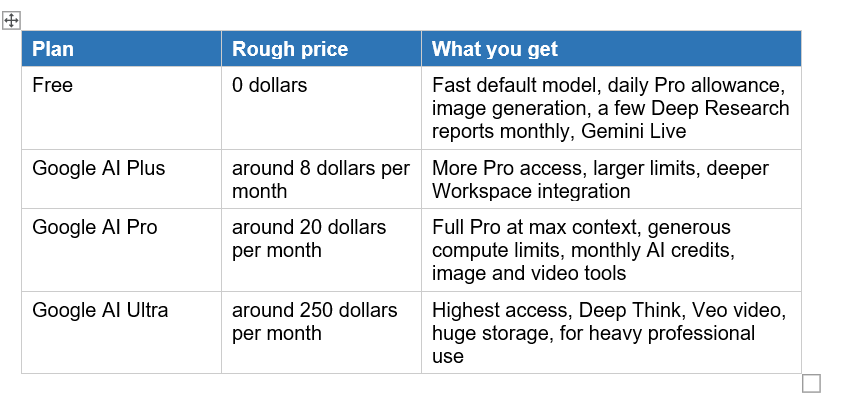
A useful change Google made in 2026: paid plans moved away from fixed daily prompt caps to compute-based usage limits. In plain terms, a simple text question now spends almost nothing of your allowance, while a long video generation or heavy coding session spends more. You are billed by how hard the work is, not by a flat count, which is fairer for normal users.
My recommendation: start free and use it seriously for a couple of weeks. If you keep bumping into the Pro daily limit or want regular Deep Research and image work, Google AI Pro at around 20 dollars is the sweet spot. AI Ultra at 250 dollars is for professionals who live in these tools, not for curious beginners. Do not pay before you feel the limits, because you may never hit them.
7 Prompt Habits That Get Better Results
The single biggest factor in how useful Gemini is comes down to how you ask, and a few simple habits transform your results. Most disappointing AI answers come from vague requests, not a weak model.
Give context, not just a question. Instead of write a cover letter, say write a cover letter for a junior marketing role at a startup, from a recent graduate with two internships. Context is everything.
Tell it who to be. Start with act as a patient maths tutor or you are an experienced editor. Giving Gemini a role sharpens the tone and depth of its answer.
Say what format you want. Ask for a table, a bulleted list, a step-by-step plan, or a short paragraph. If you do not specify, you get whatever it chooses.
Give it your files. Upload the document, image, or data you are working with instead of describing it. Gemini is far stronger when it can see the actual material.
Iterate, do not restart. If the first answer is close, refine it: make it shorter, more formal, add an example. Treat it as a conversation, not a slot machine.
Ask it to think step by step. For hard problems, adding work through this step by step often produces a noticeably more careful, accurate answer.
Always verify important facts. Gemini can be confidently wrong, so check anything that matters against a real source, especially names, numbers, and dates.
That last habit deserves emphasis, because AI tools sometimes state false things with total confidence. Our guide on why AI makes things up explains why this happens and how to protect yourself, and it applies to Gemini exactly as it does to ChatGPT.
A weak answer is usually a weak question. Brief Gemini like a smart assistant and it behaves like one.
Gemini vs ChatGPT: Which Should You Use?
The short answer is that Gemini shines if you live in Google's ecosystem and want deep research and multimodal tools, while ChatGPT and Claude each have their own strengths, and the honest move is to try more than one. They are close enough in 2026 that the best pick depends on your workflow, not on a clear winner.
Gemini's real edge is integration and reach. It connects to Gmail, Docs, Drive, and Calendar, it powers answers in Google Search, and its Deep Research and generous free multimodal features are genuinely strong. If your digital life already runs on Google, Gemini slots in with almost no friction, which is a bigger advantage in daily use than any single benchmark score.
That said, the differences between the major tools are real, and worth understanding before you commit. We compare their strengths, weaknesses, and pricing in detail in our guide on ChatGPT vs Claude vs Gemini, and it is the fastest way to decide which fits you.
My honest advice: the tools are free to start, so do not agonize. Spend a week each with Gemini and with one rival, using our guide to using Claude alongside this one, and let your own tasks decide. The best AI tool is the one whose habits you actually build, and that is something only you can test.
Frequently Asked Questions
Q: How do I start using Google Gemini?
Go to gemini.google.com or download the Gemini app, sign in with a free Google account, and type your question in the chat box. If you have a Gmail address, you already have access. The core features, including chat, image generation, and basic Deep Research, are free to use right away.
Q: Is Google Gemini free to use?
Yes. The free tier includes the fast default model, a daily allowance of the stronger Pro model, image generation, a few Deep Research reports per month, and voice mode through Gemini Live. Paid plans like Google AI Pro at around 20 dollars per month add more Pro access, higher limits, and video generation, but most people can do a lot for free.
Q: What can Google Gemini do?
Gemini can chat, write and edit text, summarize documents, answer questions about files and images you upload, run Deep Research reports with citations, build documents and mini apps in Canvas, generate images and video, and hold voice conversations. It also connects to Gmail, Docs, and Calendar, making it useful across Google's whole ecosystem.
Q: What is the difference between Gemini Flash and Pro?
Flash is the fast, efficient model that handles most everyday tasks like writing and quick questions, and it is the free app's default. Pro is the stronger model built for hard reasoning, long documents, and complex problems, but it is slower and, on the free tier, limited to a daily allowance. Use Flash most of the time and switch to Pro for genuinely difficult tasks.
Q: What is Deep Research in Gemini?
Deep Research is a Gemini feature that performs hundreds of web searches on a topic you give it, reasons across the sources, and produces a long, cited report in minutes. You can review and edit its research plan before it starts. It works best when you brief it clearly on why you need the report, your knowledge level, and the format you want.
Q: What are Gems in Gemini?
Gems are custom versions of Gemini that save your instructions, so you set up a specialized assistant once and reuse it. For example, you might make a Gem for professional emails or study help. In 2026, Super Gems can include buttons and forms, making them behave like lightweight apps rather than just saved prompts.
Q: Is Gemini better than ChatGPT?
Neither is clearly better in 2026; it depends on your needs. Gemini excels at integration with Google apps, Deep Research, and free multimodal features, while ChatGPT and Claude have their own strengths. Since all are free to start, the best approach is to try more than one and let your actual tasks decide which fits your workflow.
Q: Do I need a paid plan to use Gemini well?
No, most people can do a lot on the free tier, which includes the default model, a daily Pro allowance, image generation, and some Deep Research. Consider paying only once you regularly hit those limits doing real work. Google AI Pro at around 20 dollars per month is the practical upgrade; the 250-dollar Ultra plan is aimed at heavy professional users.
Recommended Reads
• ChatGPT vs Claude vs Gemini (2026)
• How to Use Claude AI for Free (Beginner's Guide)
• How to Use Perplexity AI for Research
• How to Write a Perfect AI Prompt: 10 Templates
The people who get the most from AI are the ones who learn the tools properly, not just poke at them. Five minutes a day is enough to master one feature at a time.
References
• Google - Gemini App and Features
• Precision AI Academy - Google Gemini
• Fresh van Root - Mastering Gemini: Gems