

ChatGPT vs Gemini vs Claude: Best AI for Students in 2026
If you are hunting for the best AI for students in 2026, you have probably done what I did: opened three tabs, pasted the same question into ChatGPT, Gemini, and Claude, and then wasted twenty minutes deciding which answer to trust. That tab-switching tax is real, and it adds up over a semester. So this is the honest ChatGPT vs Gemini vs Claude breakdown I wish someone had handed me: which AI is best for students, task by task, with a clear verdict instead of vague praise.
Here is my short answer before the details. There is no single winner for every student. ChatGPT is the most versatile all-rounder and the easiest starting point. Google Gemini is the best value if you already live in Gmail, Docs, and YouTube, and it has a genuinely useful free tier. Claude, from Anthropic, is my pick for long reading, careful writing, and thinking through hard problems without the answer feeling rushed. I will explain exactly where each one shines and where each one let me down, so you can pick the best AI chatbot for studying based on your actual coursework.
A quick note on honesty. All three tools are made by serious labs: ChatGPT by OpenAI, Gemini by Google DeepMind, and Claude by Anthropic. They change fast, so I am keeping this evergreen and avoiding fake benchmark numbers. What I compare are the durable things that matter to a student: free access, ease of use, writing quality, math and reasoning, research help, document upload, context length, study features, and privacy. If you remember one line, remember this: the best AI is the one you learn to prompt well, not the one with the flashiest launch.
Quick verdict: which AI should students use?
Quick answer: for most students, ChatGPT is the safest first pick, Gemini is the best free everyday option inside Google apps, and Claude is the best for serious writing and long documents. Pick by your biggest need rather than by hype.
Let me name winners so you are not stuck reading the whole article to get a decision. If you want one tool that does a bit of everything and rarely confuses you, start with ChatGPT. If you are on a tight budget and already type essays in Google Docs, Gemini gives you the most for free. If you write long essays, read dense PDFs, or need an AI that explains its reasoning patiently, Claude is my favorite. I have flipped between all three during a single week of assignments, and honestly that is fine: they are cheap or free enough that you do not have to marry one.
Here is the contrarian point I will keep coming back to. Most students obsess over which AI is most accurate, but accuracy is not the real differentiator anymore. On typical homework, all three are close enough that the gap is smaller than the gap between a good prompt and a lazy one. What actually changes your grades is how you use the tool: whether you make it show its steps, whether you check its sources, and whether you learn the material instead of outsourcing it. The tool matters less than the habit.
So my quick verdict per need looks like this. Best all-rounder: ChatGPT. Best free daily driver: Gemini. Best for essays and long reading: Claude. Best for math you want explained: a tie between ChatGPT and Gemini, with Claude close behind. Best for research where sources matter: Gemini for live web results, Claude for reasoning over documents you provide. Now let me show my work.
How I compared them
Quick answer: I judged all three on the ten things that actually affect student work, using the same prompts across each tool and giving honest marks rather than crowning a single champion.
My criteria were free access, ease of use, writing quality, math and reasoning, coding help, research and sources, document upload, context length (how much text it can hold at once), study features, and privacy. I fed each AI identical tasks: draft a five paragraph essay, solve a multi step algebra problem, summarize a long research PDF, debug a short Python script, and turn a lecture transcript into flashcards. I paid attention not just to whether the answer was right, but to whether it helped me understand why.
I want to be upfront about my bias. I care more about learning than about speed. An answer that hands me a finished essay teaches me nothing; an answer that walks me through structure and lets me write the sentences is worth more, even if it takes longer. That preference shows up in my verdicts, so if you just want output fast, weigh my opinions accordingly. I also tested mostly on the free tiers, because that is what most students actually use, and I will flag when a paid plan meaningfully changes the picture.
One more thing I checked: how each tool behaves when it does not know something. This matters because all large language models can make up facts, a habit sometimes called hallucination. In my testing, none of the three was immune. The difference was in tone. Claude was the most likely to hedge when unsure, ChatGPT was confident and usually right but occasionally confidently wrong, and Gemini leaned on live search to back up claims. Treat every answer as a draft to verify, not gospel.
Head-to-head comparison table
Quick answer: the table below sums up ChatGPT vs Gemini vs Claude across the dimensions students care about most, so you can scan it in thirty seconds.
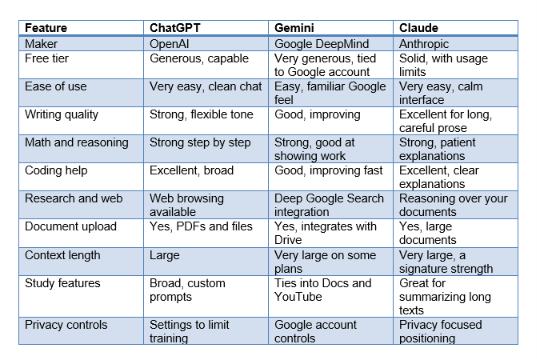
Read that table as a starting map, not a scoreboard. The rows where the three genuinely diverge are context length, web integration, and writing feel. Everywhere else they are closer than the marketing suggests. Next I will go tool by tool with the honest good and bad for students.
ChatGPT: strengths and weaknesses for students
Quick answer: ChatGPT from OpenAI is the most versatile all-rounder and the easiest tool to recommend to a student who is just getting started.
What I like most about ChatGPT is that it rarely leaves me confused. The interface is clean, the responses are well organized, and it handles almost anything a student throws at it: outlining an essay, explaining a chemistry concept, generating practice questions, cleaning up a resume, or debugging code. It is the Swiss Army knife of the three. If a friend asked me which single AI to install first, I would say ChatGPT, because the learning curve is basically flat and the free tier is capable enough for daily coursework.
Its writing is genuinely good and, importantly, flexible. I can ask for a formal tone for a lab report and a casual tone for a discussion post, and it switches cleanly. It is also strong at the meta work around studying: turning messy notes into an outline, generating a study schedule, or role playing as an examiner who quizzes me. For coding, it is excellent, explaining errors in plain language and offering fixes that usually work on the first try. That breadth is why so many students default to it.
Now the weaknesses, because no tool is perfect. ChatGPT can be confidently wrong. When it does not know something, it sometimes invents a citation or a statistic with total conviction, which is dangerous for research. I have caught it inventing a study that did not exist. It is also the tool most likely to just do the whole assignment for you, which is convenient and also a trap if you actually need to learn the material. And on the free tier, heavy days can hit usage limits at annoying moments. My honest take: brilliant generalist, but keep your skeptic hat on for anything factual.
If you are new to it, our guide on how to use ChatGPT for free walks through the basics without spending a rupee. The short version: be specific, ask it to show its reasoning, and never paste a factual claim into an assignment without checking it against a real source.
Gemini: strengths and weaknesses for students
Quick answer: Google Gemini is the best value for students who already live in the Google ecosystem, thanks to a generous free tier and deep integration with Search, Docs, and YouTube.
Gemini, built by Google DeepMind, has one enormous advantage for students: it is right where you already work. If you write in Google Docs, store files in Drive, and watch lectures on YouTube, Gemini plugs into that world naturally. I can ask it to summarize a long YouTube lecture, pull key points from a Doc, or draft an email to a professor without leaving my browser. For a lot of students, that convenience is worth more than any benchmark, and the free access is generous compared with the competition.
Its tightest strength is live information. Because Gemini leans on Google Search, it is often the best of the three at answering questions about recent events or fetching current facts with links you can click and verify. For research where freshness matters, I reach for Gemini first. It is also improving quickly at math and coding, and it is comfortable showing its work step by step, which is exactly what you want when you are trying to learn rather than just copy an answer.
The weaknesses are real too. In my testing, Gemini's longer-form writing sometimes felt flatter than ChatGPT's or Claude's, needing more editing to sound human. It can also be inconsistent: a brilliant answer one minute, a shallow one the next. And because it is woven into Google, students who want to keep schoolwork separate from their main account should check the privacy settings carefully. My take: unbeatable value and freshness, but budget time to polish its prose.
If Gemini is your pick, our walkthrough on how to use Google Gemini covers the features students actually benefit from, including how to bring in your Docs and get cleaner summaries.
Claude: strengths and weaknesses for students
Quick answer: Claude from Anthropic is my favorite for serious writing, reading long documents, and thinking through hard problems with patient, well-explained reasoning.
Claude is the tool I reach for when the work is heavy. Its writing has a calm, considered quality that needs less editing to sound human, which is a real gift when you are drafting an essay you actually care about. It is also outstanding at holding a lot of text at once, so I can drop in a fifty page reading and ask genuine comprehension questions, or paste an entire chapter and have it build a study guide. That large context window is Claude's signature strength for students who read a lot.
I also appreciate how Claude handles uncertainty. Of the three, it was the most likely to tell me when it was not sure, to flag assumptions, and to reason out loud instead of blurting a confident answer. For learning, that honesty is valuable, because it models how a careful thinker actually works. It is strong at coding too, with explanations that teach rather than just patch. When I want to understand something deeply rather than get a quick answer, Claude is usually my pick.
The weaknesses: Claude does not have the same live web reach as Gemini, so for very current facts it is weaker unless you give it the source yourself. Its free tier has usage limits that can interrupt a long study session. And because it is more measured, students who just want a fast, decisive answer sometimes find it a touch verbose or cautious. My honest take: the best pure writing and reading partner of the three, weakest on live web lookups. Our guide on how to use Claude AI shows how to get the most from its long-document strengths.
Best for writing essays
Quick answer: for writing essays, Claude is my top pick for polished, human-sounding prose, with ChatGPT a very close second for flexibility and speed.
When I drafted the same five paragraph essay across all three, Claude's version needed the least editing. Its sentences varied naturally, the transitions were smooth, and it avoided the robotic rhythm that gives AI writing away. ChatGPT was close and more flexible on tone: if I needed a punchy opening or a specific voice, it adapted faster. Gemini's draft was solid but the flattest, and I spent the most time rewriting it to sound like me. For pure essay quality, my order is Claude, then ChatGPT, then Gemini.
That said, do not let any of them write the whole essay. The smart move, and the one that actually helps your grade, is to use AI as a thinking partner. Ask it to critique your thesis, suggest three counterarguments, or point out where your logic is weak. I get far more value asking Claude to poke holes in my draft than asking it to write one from scratch. Your voice is the thing a professor is grading, and it is also the thing AI cannot fake convincingly. Learning to prompt well helps here, and our prompt engineering for beginners guide is a good starting point.
Best for math and problem solving
Quick answer: for math, ChatGPT and Gemini are neck and neck at showing clear step by step solutions, with Claude close behind for problems that need careful reasoning.
Math is where you must demand that the AI shows its work, because a right answer with no steps teaches you nothing and a wrong answer with steps is at least fixable. All three can walk through a problem, but I found ChatGPT and Gemini slightly quicker to lay out clean, numbered steps for algebra, calculus, and statistics. Gemini's ability to pull in current formulas or definitions via search was a nice bonus. Claude was excellent at the reasoning-heavy word problems where you have to set the equation up correctly before solving.
My strong warning: verify every numerical answer. Language models are pattern machines, not calculators, and all three occasionally slip on arithmetic even when the setup is perfect. I always ask the AI to solve the problem two different ways, or I check the final number by hand or with a calculator. Used that way, these tools are fantastic math tutors, because they explain the concept behind the step, not just the step. Used lazily, they will happily hand you a confident wrong answer. The habit matters more than the tool.
Best for research and sources
Quick answer: for research, Gemini wins on fresh web results with clickable sources, while Claude wins when you already have the documents and need careful reasoning over them.
Research splits into two jobs, and the best tool depends on which one you are doing. If you need current information from the open web, Gemini's tight link to Google Search makes it the most reliable at fetching recent facts with sources you can actually click and check. That verifiability is exactly what you want when a claim will end up in a paper. ChatGPT with web browsing does this too and is a strong second. For live research, Gemini is my first stop.
But research is also about reasoning over material you already have, and here Claude shines. Because it holds so much text at once, I can drop in several papers or a long report and ask it to compare arguments, find contradictions, or summarize the methodology. It is the best of the three at not losing the thread across a very long document. My honest contrarian note: no matter which tool you use, never cite a source the AI gives you without opening it yourself, because all three can invent citations that look perfectly real. If you cannot find the source, it probably does not exist.
Best for coding
Quick answer: for coding help, ChatGPT and Claude are both excellent, with ChatGPT slightly ahead on breadth and Claude ahead on clear, teaching-style explanations.
For computer science students, all three are genuinely useful, but the top two are close. ChatGPT has the widest coverage: it handles obscure libraries, older languages, and weird error messages with impressive range, and it usually gets a fix right on the first attempt. Claude is my pick when I want to understand the code, not just make it run. Its explanations read like a patient teaching assistant walking you through why the bug happened, which is how you actually get better. Gemini is improving fast and is perfectly capable for common tasks.
My advice for students: use these tools to learn, not to launder assignments. Ask the AI to explain a concept, review your code, or suggest a better approach, then write the solution yourself. I learned more debugging alongside Claude than I ever did copying a fix. If you want to go deeper on coding-specific tools and workflows, that is a whole topic of its own, but for general homework help, ChatGPT and Claude are both more than enough. Whichever you choose, make it explain every line it writes.
Best for studying and quizzes
Quick answer: for studying and self-quizzing, ChatGPT is the most versatile, while Claude is best at turning long readings into study guides and flashcards.
This is where AI genuinely changed how I study. My favorite technique is active recall: instead of rereading notes, I ask the AI to quiz me. ChatGPT is superb at this, because I can tell it to act as a strict examiner, ask one question at a time, wait for my answer, and then grade me. That back and forth is far more effective than passive review, and ChatGPT's flexibility makes it easy to set up. It is also great at building spaced repetition schedules and explaining a concept five different ways until one clicks.
Claude earns its place here through sheer reading capacity. When I have a fifty page chapter and an exam in two days, I paste the whole thing into Claude and ask for a structured study guide, then flashcards, then ten practice questions ranked by difficulty. It keeps track of the whole text without losing detail. Gemini is handy too, especially for summarizing YouTube lectures into notes. My take: use ChatGPT to quiz you and Claude to digest heavy reading. The tool that works is the one you will actually open at 11 pm before an exam.
Best free option
Quick answer: Gemini is usually the best free AI for students in 2026 thanks to its generous limits and Google integration, though ChatGPT and Claude both offer capable free tiers worth using.
If money is tight, and for students it usually is, the free tiers matter more than any premium feature. Gemini tends to give the most generous free access, and because it is tied to your Google account and the apps you already use, there is nothing extra to set up. For everyday studying, drafting, and quick research, the free version handles the vast majority of coursework. That is why I recommend Gemini as the default free daily driver for most students.
ChatGPT's free tier is also very capable and is the friendliest place to start if you are brand new to AI. Claude's free tier is excellent for writing and long reading, though its usage limits can interrupt a marathon study session sooner. My honest advice: you do not need to pay to get real value from any of these. Start free, use all three for different jobs, and only consider paying if you hit limits constantly or need a specific premium feature. For a deeper look at the free landscape, our roundup of free AI tools for students is a useful companion. And if you want to squeeze the most out of a free plan, learning to prompt well pays off more than upgrading.
Best tool by task (table)
Quick answer: the table below maps each common student task to my recommended AI, so you can jump straight to the right tool for the job in front of you.
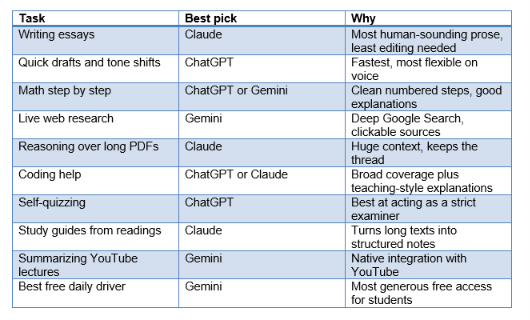
Notice how the winners rotate. That is the whole point: there is no universal best AI for students, only the best AI for a specific task. If you internalize this table, you will stop wasting time in three tabs and go straight to the tool that fits the job.
How to use all three together
Quick answer: the smartest students do not pick one AI; they use ChatGPT, Gemini, and Claude as a team, sending each task to whichever tool is strongest for it.
Here is the workflow I actually use during a busy week. I start research in Gemini because of its live web access and clickable sources. Once I have the material, I move the heavy reading and drafting into Claude, which handles long documents and produces the cleanest prose. For quick edits, tone changes, coding help, and self-quizzing, I bounce over to ChatGPT because it is the fastest and most flexible. It sounds like a lot of switching, but with a clear map of what each tool is for, it takes seconds to decide.
A second technique I love is cross checking. When a factual answer really matters, I ask the same question in two different tools and compare. If ChatGPT and Gemini agree and both cite something I can verify, my confidence goes up. If they disagree, that disagreement is a flag to dig deeper, which is exactly the kind of skepticism good research requires. Using the three together is not overkill; it is a built-in fact checking system that a single tool cannot give you. For a broader side by side of the three, our ChatGPT vs Claude vs Gemini comparison goes even deeper.
Which is safest for academic integrity
Quick answer: no AI is automatically safe or unsafe for academic integrity; safety comes from how you use it, and using AI to understand rather than to submit is what keeps you on the right side of the line.
Let me be direct, because this matters more than any feature comparison. Turning in AI-written work as your own is cheating at almost every school, and AI detectors are unreliable in both directions, so do not gamble your record on beating them. The genuinely safe path is to use these tools the way you would use a tutor or a study group: to explain concepts, quiz you, critique your drafts, and help you understand material. That use is not only allowed at most institutions, it makes you a better student.
Between the three, I will not crown one as more ethical, because the ethics live in your choices, not in the software. That said, Claude's habit of explaining its reasoning and flagging uncertainty nudges you toward learning rather than copying, which I find quietly helpful. My firm opinion: always check your school's specific AI policy, always disclose AI use when required, and never submit anything you could not explain if a professor asked you about it in person. If you cannot defend a sentence out loud, it should not be in your paper. Used honestly, AI is one of the best study aids students have ever had; used to dodge the work, it robs you of the education you are paying for.
FAQ
Which AI is best for students in 2026?
There is no single winner. ChatGPT is the best all-rounder and easiest starting point, Gemini is the best free daily option and strongest for live research, and Claude is best for essays and long reading. Pick based on your biggest need, or use all three for different tasks.
Is ChatGPT, Gemini, or Claude better for writing essays?
For polished, human-sounding essays I rank Claude first, ChatGPT a close second for flexibility, and Gemini third because its longer prose usually needs the most editing. Whichever you use, treat it as an editor and thinking partner, not a ghostwriter.
Which AI is most accurate for math and homework?
ChatGPT and Gemini are slightly ahead for clean step by step math, with Claude close behind on reasoning-heavy problems. But no language model is a reliable calculator, so always verify the final number and ask the AI to show every step.
What is the best free AI for students?
Gemini is usually the best free AI for students in 2026, with generous limits and built-in Google integration. ChatGPT and Claude also have capable free tiers, so you can get real value without paying anything.
Which AI is best for research and citing sources?
Gemini is best for live web research with clickable sources, and Claude is best for reasoning over documents you already have. In every case, open and verify each source yourself, because all three can invent citations that look real.
Which AI is safest for academic integrity?
None is automatically safe or unsafe; it depends on how you use it. Using any of the three to understand, quiz yourself, and critique drafts is fine at most schools. Submitting AI-written work as your own is cheating. Always check your school's policy.
Should I pay for a premium plan as a student?
Usually not at first. The free tiers of all three cover the vast majority of coursework. Consider paying only if you constantly hit usage limits or need a specific premium feature. Start free and upgrade based on real friction, not hype.
Can I use all three AIs at the same time?
Yes, and I recommend it. Research in Gemini, draft and read long documents in Claude, and do quick edits, coding, and self-quizzing in ChatGPT. Cross checking a fact in two tools is a simple built-in way to catch mistakes.
Recommended Blogs
· Prompt Engineering for Beginners
Want to actually learn AI instead of just picking a tool? Unrot teaches you AI in 5 minutes a day, one bite-sized lesson at a time. Start today and get more out of every chatbot you use.