How to Use AI to Summarize Long PDFs and Videos
It is 11 p.m., you have a 90-page PDF due tomorrow, and a two-hour recorded lecture you never watched. I have been exactly there, and it is a miserable feeling. The good news: you can now learn how to use AI to summarize almost anything, and turn that 90-page monster into a one-page brief in about five minutes. This guide walks through how to summarize a PDF with AI, how to summarize a YouTube video with AI, and how to do it in a way you can actually trust, not just a wall of text you paste and pray over.
I have tested this workflow on messy scanned contracts, dense academic papers, product manuals, and marathon conference talks. Some tools are brilliant. Some quietly make things up. By the end of this piece you will know which AI to reach for, the exact steps and prompts I use, and how to catch the one mistake that trips up most beginners. No fluff, just the process that saves me hours every single week.
Can AI really summarize PDFs and videos?
Yes, modern AI tools can summarize both PDFs and videos accurately, as long as the source text or transcript fits inside the model's context window and you verify the key facts. This is the honest answer up front, because the marketing around AI summarizers oversells the magic and undersells the limits.
Here is what is actually happening under the hood. Automatic summarization is a decades-old field in natural language processing, and today's large language models like ChatGPT (OpenAI), Claude (Anthropic), and Gemini (Google) are extraordinarily good at it. They read the full text, identify the load-bearing ideas, and compress them. For a PDF, the tool extracts the text layer and feeds it to the model. For a video, it first pulls the transcript (from captions or speech-to-text), then summarizes that transcript. So in most cases you are not summarizing the video itself, you are summarizing its words. That distinction matters, and I will come back to it.
The single biggest limit is the context window: the amount of text a model can hold at once. In 2026, Gemini leads with roughly a one-million-token window, Claude sits around 200,000 tokens, and ChatGPT's flagship models handle around 128,000 or more depending on the tier. As a rough rule, 100,000 tokens is about 75,000 words, or a 250-page book. A 90-page PDF fits comfortably in any of them. A 900-page textbook does not, and that is where people get burned: the tool silently reads only part of the file and confidently summarizes the fraction it saw.
My honest opinion after a lot of testing: AI summaries are excellent for understanding the gist, terrible as a substitute for reading anything legally or medically binding, and somewhere in between for study. Treat the summary as a smart friend's recap, not gospel. Verify anything that carries a consequence. Do that, and the time savings are genuinely enormous.
Which AI tool should you use to summarize
For most people, ChatGPT or Claude is the best all-round choice for documents, Gemini wins on very long files, and NotebookLM is the best free tool for turning sources into study notes. There is no single winner, so pick based on the job in front of you.
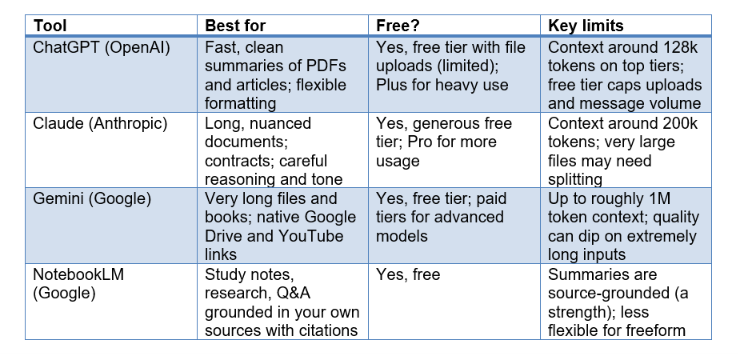
I use all four, and I switch constantly. When I want a fast, clean summary of a report I drop it into ChatGPT. When the document is long and nuanced, or I need careful reasoning over a contract, I go to Claude, which in my experience handles long-form structure and tone the best. When a file is genuinely huge, hundreds of pages, Gemini's massive context window is the only one that swallows it whole. And when I am studying and want to ask a source questions over and over, NotebookLM is my favorite because it grounds every answer in the documents you upload and cites them.
Here is how they compare for summarizing documents and media. Free tiers change often, so treat the free column as a general guide, not a contract.
One contrarian take: do not obsess over which tool is best. The difference between a good summary and a bad one is almost always the prompt and the source quality, not the logo. A clear prompt in the free tier of any of these beats a lazy prompt in the most expensive model. I have watched people pay for upgrades to fix a problem that a better instruction would have solved for free.
How to summarize a PDF with AI (step by step)
To summarize a PDF with AI, upload the file to ChatGPT, Claude, or Gemini, ask for a structured summary with a specific length and format, then spot-check the output against the document. That is the whole loop, and it takes about five minutes. Here is the exact process I follow.
1. Pick your tool based on length. Under 200 pages, any of ChatGPT, Claude, or Gemini is fine. Over 300 pages, start with Gemini or plan to split the file.
2. Check the PDF is text, not an image. Try to select text with your cursor. If nothing highlights, it is a scanned image and the AI cannot read it directly. Run it through OCR first (many tools do this automatically, but not all).
3. Upload the file. In ChatGPT, use the attachment (paperclip) button. In Claude, drag the file into the message box. In Gemini, attach the file or paste a Google Drive link.
4. Write a specific prompt. Do not just say summarize this. Tell it the length, the audience, and the format. Example: Summarize this PDF in about 300 words for someone with no background in the topic. Give me a one-line takeaway, five key points as bullets, and any numbers or dates that matter.
5. Ask follow-up questions. The real power is the conversation after the summary. Ask what did the author get wrong, or explain section 3 like I am twelve, or pull every action item into a checklist.
6. Verify the load-bearing facts. Open the PDF, use Ctrl+F to find the key numbers and claims the summary made, and confirm they are real. This takes 60 seconds and it is the step almost everyone skips.
A few field notes. If you use ChatGPT to summarize a PDF on the free tier and it says the file is too large, split it into two or three PDFs and summarize each, then paste those summaries back and ask for a combined overview. This chunking trick works everywhere and it is how I handle files that blow past the context window. For a quick, no-account option, Gemini inside a Google account tends to have the smoothest upload experience, and it can also summarize a Google Doc directly.
My opinion: the best free AI to summarize documents for most people is Claude, because the free tier is generous, it reads long PDFs well, and it rarely mangles structure. But if you already live inside Google, NotebookLM plus Gemini is a hard combination to beat for zero dollars.
How to summarize a long video or YouTube lecture
To summarize a long video or YouTube lecture, get the transcript first, then feed that transcript to an AI with a clear prompt, or paste the YouTube link directly into a tool that supports it like Gemini or NotebookLM. Remember, an AI video summarizer is really summarizing the words, so the transcript quality sets the ceiling.
Here is the method I use to summarize a YouTube video with AI, in order of least to most effort.
7. Try the direct link first. Paste the YouTube URL into Gemini or add it as a source in NotebookLM and ask for a summary. When it works, this is the fastest path by far.
8. If the link is not supported, grab the transcript manually. On YouTube, click the three dots under the video, choose Show transcript, then copy the text. Paste it into ChatGPT or Claude with your prompt.
9. For a local video file or a lecture recording, generate a transcript first. Many note apps and meeting tools export transcripts, or you can use a speech-to-text tool. Then summarize that text like any other document.
10. Ask for a timestamped outline. A prompt I love: Summarize this lecture as a timestamped outline with the main topic at each stage, then list the three most important takeaways. Timestamps let you jump back to the exact moment for anything you want to rewatch.
Two honest cautions from experience. First, auto-generated captions are often wrong on names, jargon, and numbers, so the AI inherits those errors. If a speaker's name or a statistic matters, verify it against the video. Second, a summary strips out demonstrations, on-screen slides, and body language. For a coding tutorial or a lab demo, the summary tells you what was covered but not how to do it, so use it as a map, not a replacement for watching the key sections.
My take: for study, summarizing the lecture transcript and then quizzing yourself against it beats passive rewatching every time. I turn a two-hour talk into a one-page outline, skim it, then rewatch only the two or three segments I flagged as fuzzy. That single habit cut my review time in half.
How to summarize a research paper or textbook chapter
To summarize a research paper or textbook chapter, upload it and ask the AI for a structured breakdown: the research question, method, key findings, limitations, and why it matters, in plain language. Academic text is dense and precise, so your prompt should force the AI to separate what the authors claim from what they actually proved.
For research papers, this is my go-to prompt structure: Summarize this paper for a smart non-expert. Give me the research question in one sentence, the method in two sentences, the main findings as bullets with the key numbers, the limitations the authors admit, and one sentence on why this matters. Flag anything that sounds overstated. That last line matters, because papers often hedge in the text and AI summaries tend to sand off the hedging and make results sound more certain than they are.
NotebookLM shines here. Upload several papers as sources, and it will answer questions across all of them with citations pointing back to the exact passage. When I am doing a literature review, I upload ten papers, ask what do these studies disagree about, and get a grounded answer I can trace. That traceability is the difference between a study aid and a guessing machine.
For textbook chapters, ask for a study-oriented summary: the core concepts, the definitions I must memorize, worked examples restated simply, and five practice questions with answers. This turns a passive read into an active study session. One contrarian point: do not summarize the entire textbook at once even if the context window allows it. Chapter-by-chapter summaries are far more accurate and far more useful, because the AI keeps its attention on one topic instead of blurring twenty.
Best prompts for better summaries
The best summary prompts specify length, audience, format, and a verification instruction, because vague prompts produce vague summaries. Saying summarize this gives you a generic paragraph; saying exactly what you want gives you something usable. After a lot of trial and error, these are the prompt templates I reuse constantly. Steal them.
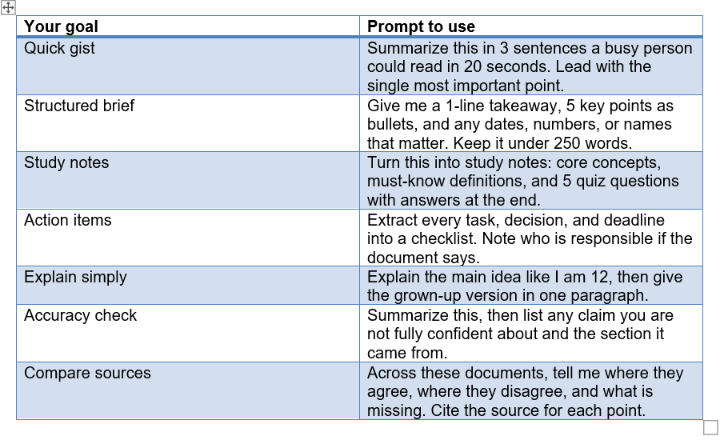
Three principles make all of these work better. First, always give a word count or sentence count; it forces prioritization. Second, name the audience, because a summary for a beginner and a summary for an expert are completely different documents. Third, ask the AI to cite sections or quote the source for its biggest claims. That one habit surfaces errors immediately, and it costs you nothing. If you want to go deeper on writing instructions that behave, our prompt engineering guide is a solid next step.
My opinion: the accuracy-check prompt in that table is the most underrated instruction in this entire article. Asking the model to flag its own low-confidence claims will not catch everything, but it catches a surprising amount, and it turns the AI from a confident narrator into a slightly nervous assistant, which is exactly the personality you want when facts are on the line.
How to check the summary is accurate
To check an AI summary is accurate, verify every specific fact (numbers, names, dates, quotes) against the source, and be suspicious of any claim that sounds too clean, because AI can hallucinate confidently. This is the step that separates people who use AI well from people who eventually get embarrassed by it.
Hallucination is when the model states something false as if it were true. It happens because these models predict plausible text, not verified facts. In a summary, hallucinations usually show up as invented statistics, a conclusion the author never made, a citation that does not exist, or a subtle flip of the meaning (the paper said might reduce risk and the summary says reduces risk). None of these look wrong on the page, which is exactly why they are dangerous.
My five-point verification routine, which takes about two minutes:
· Search the source for every number and name in the summary using Ctrl+F. If it is not in the document, it is a red flag.
· Re-read the summary's strongest claim and find the exact sentence it came from. Confirm the AI did not overstate it.
· Ask the AI directly: which of these points are you least confident about, and quote the source text for each. Then check those first.
· Watch for certainty creep. If the source hedges and the summary does not, trust the source.
· For anything high-stakes (legal, medical, financial), read the original section yourself. A summary is a shortcut to understanding, not a shortcut to responsibility.
A contrarian point people resist: the better an AI writes, the more you should verify it, not less. Fluent, confident prose is persuasive even when it is wrong, and modern models are extremely fluent. I trust a clumsy summary that shows its sources more than a beautiful one that asserts everything. If you want the full picture on why models invent facts, it is worth understanding the mechanism rather than just the symptom.
How to turn a summary into study notes or action items
To turn a summary into study notes or action items, follow up your summary prompt with a transformation prompt that reshapes the content into flashcards, a checklist, or an outline. The summary is the raw material; the second prompt is where it becomes useful. This is my favorite part of the workflow because it is where AI stops saving you reading time and starts saving you thinking time.
For studying, I chain prompts. After the summary, I ask: make 15 flashcards from this as question and answer pairs, then quiz me one at a time and wait for my answer before showing the next. That last instruction turns a static list into an active recall session, which is one of the most effective study methods there is. If you want a full routine built around this, our guide to studying with ChatGPT goes deep on it.
For work, I turn summaries into action items. After summarizing a long report or a meeting transcript, I ask: extract every decision, task, and deadline into a table with columns for item, owner, and due date. Then I paste that straight into my task manager. A 40-page report becomes a five-row action list in under a minute.
Other transformations I use constantly:
· Make a one-page cheat sheet I could print and glance at during an exam.
· Rewrite this summary as a LinkedIn post in my voice, then as a three-tweet thread.
· Turn this into an FAQ with the ten questions a beginner would actually ask.
· Create a timeline of every event mentioned, in order.
My take: the summary is the least interesting thing AI does with a document. The transformations are the real reward. Once you internalize that any source can become notes, quizzes, checklists, or teaching material with one more sentence, you stop reading to remember and start reading to reshape.
Mistakes to avoid
The biggest mistakes when using AI to summarize are trusting the output blindly, feeding it files that are too large or scanned, and writing lazy prompts. Avoid these and you will get far more from every tool. I have made all of them, so this list is confession as much as advice.
· Trusting without verifying. Never quote an AI summary's numbers or claims in something that matters without checking the source. This is the mistake that hurts.
· Ignoring the context window. If you paste a 600-page document into a model that can only read 200 pages, it will summarize the part it saw and never warn you. Check the length and split large files.
· Summarizing scanned image PDFs. If you cannot select the text, the AI cannot read it. Run OCR first or the summary will be empty or invented.
· Writing lazy prompts. Summarize this gives you a shrug. Specify length, audience, and format every time.
· Treating the video summary as the video. Summaries skip demos, visuals, and tone. For anything hands-on, watch the key parts.
· Over-summarizing. Compressing a nuanced argument into three bullets can strip the exact caveat that mattered. Match the summary length to how much the details count.
· Forgetting privacy. Do not upload confidential or sensitive documents to a tool without checking how your data is handled and whether it is used for training.
One more, and it is a mindset mistake: expecting AI to understand rather than compress. These tools are exceptional at compression and pattern-matching, but they do not understand a contract the way a lawyer does or a paper the way its author does. Use them to get oriented fast, then bring your own judgment. That combination, AI speed plus human judgment, is where the real payoff lives.
Frequently asked questions
What is the best free AI to summarize documents?
Claude and NotebookLM are the strongest free options. Claude reads long PDFs well on a generous free tier, and NotebookLM (free) is best for study because it grounds every answer in your uploaded sources and cites them. ChatGPT and Gemini also have capable free tiers with file uploads.
Can ChatGPT summarize a PDF file?
Yes. Attach the PDF using the paperclip button and ask for a summary. The free tier supports uploads with limits, and paid tiers handle larger files and more usage. If the file is too big, split it into parts and summarize each, then combine.
How do I summarize a YouTube video with AI for free?
Paste the video link into Gemini or add it to NotebookLM and ask for a summary. If the link is not supported, open the transcript on YouTube (three dots then Show transcript), copy it, and paste it into any AI with your prompt.
How long can a PDF be for AI to summarize it?
It depends on the context window. Gemini handles up to roughly a million tokens (hundreds of pages), Claude around 200k tokens (a 250-page book), and ChatGPT around 128k on top tiers. Beyond that, split the file into chunks and summarize each part.
Are AI summaries accurate?
They are usually accurate for the overall gist but can invent specific facts, numbers, or conclusions. Always verify names, dates, statistics, and any high-stakes claim against the original source before relying on it. Treat the summary as a first draft of understanding.
Can AI summarize a research paper accurately?
Yes, if you prompt it well. Ask for the research question, method, findings with numbers, and stated limitations, and tell it to flag anything overstated. NotebookLM is especially good because it cites the exact passages, making verification fast.
Does summarizing a video work as well as a document?
It works well for spoken content because the AI summarizes the transcript. It works less well when the value is visual (demos, slides, diagrams), since those are not captured in text. Use video summaries as a map to the parts worth watching.
Is it safe to upload confidential files to summarize?
Be cautious. Check each tool's data and privacy policy, whether your files are used for training, and your organization's rules. For sensitive material, use enterprise tiers with data protections or avoid uploading entirely and summarize a redacted version.
Recommended blogs
· Prompt Engineering for Beginners
Want to actually get good at this instead of guessing? Unrot teaches you AI in 5 minutes a day, one small lesson at a time. Start today and turn skills like this into a daily habit.